
Maclean MCE70
Maclean MCE70 European Schuko to UK 3-Pin Travel Adapter Instruction Manual
Model: MCE70
1. Introduction
Thank you for choosing the Maclean MCE70 European Schuko to UK 3-Pin Travel Adapter. This adapter is designed to safely convert European 2-pin (Schuko) plugs for use in UK 3-pin sockets. Please read this manual carefully before use to ensure proper operation and safety.
2. Safety Information
Always observe the following safety precautions to prevent electric shock, fire, or damage to the adapter or connected devices:
- This adapter is for converting plug types only; it does not convert voltage. Ensure your device is compatible with the UK voltage (typically 230-240V).
- Do not exceed the maximum load rating of 250V, 13A.
- Do not use the adapter if it is damaged or shows signs of wear.
- Keep out of reach of children.
- Do not expose the adapter to moisture or extreme temperatures.
- Always ensure the adapter is fully inserted into the wall socket and the device plug is fully inserted into the adapter.
3. Product Overview
The Maclean MCE70 adapter features a robust design for reliable power conversion. It includes a built-in fuse for overcurrent protection.

Figure 3.1: Front view of the Maclean MCE70 adapter with UK 3-pin configuration.

Figure 3.2: Rear view of the Maclean MCE70 adapter, highlighting the UK 3-pin plug.
4. Setup and Installation
Follow these steps to correctly set up and use your adapter:
- Verify Compatibility: Ensure your electronic device operates within the UK voltage range (230-240V) and does not exceed the adapter's maximum current rating of 13A.
- Insert European Plug: Take your European 2-pin (Schuko) plug and firmly insert it into the receptacle on the Maclean MCE70 adapter. Ensure it is fully seated.

Figure 4.1: A European 2-pin plug correctly inserted into the adapter.
- Insert Adapter into UK Socket: Plug the adapter, with your device's plug inserted, into a standard UK 3-pin wall socket. Push firmly until it is fully engaged.
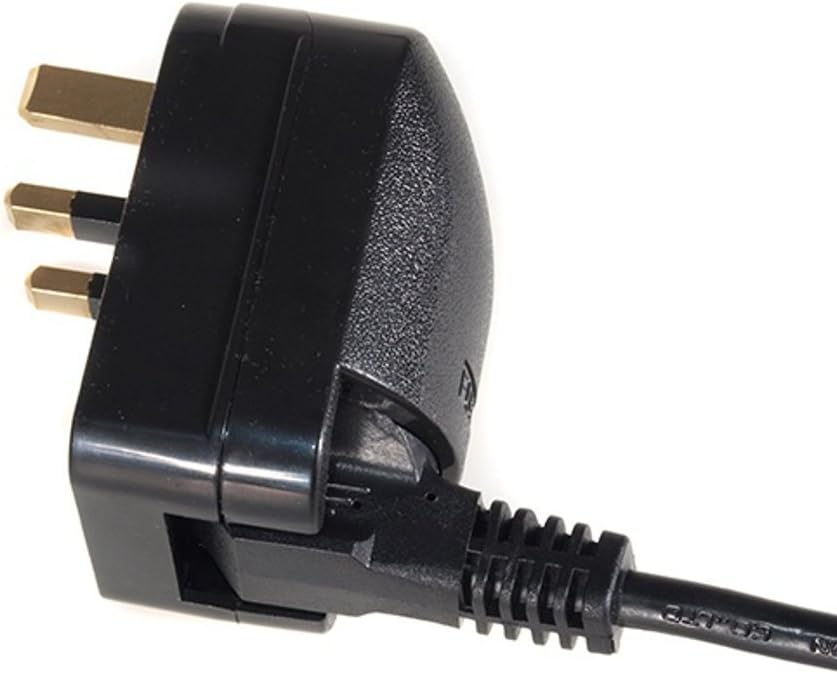
Figure 4.2: The adapter with a European plug, ready for connection to a UK wall socket.
5. Operating Instructions
Once the adapter is correctly installed, you can operate your device as usual. The adapter provides a secure electrical connection between your European device and the UK power supply.
- Turn on the power at the wall socket if it has a switch.
- Operate your device according to its own instruction manual.
- When finished, turn off the device and then unplug the adapter from the wall socket before removing your device's plug from the adapter.
6. Maintenance
The Maclean MCE70 adapter is designed for low maintenance. The primary maintenance task is fuse replacement.
6.1. Fuse Replacement
The adapter contains a replaceable fuse for overcurrent protection. If the adapter stops working, the fuse may need replacement.
- Unplug the Adapter: Always unplug the adapter from the wall socket and remove the device's plug before attempting to replace the fuse.
- Open the Fuse Compartment: Locate the fuse compartment cover, usually on the side or bottom of the adapter. Gently pry it open using a small flat-head screwdriver or your fingernail.

Figure 6.1: The adapter with its fuse compartment open, revealing the fuse holder.
- Remove Old Fuse: Carefully remove the old fuse from its holder.
- Insert New Fuse: Insert a new 13A BS1362 compliant fuse into the holder. Ensure it is securely seated.
- Close Compartment: Close the fuse compartment cover until it clicks into place.
- Test: Plug the adapter back into the wall socket and test its functionality.
Note: Always replace with a fuse of the same rating (13A) and type (BS1362) to maintain safety and proper operation.
7. Troubleshooting
If you encounter issues with your Maclean MCE70 adapter, refer to the table below for common problems and solutions:
| Problem | Possible Cause | Solution |
|---|---|---|
| Device not receiving power | Blown fuse in adapter | Replace the fuse (see Section 6.1). |
| Device not receiving power | Adapter not fully inserted into wall socket | Push the adapter firmly into the wall socket. |
| Device not receiving power | Device plug not fully inserted into adapter | Ensure the European plug is fully seated in the adapter. |
| Device not receiving power | Wall socket is faulty or switched off | Test the wall socket with another known working appliance. Ensure the socket switch is on. |
| Adapter feels hot during use | Overload or faulty device | Immediately unplug the adapter. Check if the connected device exceeds the adapter's 13A rating. Discontinue use if overheating persists. |
8. Specifications
Technical details for the Maclean MCE70 adapter:
| Feature | Detail |
|---|---|
| Model Number | MCE70 |
| Input Plug Type | European 2-pin (Schuko) |
| Output Plug Type | UK 3-pin (Type G) |
| Maximum Voltage | 250V |
| Maximum Current | 13A |
| Overvoltage Protection | Yes (via internal fuse) |
| Grounding | Yes |
| Dimensions (L x W x H) | 13 x 9 x 6 cm |
| Weight | 40 g |
9. Warranty and Support
Maclean products are designed for reliability and performance. For warranty information or technical support, please refer to the documentation included with your purchase or visit the official Maclean website. Keep your proof of purchase for warranty claims.
Ask a question about this manual
Ask about setup, troubleshooting, compatibility, parts, safety, or missing instructions. Manuals+ will review the question and use this page’s manual context to help answer it.