
Victrola VTA-750B
Contents
Victrola Aviator 8-in-1 Bluetooth Record Player & Multimedia Center
Model: VTA-750B | Brand: Victrola
Introduction
The Victrola Aviator 8-in-1 Bluetooth Record Player & Multimedia Center is a versatile audio system designed to bring together classic and modern music playback options. This unit features a 3-speed turntable, CD player, cassette player, FM radio, Bluetooth connectivity, and auxiliary input, offering a comprehensive entertainment experience. Its elegant mahogany finish and retro design make it a stylish addition to any room.
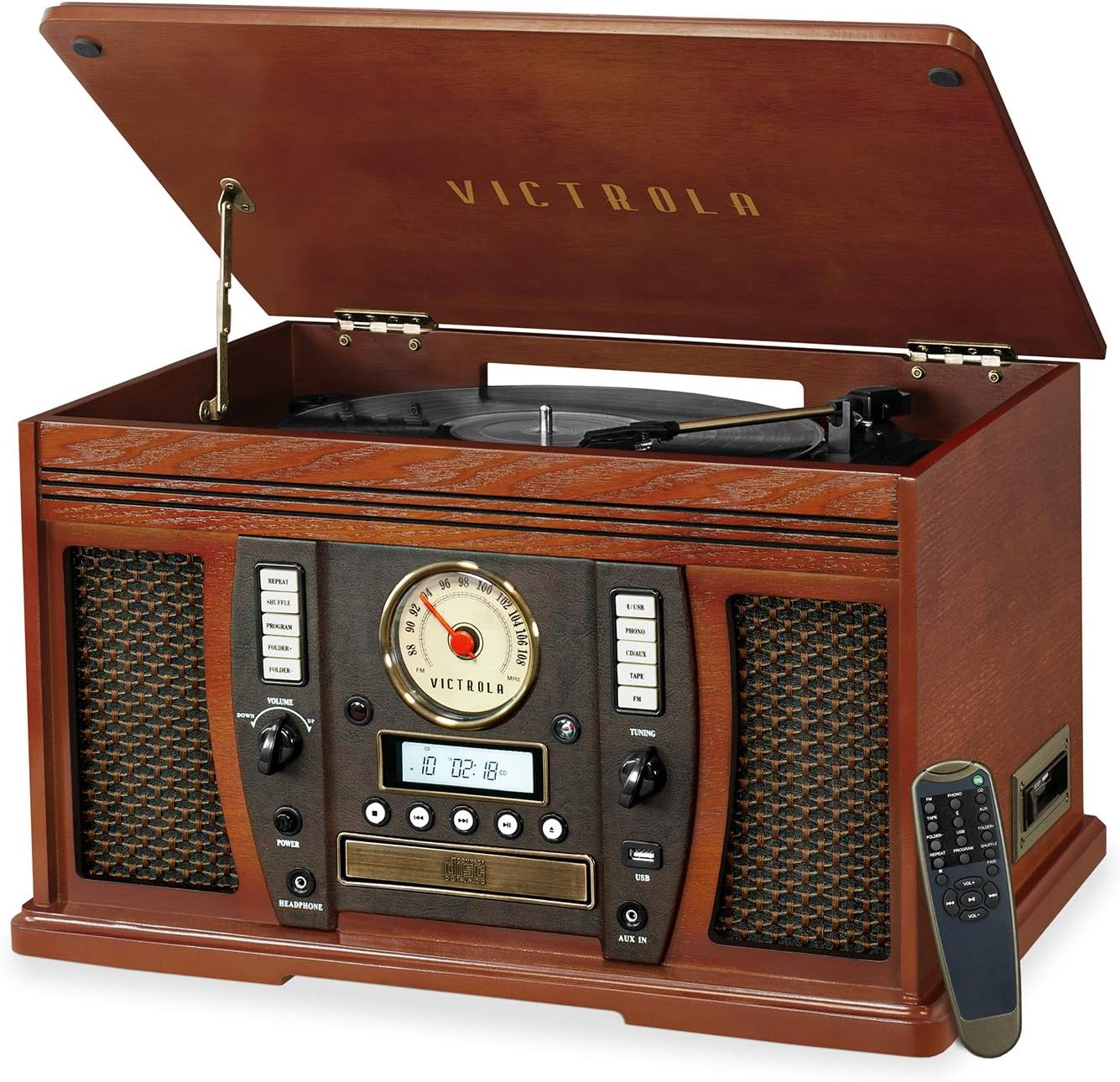
Figure 1: The Victrola Aviator 8-in-1 Bluetooth Record Player and Multimedia Center, showcasing its elegant mahogany finish and integrated components.
Key Features
- 8-in-1 Entertainment Center: Plays Vinyl records, CDs, cassette tapes, FM radio, and streams music wirelessly via Bluetooth. Includes Auxiliary and Headphone jacks.
- Integrated System: No additional stereo system or external equipment is required for operation.
- 3-Speed Belt-Driven Turntable: Supports 33 1/3, 45, and 78 RPM records with upgraded premium sound quality and minimal vibrations.
- Comprehensive Controls: Features a volume knob, FM tuner, easy-click buttons for input selection, power, playback controls (play/pause/forward/rewind, eject, program, shuffle, repeat), and a full-function remote control.
- Expanded Connectivity: RCA Line outputs for connecting external speakers or an amplifier, and Bluetooth out technology for wireless audio transmission. Headphone jack for private listening.
- High-Quality Design: Crafted with a retro real wood case, strong hinges, high-quality fabric grilles, a gentle lifting mechanism, and well-balanced sound.
- Vinyl to MP3 Recording: Directly record vinyl records to MP3 format via the USB port.
Product Components and Controls
Familiarize yourself with the various components and controls of your Victrola Aviator unit.

Figure 2: Detailed view of the front control panel, showing the radio tuner, display, CD tray, and various control buttons.
Front Panel Controls
- Power Button: Turns the unit on or off.
- Volume Knob: Adjusts the master volume level.
- Input Select Buttons: PHONO, CD/AUX, TAPE, AM/FM, USB/BLUETOOTH. Selects the desired audio source.
- Tuning Knob: Adjusts the radio frequency for AM/FM reception.
- CD Tray & Controls: Eject, Play/Pause, Stop, Skip Forward/Backward for CD playback.
- USB Port: For MP3 recording and playback from USB devices.
- AUX IN Jack: Connect external audio devices via a 3.5mm cable.
- Headphone Jack: For private listening.

Figure 3: The 3-speed turntable, ready for vinyl record playback.
Turntable
- Platter: Where the vinyl record rests.
- Tone Arm: Holds the stylus (needle) and tracks the record grooves.
- Speed Selector: Switch to select 33 1/3, 45, or 78 RPM.

Figure 4: The side-loading cassette player slot.
Cassette Player
- Cassette Slot: Insert cassette tapes for playback.
- Eject Button: Ejects the cassette tape.
Product Overview Video
Video 1: An official overview of the Victrola Aviator 8-in-1 Bluetooth turntable, highlighting its various features and functions.
Setup
Initial Setup
- Unpack the Unit: Carefully remove the Victrola Aviator from its packaging. Retain all packaging materials for future transport or storage.
- Placement: Place the unit on a flat, stable surface away from direct sunlight, heat sources, and excessive dust or moisture. Ensure adequate ventilation around the unit.
- Power Connection: Plug the AC power cord into a wall outlet.
- Dust Cover: Remove any protective films or packaging from the dust cover and turntable platter.
Operating Instructions
Playing Vinyl Records
- Lift the dust cover.
- Place a vinyl record on the turntable platter.
- Select the appropriate speed (33 1/3, 45, or 78 RPM) using the speed selector switch.
- Move the tone arm to the desired position over the record. The platter will begin to spin automatically.
- Gently lower the tone arm onto the record using the cueing lever.
- Adjust the volume using the Volume knob.
- At the end of the record, the turntable will stop spinning. Manually return the tone arm to its rest.
Playing CDs
- Press the CD/AUX button to select CD mode.
- Press the EJECT button to open the CD tray.
- Place a CD onto the tray with the label side facing up.
- Press the EJECT button again to close the tray. The unit will read the CD.
- Press the PLAY/PAUSE button to start playback.
- Use the SKIP FORWARD/BACKWARD buttons to navigate tracks.
Playing Cassette Tapes
- Press the TAPE button to select Tape mode.
- Insert a cassette tape into the side-loading slot until it clicks into place.
- Playback will begin automatically.
- To stop playback, press the EJECT button.
Using FM Radio
- Press the AM/FM button to select Radio mode.
- Rotate the TUNING knob to find your desired radio station.
- Extend the FM wire antenna for improved reception.
Bluetooth Streaming
- Press the USB/BLUETOOTH button to select Bluetooth mode. The display will show "BLUE".
- Enable Bluetooth on your external device (smartphone, tablet, etc.).
- Search for "Victrola Wooden Music Center" in your device's Bluetooth settings and pair.
- Once connected, you can stream audio from your device to the Victrola Aviator.
Vinyl to MP3 Recording (via USB)
The Victrola Aviator allows you to convert your vinyl records directly to MP3 files on a USB flash drive.
- Insert a USB flash drive into the USB port.
- Select PHONO mode.
- Place a vinyl record on the turntable and prepare it for playback.
- Press the RECORD button (usually labeled 'REC' or similar) on the unit. The recording indicator will light up.
- Start playing your vinyl record. The unit will begin recording the audio to the USB drive.
- To stop recording, press the RECORD button again.
- To finalize the recording session and save the files, press the FINALIZE button (refer to the unit's specific button layout for exact labeling).
Maintenance
Cleaning the Unit
- Wipe the exterior with a soft, dry cloth. Do not use abrasive cleaners or solvents.
- Keep the dust cover closed when not in use to prevent dust accumulation on the turntable.
Stylus (Needle) Care
- Clean the stylus periodically with a soft brush, brushing from back to front.
- Replace the stylus approximately every 200-300 hours of playback or if sound quality deteriorates.
Troubleshooting
| Problem | Possible Cause | Solution |
|---|---|---|
| No Power | Power cord not securely plugged in. | Ensure the power cord is firmly connected to the unit and the wall outlet. |
| No Sound | Volume too low; Incorrect input selected; Headphones connected. | Increase volume; Select correct input source; Disconnect headphones. |
| Turntable not spinning | Tone arm not moved over record; Speed selector incorrect. | Move tone arm over record to activate platter; Select correct RPM. |
| Poor Radio Reception | Antenna not extended or positioned correctly. | Fully extend and adjust the FM wire antenna. Try repositioning the unit. |
| Bluetooth Pairing Issues | Unit not in Bluetooth mode; Device too far; Already paired to another device. | Ensure unit is in Bluetooth mode; Move device closer; Disconnect from other devices. |
Specifications
| Feature | Detail |
|---|---|
| Model Number | VTA-750B |
| Product Dimensions | 21 x 15 x 12.9 inches |
| Item Weight | 23.8 pounds |
| Connectivity Technology | Wired, Wireless (Bluetooth) |
| Material | Wood |
| Color | Mahogany |
| Motor Type | AC Motor |
| Included Components | Built-in stereo speakers, stylus (needle), remote control |
Warranty and Support
For warranty information, technical support, or service inquiries, please refer to the warranty card included with your product or visit the official Victrola website. Keep your purchase receipt as proof of purchase for warranty claims.

Figure 5: The Victrola Aviator integrated into a living space, demonstrating its aesthetic appeal.
Documents and downloads
Ask a question about this manual
Ask about setup, troubleshooting, compatibility, parts, safety, or missing instructions. Manuals+ will review the question and use this page’s manual context to help answer it.