
Victrola VSC-550BT
Contents
Victrola Journey Bluetooth Portable Suitcase Record Player User Manual
Model: VSC-550BT
Introduction
Welcome to the world of vinyl with your new Victrola Journey Bluetooth Portable Suitcase Record Player. This manual provides essential information for setting up, operating, and maintaining your record player to ensure years of musical enjoyment. Its classic design and modern features make it a versatile audio companion for any setting.
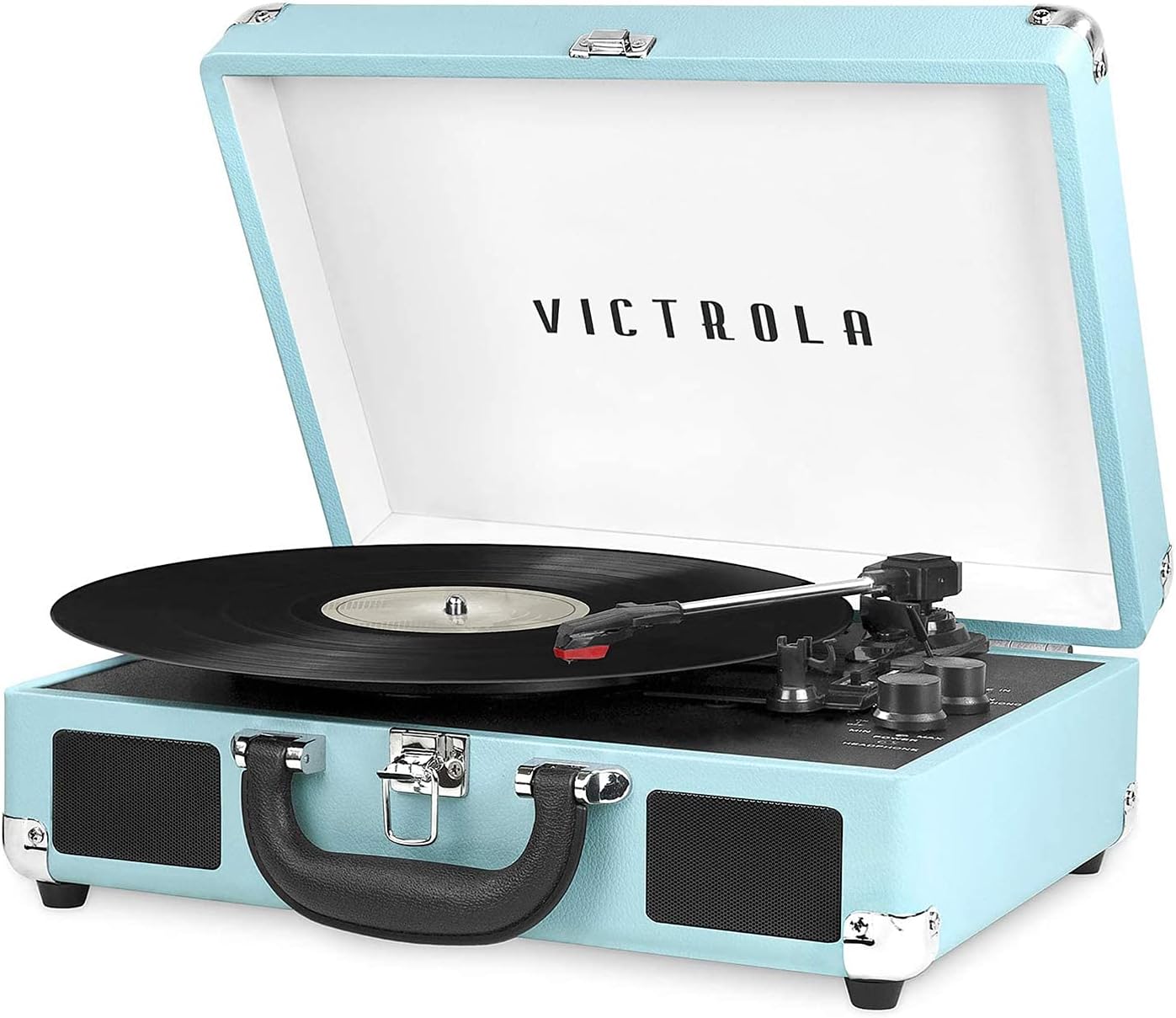
Figure 1: Victrola Journey Portable Suitcase Record Player (Turquoise color shown).
What's in the Box
Upon unpacking, please ensure all items listed below are present:
- Bluetooth Turntable with Built-in Speakers
- Extra Stylus
- Power Adapter (not explicitly listed but implied for operation)
- User Manual (this document)

Figure 2: Key components and features of the Victrola Journey record player.
Product Features
The Victrola Journey record player is designed with a blend of classic aesthetics and modern functionality:
- Three-Speed Belt-Driven Turntable: Supports 33 1/3, 45, and 78 RPM records, ensuring compatibility with your entire vinyl collection.
- Upgraded Premium Sound Quality: Features sound isolating feet to prevent vibration and a custom-tuned Pre-Amp for improved audio clarity and bass performance.
- Portable Suitcase Design: Housed in a vintage-style suitcase with an easy-carry handle, allowing for convenient transport.
- Built-in Bluetooth Speakers: Seamlessly stream audio from your smartphone or other Bluetooth-enabled devices.
- Expanded Connection Options:
- 3.5mm Aux-In: Connect non-Bluetooth devices like CD players.
- RCA Outputs: Connect to external speakers for enhanced sound.
- Headphone Jack: For private listening.
- Effortless Setup: No complex stereo system or extra equipment required; ready to use in minutes.
- Simple Controls: Features an Input select knob, Power/Volume Knob, and an Auto-stop switch.

Figure 3: The turntable supports 33 1/3, 45, and 78 RPM records.

Figure 4: Enjoy wireless music from up to 33 feet away via Bluetooth.
Setup
- Unpack the Unit: Carefully remove the record player from its packaging. Retain all packaging materials for future transport or storage.
- Placement: Place the unit on a flat, stable surface away from direct sunlight, heat sources, or excessive dust. Ensure adequate ventilation around the unit.
- Power Connection: Locate the power adapter. Insert the small end into the DC IN port on the back of the record player. Plug the other end into a standard wall outlet (AC 100-240V, 50/60Hz).
- Remove Stylus Protector: Gently remove the clear plastic stylus protector from the needle. Be careful not to bend the stylus.
- Unlock Tone Arm: Release the tone arm lock to allow the tone arm to move freely.

Figure 5: The record player is designed for effortless setup and simple controls.
Operating Instructions
Playing a Vinyl Record
- Power On: Turn the POWER/VOLUME knob clockwise to turn on the unit. The power indicator light will illuminate.
- Select Mode: Turn the INPUT SELECT knob to "PHONO".
- Place Record: Place a vinyl record on the turntable platter.
- Select Speed: Set the SPEED SELECTOR switch to the correct speed (33 1/3, 45, or 78 RPM) for your record. For 45 RPM records, place the included 45 RPM adapter on the center spindle.
- Start Playback: Gently lift the tone arm using the tone arm lift lever and move it over the desired track on the record. Lower the tone arm slowly onto the record. The turntable will begin to spin and play.
- Adjust Volume: Adjust the volume using the POWER/VOLUME knob.
- Auto-Stop Feature: If the AUTO STOP switch is set to "ON", the turntable will automatically stop spinning when the record finishes playing. If set to "OFF", it will continue to spin.
- End Playback: When finished, gently lift the tone arm using the lift lever and return it to the tone arm rest. Turn the POWER/VOLUME knob counter-clockwise to turn off the unit.
Bluetooth Pairing
- Select Mode: Turn the INPUT SELECT knob to "BT" (Bluetooth). The Bluetooth indicator light will flash.
- Enable Bluetooth: On your Bluetooth-enabled device (smartphone, tablet, etc.), enable Bluetooth and search for "Victrola Journey".
- Pair: Select "Victrola Journey" from the list of available devices. Once paired, the Bluetooth indicator light will stop flashing and remain solid.
- Play Music: You can now play music from your device through the record player's built-in speakers. Adjust volume from both your device and the record player.
Using Aux-In / Headphone Jack / RCA Out
- Aux-In: Connect an external audio device (e.g., MP3 player, CD player) to the "LINE IN" port using a 3.5mm audio cable. Select "LINE IN" mode using the INPUT SELECT knob.
- Headphone Jack: For private listening, plug your headphones into the "HEADPHONE" jack. The built-in speakers will automatically mute.
- RCA Out: To connect to external speakers or an amplifier, use RCA cables (not included) to connect the "OUT" ports on the back of the record player to the audio input of your external system.
Maintenance
- Cleaning the Unit:
- Wipe the exterior of the unit with a soft, dry cloth. Do not use abrasive cleaners or solvents.
- For the turntable platter, use a soft, slightly damp cloth.
- Stylus Care:
- The stylus (needle) is delicate. Handle with care.
- Clean the stylus periodically with a soft brush, brushing from back to front.
- Replace the stylus when you notice a degradation in sound quality or visible wear. An extra stylus is included with your purchase.
- Record Care:
- Keep records clean and free of dust. Use a record brush before each play.
- Store records vertically in their sleeves to prevent warping.
Troubleshooting
| Problem | Possible Cause | Solution |
|---|---|---|
| No power | Power adapter not connected; Power switch off. | Ensure power adapter is securely plugged into unit and outlet. Turn POWER/VOLUME knob clockwise. |
| No sound from speakers | Volume too low; Incorrect input mode; Headphones plugged in. | Increase volume. Select correct input mode (PHONO, BT, LINE IN). Unplug headphones. |
| Turntable not spinning | Power off; Tone arm not over record. | Ensure unit is powered on. Move tone arm over the record to activate platter. |
| Skipping or distorted sound | Dirty record; Worn or damaged stylus; Unit not level. | Clean record. Replace stylus. Ensure unit is on a flat, stable surface. |
| Bluetooth not pairing | Incorrect mode; Device too far; Bluetooth not enabled on device. | Select "BT" mode. Ensure device is within 33 feet. Enable Bluetooth on your device and re-scan. |
Specifications
- Model Name: The Journey
- Model Number: VSC-550BT
- Brand: Victrola
- Color: Turquoise
- Product Dimensions: 13.9 x 10.1 x 5 inches
- Item Weight: 2.69 pounds
- Material: Plastic
- Connectivity Technology: Wireless (Bluetooth), Wired (Aux-In, RCA Out)
- Maximum Rotational Speed: 78 RPM (supports 33 1/3, 45, 78 RPM)
- Included Components: Bluetooth Turntable with Speakers, Extra Stylus
- Special Feature: Foldable suitcase design
- Manufacturer: Innovative Technology
- Country of Origin: USA
- Date First Available: March 3, 2015
- On-mode power consumption: 12 watts

Figure 6: Product dimensions for the Victrola Journey record player.
Warranty and Support
For detailed warranty information, product registration, and customer support, please refer to the full user manual available as a PDF document or visit the official Victrola website. The PDF user manual can be accessed via this link: Victrola Journey User Manual (PDF).
For additional assistance, please contact Victrola customer service through their official channels.
Documents and downloads
Ask a question about this manual
Ask about setup, troubleshooting, compatibility, parts, safety, or missing instructions. Manuals+ will review the question and use this page’s manual context to help answer it.