
1. Introduction
This manual provides detailed instructions and information for the Metra 99-7808B installation kit. This kit is designed to facilitate the installation of an aftermarket single or double-DIN car stereo into specific Acura TL models, replacing the factory radio. Please read all instructions carefully before beginning the installation process.
2. Product Overview
The Metra 99-7808B installation kit offers a solution for integrating aftermarket audio systems into your vehicle's dashboard. It features a matte black finish designed to match the factory interior. The kit provides:
- Provision for a single-DIN radio with an integrated storage pocket.
- Provision for a double-DIN radio.
- A scratch-resistant matte black painted finish.
Important Note: Installation of this kit will render the factory navigation system non-operational.
3. Compatibility
This installation kit is compatible with the following vehicle:
- Acura TL: 2009, 2010, 2011, 2012, 2013, 2014
4. Kit Contents
The Metra 99-7808B kit includes the following components:
- Main Dash Bezel (Matte Black)
- Left and Right Mounting Brackets
- Single-DIN Storage Pocket
The following items are required for a complete installation and are sold separately:
- Wiring Harness: Metra 70-1729
- Antenna Adapter: Metra 40-HD11 (for non-navigation models) or Metra 40-HD12 (for navigation models)
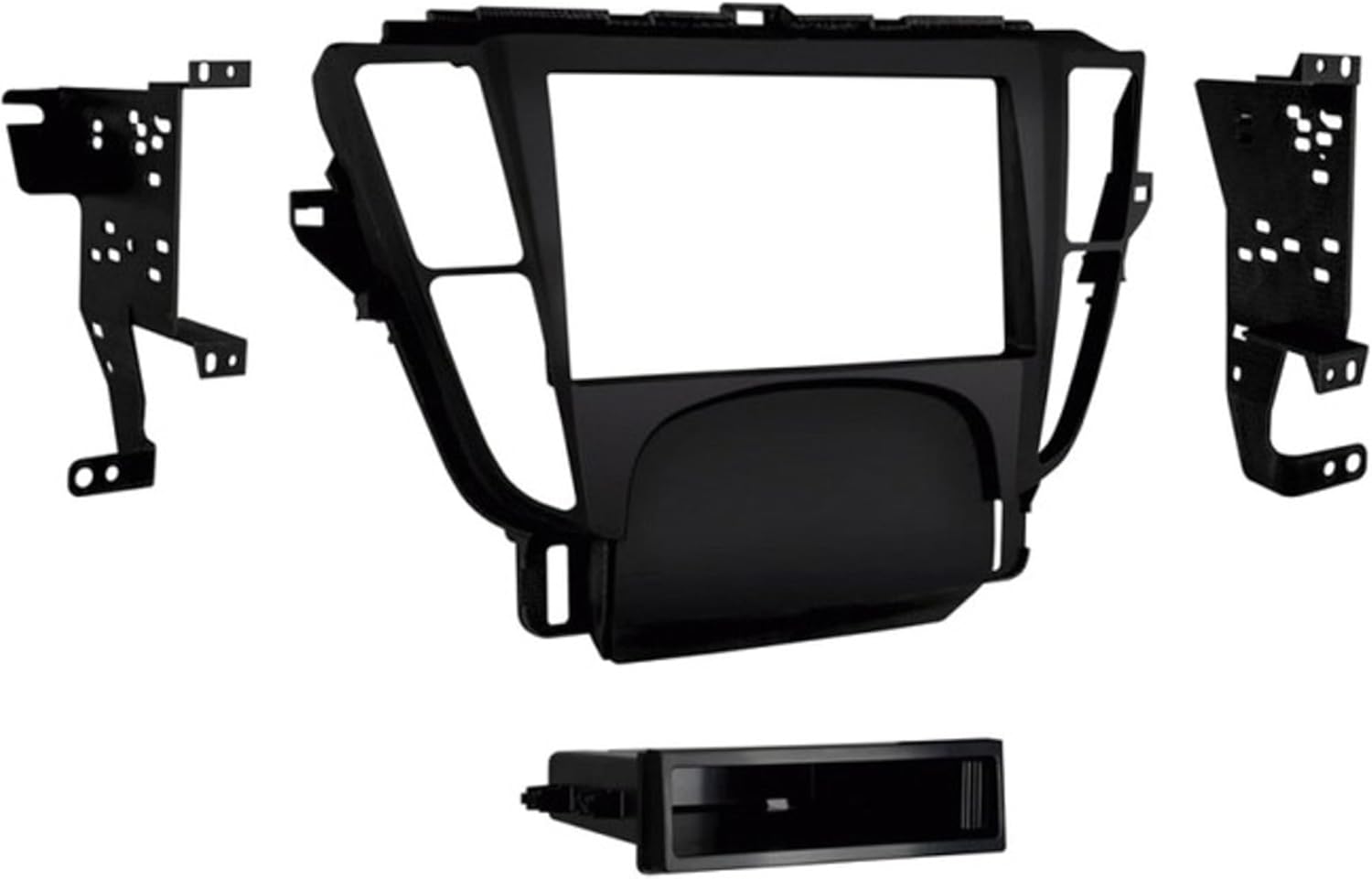
Image 1: Components of the Metra 99-7808B installation kit. This image displays the main matte black dash bezel designed for single or double-DIN radio installation, two metal mounting brackets, and a single-DIN storage pocket. These parts are used to integrate an aftermarket car stereo into compatible Acura TL vehicles.
5. Setup and Installation
Installation of this kit requires disassembly of the vehicle's dashboard and connection of electrical components. Professional installation is highly recommended.
5.1. Pre-Installation Steps
- Disconnect the vehicle's negative battery terminal to prevent electrical shorts.
- Carefully remove the factory radio and associated trim panels according to your vehicle's service manual.
- Connect the aftermarket radio's wiring harness to the Metra 70-1729 wiring harness (sold separately).
- Connect the appropriate antenna adapter (40-HD11 or 40-HD12, sold separately) to the vehicle's antenna cable and the aftermarket radio.
5.2. Assembling the Dash Kit
- Attach the left and right mounting brackets to the aftermarket radio using the screws provided with the radio. Ensure the radio is securely fastened.
- For single-DIN installations, slide the single-DIN storage pocket into the lower opening of the main dash bezel.
- Secure the assembled radio and brackets into the main dash bezel.
5.3. Final Installation
- Connect all necessary wiring harnesses and antenna cables to the aftermarket radio.
- Carefully slide the assembled dash kit with the aftermarket radio into the dashboard opening.
- Secure the dash kit using the factory mounting points.
- Reassemble any removed trim panels.
- Reconnect the vehicle's negative battery terminal.
- Test the functionality of the new radio and all vehicle controls.
6. Operating Considerations
This installation kit provides the structural and aesthetic framework for an aftermarket radio. The operation of the new radio will depend on the specific aftermarket unit installed. Refer to the instruction manual provided with your aftermarket radio for operational details.
7. Maintenance
The Metra 99-7808B installation kit is designed for durability and requires no specific maintenance. Clean the surface with a soft, damp cloth if necessary. Avoid abrasive cleaners.
8. Troubleshooting
- Aftermarket radio not flush: Some aftermarket radios may sit slightly recessed within the dash kit. This is a design characteristic and not a defect of the kit.
- No power to radio: Verify all wiring connections, especially the power and ground wires. Ensure the vehicle's battery is properly connected.
- No sound: Check speaker wire connections and ensure the aftermarket radio's fader/balance settings are correctly configured.
- Factory navigation not working: As stated, the factory navigation system will become non-operational after installing this kit. This is an expected outcome.
If issues persist, consult a professional car audio installer.
9. Specifications
| Feature | Detail |
|---|---|
| Brand | Metra |
| Model Number | 99-7808B |
| Material | Acrylonitrile Butadiene Styrene, Plastic |
| Item Weight | 1.04 Pounds (0.47 kg) |
| Connector Type | DT (referring to a common connector type, not specific to this kit's primary function) |
| UPC | 086429307302 |
| Date First Available | March 10, 2015 |
10. Warranty and Support
For warranty information and technical support, please contact Metra Electronics directly. Refer to the official Metra website or product packaging for the most current contact details and warranty terms.


