
Introduction
This manual provides essential information for the safe and efficient use of your Indesit RAA 29 free-standing refrigerator with freezer. Please read these instructions carefully before installation and use, and keep them for future reference. Proper installation, use, and maintenance will ensure optimal performance and longevity of your appliance.
Important Safety Information
Always follow basic safety precautions when using electrical appliances to reduce the risk of fire, electric shock, and personal injury.
- Ensure the appliance is properly grounded.
- Do not damage the refrigerant circuit.
- Do not use electrical appliances inside the food storage compartments unless they are of the type recommended by the manufacturer.
- Unplug the appliance before cleaning or performing maintenance.
- Keep ventilation openings clear of obstruction.
- This appliance is not intended for use by persons (including children) with reduced physical, sensory or mental capabilities, or lack of experience and knowledge, unless they have been given supervision or instruction concerning use of the appliance by a person responsible for their safety.
Setup and Installation
1. Unpacking
Carefully remove all packaging materials, including protective films and adhesive tapes. Inspect the appliance for any signs of damage during transit. Report any damage to your retailer immediately.
2. Placement
- Location: Place the refrigerator on a firm, level surface. Use the adjustable feet to stabilize the appliance if necessary.
- Ventilation: Ensure adequate air circulation around the appliance. Leave sufficient space (at least 10 cm) at the back and sides for proper ventilation and heat dissipation. Do not block the ventilation openings.
- Heat Sources: Avoid placing the refrigerator near direct sunlight, heat sources (e.g., ovens, radiators), or in excessively humid environments.
- Temperature: The appliance is designed to operate within a specific climate class (N-ST for this model), meaning it is suitable for ambient temperatures between 16°C and 38°C.
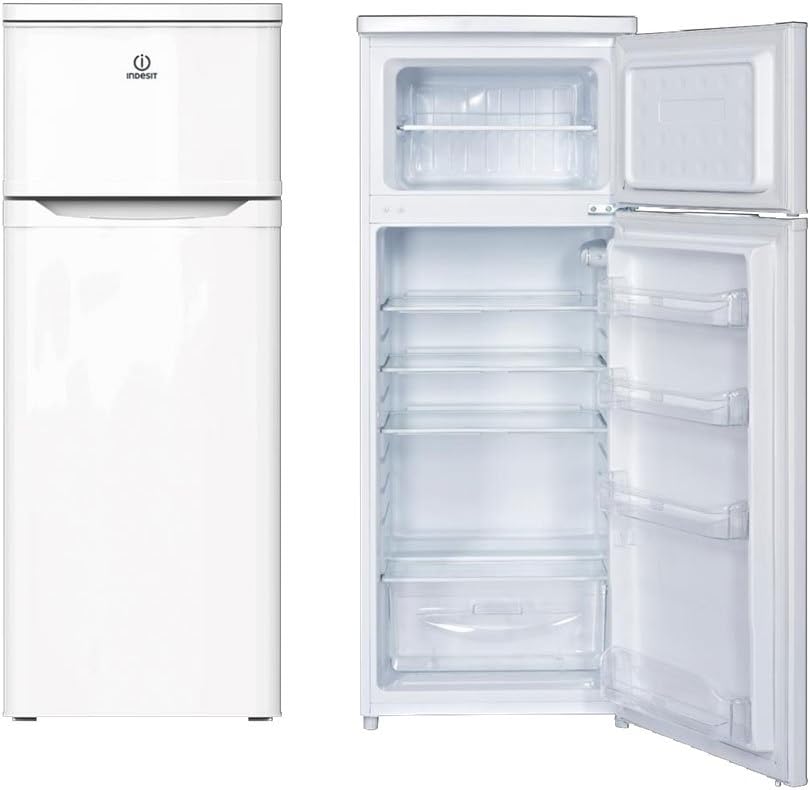
Image: Front view of the Indesit RAA 29 refrigerator with freezer. This image shows the overall design and external appearance of the appliance.
3. Electrical Connection
Before plugging in the appliance, ensure that the voltage and frequency indicated on the rating plate (located inside the refrigerator compartment) correspond to your household power supply. The appliance must be properly grounded. Do not use extension cords or multiple adapters.
4. Initial Cleaning
Before first use, clean the interior of the appliance with a solution of lukewarm water and a mild detergent. Dry thoroughly.
5. First Use
After positioning and cleaning, wait at least 2-4 hours before plugging the appliance into the power socket. This allows the refrigerant to settle. Once plugged in, set the thermostat to a medium setting and allow the appliance to run for several hours (e.g., 4-6 hours) before placing food inside.
Operating Instructions
1. Temperature Control
The temperature inside the refrigerator and freezer compartments is controlled by a thermostat dial, usually located inside the refrigerator compartment. Turn the dial to adjust the cooling intensity:
- "0" / "OFF": Appliance is off.
- "1" (Min): Less cooling, suitable for light loads or cooler ambient temperatures.
- "3" / "4" (Med): Recommended setting for general use.
- "5" (Max): Maximum cooling, suitable for heavy loads or warmer ambient temperatures.
Adjust the setting based on ambient temperature, frequency of door opening, and amount of food stored.
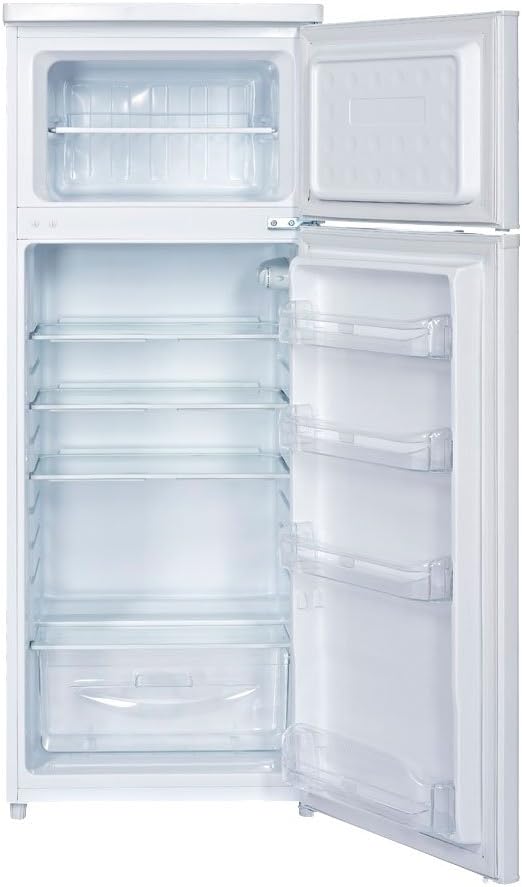
Image: Interior view of the Indesit RAA 29 refrigerator with the door open, showing shelves, door bins, and the crisper drawer.
2. Refrigerator Compartment
- Shelves: Adjustable glass shelves allow for flexible storage.
- Crisper Drawer: Located at the bottom, ideal for storing fruits and vegetables to maintain their freshness.
- Door Bins: Suitable for bottles, jars, and smaller items.
- Food Storage: Cover all food items to prevent drying out and odor transfer. Avoid placing hot food directly into the refrigerator.
3. Freezer Compartment
- Freezing Fresh Food: For best results, freeze small quantities of fresh food at a time. Place food in airtight containers or freezer bags.
- Storage Time: Observe the storage times recommended on food packaging.
- Ice Making: Use ice cube trays to make ice.
4. Energy Saving Tips
- Do not open the doors unnecessarily.
- Ensure door seals are clean and intact.
- Do not place hot food directly into the appliance.
- Defrost the freezer regularly when ice build-up exceeds 3-5 mm.
Maintenance and Care
1. Cleaning
Always unplug the appliance before cleaning.
- Interior: Clean regularly with a solution of lukewarm water and a mild, non-abrasive detergent. Rinse with clean water and dry thoroughly. Do not use harsh chemicals or abrasive cleaners.
- Exterior: Wipe with a soft cloth dampened with water and a mild detergent.
- Door Seals: Clean door seals regularly to ensure a tight seal and prevent energy loss.
- Condenser Coils (Rear): Periodically vacuum the condenser coils at the back of the appliance to remove dust and dirt, which can improve efficiency.
2. Defrosting
Refrigerator Compartment: This compartment features automatic defrosting. Frost on the rear wall will melt periodically and drain through a channel to an evaporation tray at the back of the appliance.
Freezer Compartment: The freezer compartment requires manual defrosting. Defrost when the layer of frost reaches approximately 3-5 mm thick. To defrost:
- Unplug the appliance.
- Remove all food items and wrap them in newspaper or place them in a cooler.
- Leave the freezer door open. Place a towel or shallow tray at the bottom to collect melting water.
- Do not use sharp objects or heating devices to speed up defrosting, as this can damage the appliance.
- Once defrosted, clean and dry the interior thoroughly before plugging the appliance back in and returning food.
3. Extended Absence
If the appliance will not be used for an extended period:
- Unplug the appliance.
- Empty and clean both compartments.
- Leave the doors slightly ajar to prevent odors and mold growth.
Troubleshooting
Before contacting service, check the following common issues and solutions:
| Problem | Possible Cause | Solution |
|---|---|---|
| Appliance does not operate. | No power supply; plug not inserted; fuse blown. | Check power connection; check household fuse. |
| Temperature is not cold enough. | Door not closed properly; frequent door opening; thermostat set too low; too much food inside; appliance near heat source. | Ensure door is sealed; reduce door openings; adjust thermostat to a colder setting; do not overload; relocate appliance. |
| Excessive noise. | Appliance not level; contact with wall/furniture; normal operating sounds. | Adjust leveling feet; ensure clearance; gurgling/humming sounds are normal. |
| Water on the bottom of the refrigerator compartment. | Drain hole for defrost water is blocked. | Clear the drain hole with a small, soft tool (e.g., cotton swab). |
If the problem persists after checking these points, please contact qualified service personnel.
Technical Specifications
| Feature | Specification |
|---|---|
| Model Number | F087866 |
| Total Net Capacity | 212 L |
| Refrigerator Net Capacity | 171 L |
| Freezer Net Capacity | 41 L |
| Dimensions (W x D x H) | 55 x 58 x 143 cm |
| Weight | 45 kg |
| Energy Efficiency Class | A+ |
| Annual Energy Consumption | 226 kWh |
| Noise Level | 42 dB |
| Climate Class | N-ST (16°C - 38°C) |
| Freezing Capacity | 2 kg/24h |
Warranty and Support
Your Indesit RAA 29 refrigerator with freezer is covered by a manufacturer's warranty. For specific warranty terms and conditions, please refer to the warranty card included with your appliance or visit the official Indesit website.
For technical assistance, spare parts, or to schedule a service appointment, please contact Indesit customer support. Have your model number (F087866) and serial number ready when contacting support.
For information regarding returns or defective products purchased through Amazon, please consult Amazon's help pages on returns and defective items.


