
1. Introduction
The Retevis RT388 Walkie Talkies are designed for clear and reliable communication, ideal for children's play, family outdoor adventures, and camping. These PMR446 license-free devices offer a range of features to enhance user experience and safety.
2. Safety Information
- Not suitable for children under 3 years. Use under adult supervision.
- Do not expose the device to extreme temperatures or direct sunlight for extended periods.
- Avoid dropping or subjecting the walkie talkies to severe impact.
- Do not immerse the device in water; it is not waterproof.
- Use only specified batteries (4x AAA per unit). Do not mix old and new batteries or different types of batteries.
- Dispose of batteries properly according to local regulations.
3. Package Contents
Please check the package for the following items:
- 2 x Retevis RT388 Kids Walkie Talkies
- 2 x Belt Clips
- 1 x Multi-language User Manual (UK, FR, IT, DE, ES)
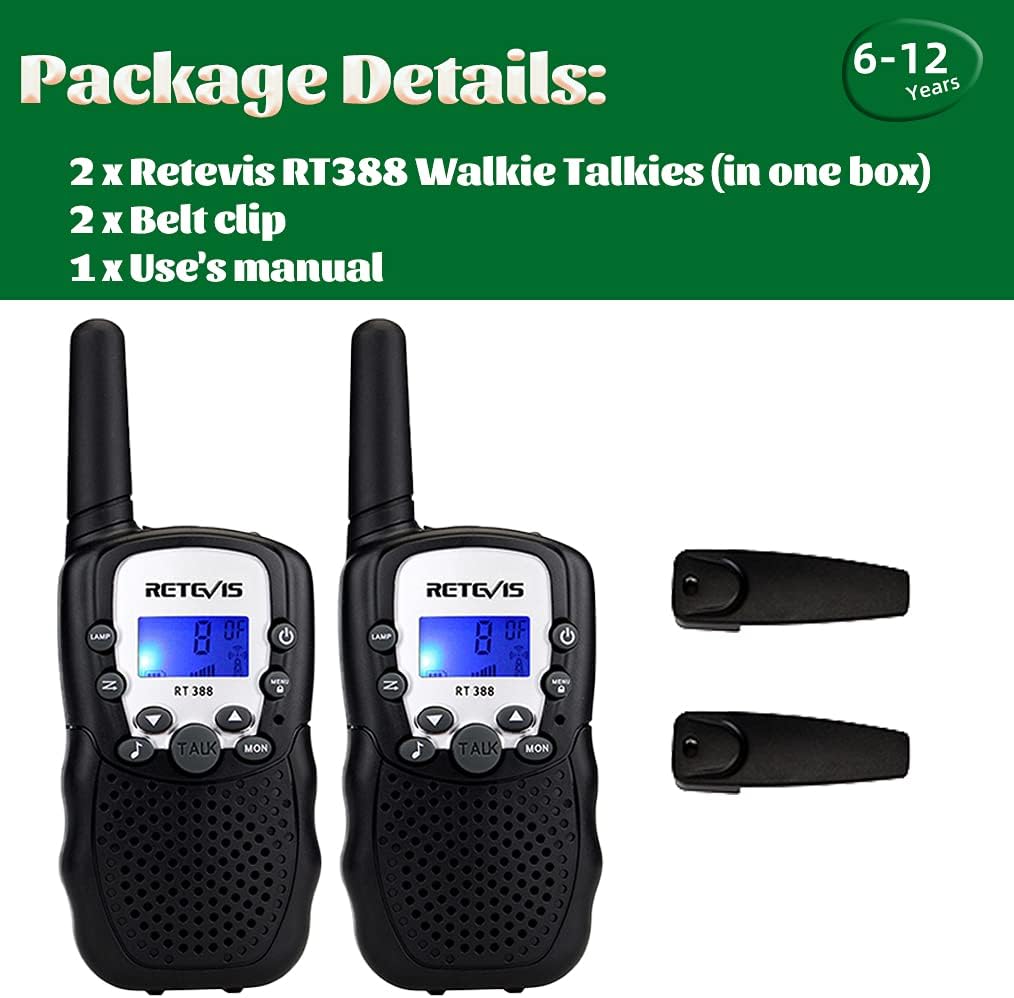
Image: Contents of the Retevis RT388 package.
4. Product Overview
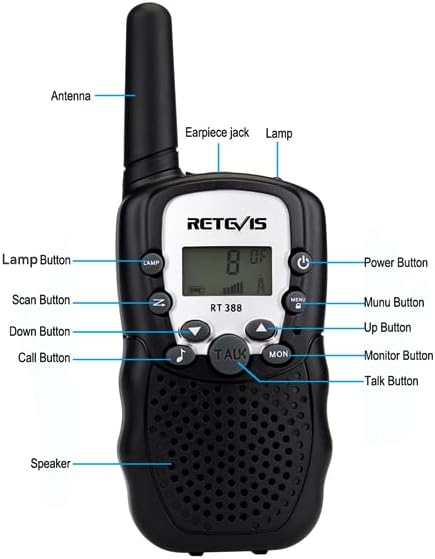
Image: Labeled diagram of the Retevis RT388 Walkie Talkie.
Key Features:
- PMR446 License-Free: Legal and safe to use in the UK and other European areas.
- Clear Sound & Good Reception: Ensures effective communication.
- Built-in Flashlight: Provides illumination for various activities.
- VOX Function: Allows hands-free communication without pressing the PTT button.
- Adjustable Volume: Customize audio levels for comfort.
- Privacy Codes (CTCSS): Prevents reception of unwanted signals, ensuring secure communication.
- Key Lock Function: Prevents accidental channel changes during use.
- Belt Clip: For convenient carrying.
- Durable Design: Compact and sturdy body, resistant to drops up to 1.2m.
5. Setup
5.1 Battery Installation
- Locate the battery compartment cover on the back of the walkie talkie.
- Slide the latch or press the tab to open the battery compartment.
- Insert 4 AAA batteries (not included) into each walkie talkie, ensuring correct polarity (+/-).
- Close the battery compartment cover securely.

Image: Battery compartment and earpiece jack.
5.2 Attaching the Belt Clip
Align the belt clip with the designated slot on the back of the walkie talkie and slide it down until it clicks into place.
6. Operating Instructions
6.1 Power On/Off
Press and hold the Power Button (usually located on the top right) for a few seconds until the display lights up or turns off.
6.2 Adjusting Volume
Use the Up Button and Down Button to adjust the speaker volume. The current volume level will be displayed on the screen.
6.3 Channel Selection
- Press the Menu Button once. The channel number will flash on the display.
- Use the Up Button or Down Button to select one of the 8 available channels.
- Press the Talk Button or Menu Button again to confirm your selection.
6.4 Setting Privacy Codes (CTCSS)
To ensure private communication and avoid interference, you can set a Continuous Tone-Coded Squelch System (CTCSS) code.
- Press the Menu Button twice. The privacy code number will flash.
- Use the Up Button or Down Button to select a privacy code (38 available).
- Press the Talk Button or Menu Button again to confirm.
- Note: Both walkie talkies must be on the same channel and privacy code to communicate.
6.5 Transmitting and Receiving
- To transmit, press and hold the Talk Button and speak clearly into the microphone. Release the button when finished speaking.
- To receive, simply listen. The walkie talkie will automatically receive signals when the channel is clear.
6.6 VOX Function (Voice Operated Exchange)
The VOX function allows you to transmit without pressing the Talk button. When enabled, the walkie talkie will automatically transmit when it detects your voice.
- Press the Menu Button three times. The VOX icon will flash.
- Use the Up Button or Down Button to select a VOX sensitivity level (e.g., 1-3, with 3 being most sensitive) or turn it off (OF).
- Press the Talk Button or Menu Button again to confirm.
6.7 Using the Flashlight
Press the Lamp Button (usually located on the left side) to turn the built-in flashlight on or off.

Image: Flashlight feature in use.
6.8 Key Lock Function
To prevent accidental changes to settings, activate the key lock:
- Press and hold the Menu Button for a few seconds until a key icon appears on the display.
- To unlock, press and hold the Menu Button again until the key icon disappears.
6.9 Call Tone
Press the Call Button (usually a musical note icon) to send a call tone to other walkie talkies on the same channel and privacy code.
7. Maintenance
- Cleaning: Wipe the walkie talkies with a soft, damp cloth. Do not use harsh chemicals or abrasive cleaners.
- Battery Care: Remove batteries if the device will not be used for an extended period to prevent leakage. Replace all batteries at the same time.
- Storage: Store the walkie talkies in a cool, dry place away from direct sunlight and moisture.
8. Troubleshooting
| Problem | Possible Cause | Solution |
|---|---|---|
| No power | Batteries are dead or incorrectly installed. | Check battery polarity. Replace with fresh AAA batteries. |
| Cannot communicate with other walkie talkies | Different channels or privacy codes. Out of range. | Ensure all walkie talkies are on the same channel and privacy code. Move closer to the other unit. |
| Poor sound quality / Static | Out of range. Obstructions (buildings, hills). Low battery. | Move to an open area. Recharge or replace batteries. |
| Walkie talkie transmits automatically (VOX issue) | VOX sensitivity is too high or VOX is enabled unintentionally. | Adjust VOX sensitivity to a lower level or disable VOX function. |
| Display remains on, draining batteries | No automatic power-off feature. | Manually power off the walkie talkie after use by pressing and holding the Power Button. |
| Accidental button presses | Key lock is not activated. | Activate the Key Lock function to prevent unintended changes. |
9. Specifications
- Model Number: A7027B
- Brand: Retevis
- Color: Black
- Number of Channels: 8
- Frequency Range: 446.00625-446.09375Mhz (PMR446)
- Maximum Talk Range: 1 Kilometer (under optimal conditions)
- Power Source: 4 x AAA batteries per unit (not included)
- Product Dimensions (D x W x H): 1.9 x 5.1 x 14.3 cm
- Item Weight: 79 Grams
- Water Resistance Level: Not waterproof
- Operating Temperature Range: -20 to 50 Degrees Celsius
- Sound Level: 40 Decibels
10. Warranty and Support
Retevis offers a 30-day unconditional return policy and a 365-day free warranty for this product.
For further assistance, technical support, or warranty claims, please contact Retevis customer service through the retailer where the product was purchased or visit the official Retevis website.
Online Resources:
- Retevis Store on Amazon: Retevis Official Store


