
1. Introduction
This instruction manual provides essential information for the safe and effective use of your GIMA Parker Otoscope, Model 31440. Please read this manual thoroughly before operating the device and retain it for future reference. The GIMA Parker Otoscope is designed for visual examination of the ear canal and eardrum.
2. Safety Information
Important Safety Instructions:
- Use this device only for its intended purpose as described in this manual.
- Do not use the otoscope if it appears damaged or is not functioning correctly.
- Keep the device out of reach of children.
- Ensure proper hygiene by cleaning the specula before and after each use.
- Consult a medical professional for diagnosis or treatment; this device is for examination purposes only.
- Do not attempt to modify or repair the device yourself. Contact qualified service personnel.
3. Package Contents
Verify that all items listed below are present in your package:
- GIMA Parker Otoscope handle
- Otoscope head with magnifying lens
- Reusable ear specula (various sizes)
- Protective carrying case (if included with your specific model)
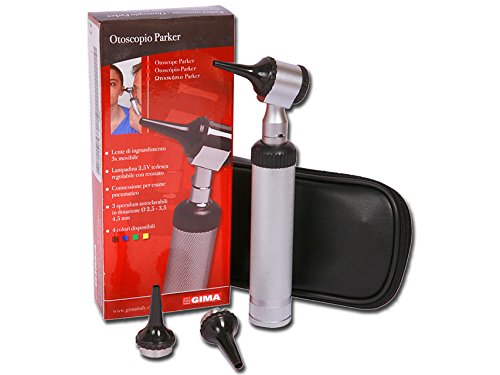
Image 1: GIMA Parker Otoscope package contents, including the device, various specula, and a protective case.
4. Setup
4.1 Battery Installation
- Unscrew the bottom cap of the otoscope handle.
- Insert the required batteries (typically 2x AA, not included) according to the polarity markings (+/-).
- Screw the bottom cap back on securely.
4.2 Attaching the Speculum
- Select an appropriate size speculum for the examination.
- Gently twist or push the chosen speculum onto the otoscope head until it is firmly seated. Ensure it is secure to prevent accidental detachment during use.

Image 2: The GIMA Parker Otoscope with a speculum attached, ready for use.
5. Operating Instructions
5.1 Power On/Off
To turn the otoscope on, slide the power switch located on the handle upwards. To turn it off, slide the switch downwards.
5.2 Light Adjustment
Some models may feature a rheostat or dimmer switch to adjust the intensity of the light. Rotate or slide this control to achieve the desired illumination level.
5.3 Performing an Examination
- Ensure the chosen speculum is clean and securely attached.
- Gently pull the outer ear upwards and backwards (for adults) or downwards and backwards (for children) to straighten the ear canal.
- Carefully insert the speculum into the ear canal, avoiding excessive force.
- Look through the viewing lens to observe the ear canal and eardrum.
- Adjust the focus ring (if present) for a clear view.
- After examination, gently remove the otoscope and turn it off.
6. Maintenance and Cleaning
6.1 Cleaning the Otoscope Head and Handle
Wipe the exterior of the otoscope head and handle with a soft cloth dampened with a mild disinfectant solution. Do not immerse the device in liquid.
6.2 Cleaning the Specula
Reusable specula should be cleaned and disinfected or sterilized according to standard medical practices after each use. Follow the manufacturer's guidelines for the specific disinfectant or sterilization method.
6.3 Storage
Store the otoscope in its protective carrying case in a clean, dry place at room temperature when not in use. Remove batteries if the device will not be used for an extended period.
7. Troubleshooting
| Problem | Possible Cause | Solution |
|---|---|---|
| No light or dim light |
|
|
| Speculum does not attach securely |
|
|
8. Specifications
- Brand: GIMA
- Model Number: 31440
- ASIN: B00U8UGLLE
- Product Dimensions: 9 x 3.5 x 21 cm
- Weight: 340 g
- Manufacturer: GIMA
- First Available Date: 17 March 2015
9. Warranty and Support
For warranty information, technical support, or service inquiries, please contact your local GIMA distributor or visit the official GIMA website. Please have your model number (31440) and ASIN (B00U8UGLLE) available when contacting support.
Note: Specific warranty terms may vary by region and retailer.
