
Introduction
The ZAZU Sam the Sheep Sleep Trainer Clock is designed to help children understand when it's time to sleep and when it's okay to wake up. This device combines a sleep trainer, a night light, and an alarm clock, providing visual cues to guide your child's sleep routine. Its intuitive color-changing display and adjustable features make it a valuable tool for establishing healthy sleep habits.

Image: Front view of the ZAZU Sam the Sheep Sleep Trainer Clock in grey.
Safety Information
Please read all safety instructions before using the ZAZU Sam the Sheep Sleep Trainer Clock. This product has been tested in accordance with international safety regulations. For detailed safety guidelines, please refer to the official Safety Information PDF document:
Package Contents
- 1x ZAZU Sam the Sheep Sleep Trainer Clock (Model ZA-SAM-01)
- 1x USB Cable (for power, 5V, 500mA input)
- Instruction Manual (this document)
Note: 4x AA alkaline batteries are required for battery operation and are not included.
Setup
1. Powering the Device
The Sam the Sheep clock can be powered by either the included USB cable or by 4x AA alkaline batteries (not included).
- USB Power: Connect the USB cable to the clock and to a compatible USB power adapter (e.g., phone charger, computer USB port).
- Battery Power: Open the battery compartment on the back of the clock and insert 4x AA alkaline batteries, ensuring correct polarity.

Image: Back view of the ZAZU Sam the Sheep clock, highlighting the battery compartment and USB port.
2. Initial Setup and Time Setting
Upon first power-on or after a battery change, you may need to set the current time.
- Press and hold the SET button (usually located on the back or bottom) until the time display starts flashing.
- Use the UP and DOWN buttons to adjust the hours, then press SET to confirm.
- Repeat for minutes.
- You can usually switch between 12-hour and 24-hour display modes during this process or via a dedicated button.
3. Setting the Wake-Up Time (Green Light)
This is the time when Sam the Sheep's eyes open and the display turns green, indicating it's okay for your child to get out of bed.
- Press and hold the ALARM or WAKE button until the wake-up time starts flashing.
- Use the UP and DOWN buttons to set the desired wake-up hour, then press ALARM/WAKE to confirm.
- Repeat for minutes.
- Confirm the setting. Sam's eyes will open and the display will turn green at this set time.

Image: The ZAZU Sam the Sheep clock showing a green display and open eyes, signifying "OK to get up".
4. Setting the Sleep Time (Red Light)
This is the time when Sam the Sheep's eyes close and the display turns red, indicating it's time to go to sleep.
- Press and hold the SLEEP or BEDTIME button until the sleep time starts flashing.
- Use the UP and DOWN buttons to set the desired sleep hour, then press SLEEP/BEDTIME to confirm.
- Repeat for minutes.
- Confirm the setting. Sam's eyes will close and the display will turn red at this set time.
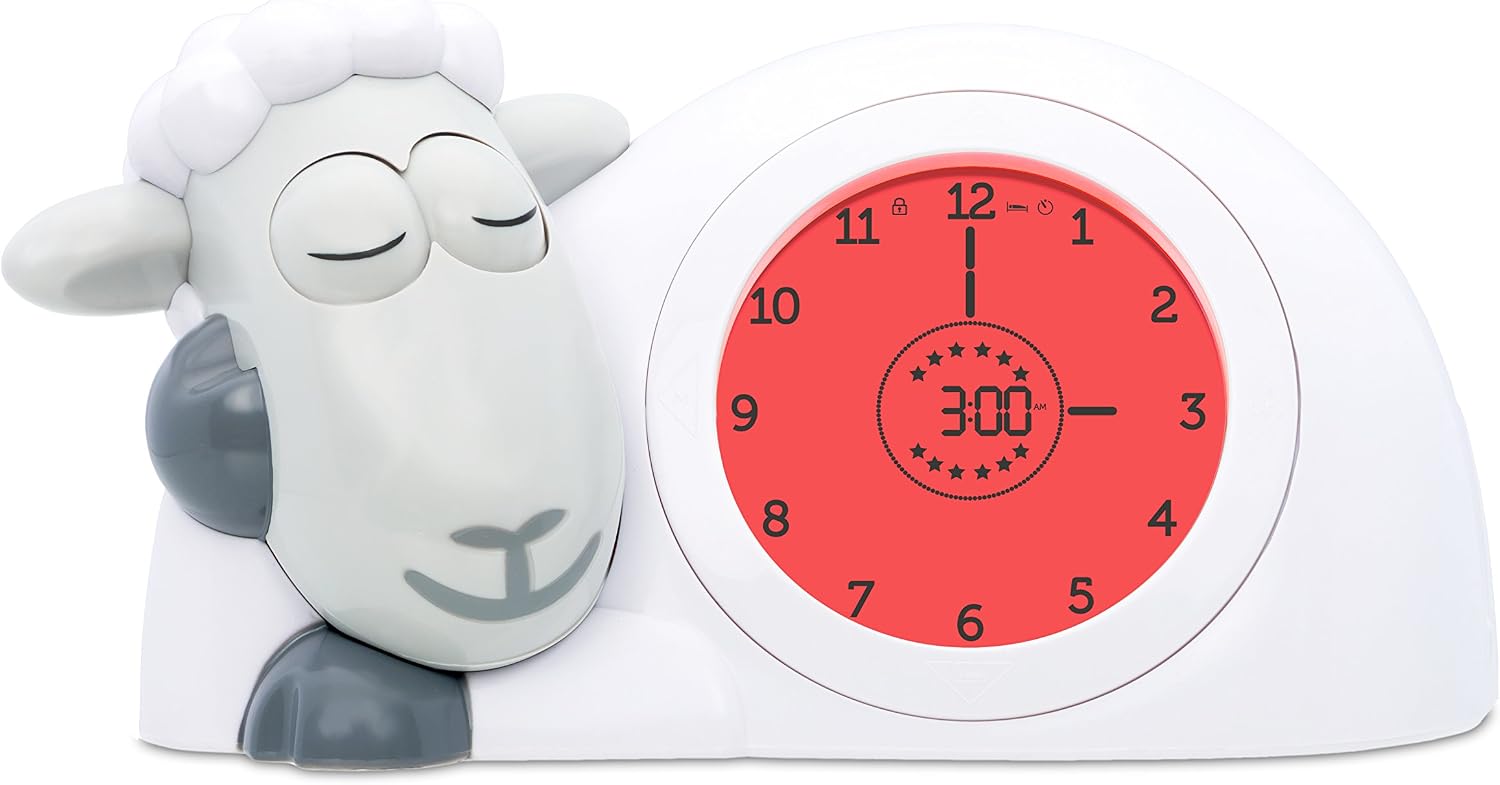
Image: The ZAZU Sam the Sheep clock showing a red display and closed eyes, signifying "Time to sleep".
Operating Instructions
1. Sleep Training Function (Color Indicators)
The core function of Sam the Sheep is its visual sleep training system, using three distinct colors:
- Red Light: Indicates it's time to sleep. Sam's eyes are closed.
- Orange Light: Appears 30 minutes before the set wake-up time. Sam's eyes remain closed, and stars on the display gradually disappear, counting down the remaining time. This signals to your child that wake-up time is approaching, but they should remain in bed.
- Green Light: Indicates it's okay to wake up. Sam's eyes are open.

Image: Visual representation of Sam the Sheep's sleep training states: Red for sleep, Yellow for waiting, and Green for wake-up.
2. Night Light Function
Sam the Sheep can also function as a night light. The brightness of the display is adjustable (4 levels). You can set the night light to stay on throughout the night or to automatically turn off after a set period.
- To adjust brightness: Use the dedicated brightness control buttons (refer to the physical device for button locations).
- To activate/deactivate auto-off: Consult the full instruction manual for specific button sequences.

Image: The ZAZU Sam the Sheep clock functioning as a red night light while a child sleeps.
3. Alarm Function
In addition to the visual cues, Sam the Sheep features an optional sound alarm. This can be particularly useful for older children or as an extra cue for waking up.
- To activate/deactivate the sound alarm: Use the alarm toggle button.
- To adjust alarm volume: There are 4 adjustable volume levels. Use the volume control buttons.
- The alarm will sound at the set wake-up time (when the display turns green).
4. Display Modes
The clock offers both digital and analog time displays, which can be helpful for children learning to read traditional clocks.
- Switch between 12-hour and 24-hour formats as needed.
- The analog display includes an hour hand for educational purposes.
Maintenance
- Cleaning: Wipe the clock with a soft, dry cloth. Do not use abrasive cleaners or immerse the device in water.
- Battery Replacement: If using batteries, replace all 4x AA alkaline batteries when the display dims or the clock functions become erratic. Ensure correct polarity.
- Storage: If storing the clock for an extended period, remove the batteries to prevent leakage.
Troubleshooting
| Problem | Possible Cause | Solution |
|---|---|---|
| Clock not turning on or display is dim. | Low or dead batteries; USB cable not connected properly or faulty. | Replace batteries with new AA alkaline batteries. Ensure USB cable is securely connected to a working power source. |
| Sam's eyes not opening/closing or display color incorrect. | Incorrect sleep/wake times set; child lock engaged; internal malfunction. | Verify sleep and wake-up times are correctly programmed. Check if child lock is active and deactivate if necessary. If problem persists, contact customer support. |
| Alarm sound not working. | Alarm function deactivated; volume set to minimum. | Ensure the alarm function is activated. Increase the alarm volume. |
| Clock settings reset unexpectedly. | Power interruption (e.g., batteries removed without USB power); internal error. | Reprogram the time and alarm settings. Ensure continuous power supply if possible. |
| Eyes make a loud noise when opening/closing. | Normal mechanical operation; potential wear. | A slight mechanical sound is normal. If the sound becomes excessively loud or grinding, contact customer support. |
Specifications
| Feature | Detail |
|---|---|
| Brand | ZAZU |
| Model Number | ZA-SAM-01 |
| Color | Grey |
| Product Dimensions | 14 cm (L) x 12 cm (H) |
| Material | ABS Plastic |
| Display Type | Analog and Digital |
| Power Source | 4x AA Batteries (not included) or USB (5V, 500mA) |
| Special Features | Adjustable Brightness (4 levels), Sleep Coach with Visual Indicators (Red, Orange, Green), Child Safety Lock, Adjustable Alarm Volume (4 levels) |
| Movement Type | Quartz |
| Connectivity Technology | USB |
| Intended Use | Indoor, Bedroom |
Warranty and Support
For warranty information, product registration, or technical support, please visit the official ZAZU website or contact their customer service directly. Keep your purchase receipt as proof of purchase.
You can also refer to the full user manual for more detailed instructions and support information:
© 2024 ZAZU. All rights reserved.


