
EUG X760+(A)
EUG X760+ LED Projector User Manual
Model: X760+(A) | Brand: EUG
1. Introduction
The EUG X760+ LED Projector is a versatile multimedia device designed for home cinema and business applications. Featuring an integrated Android operating system, it supports wireless connectivity options like Airplay, Miracast, and DLNA, allowing seamless content sharing from various devices. With a native resolution of 1024 x 600 and support for 1080p, it delivers clear visuals. The projector boasts 2600 lumens brightness and a 2500:1 contrast ratio, ensuring a vibrant viewing experience. Its LED light source offers a long lifespan of up to 50,000 hours, contributing to energy efficiency and reduced maintenance.


2. Setup
2.1 Placement
The EUG X760+ projector offers flexible placement options to suit various environments. It can be positioned on a desk, mounted to the ceiling, or placed on a tripod. Ensure the projector is placed on a stable, level surface or securely mounted to prevent accidental movement.

2.2 Initial Adjustments
After placing the projector, perform the following adjustments for optimal image quality:
- Focus Adjustment: Rotate the focus ring on the projector lens until the projected image appears sharp and clear.
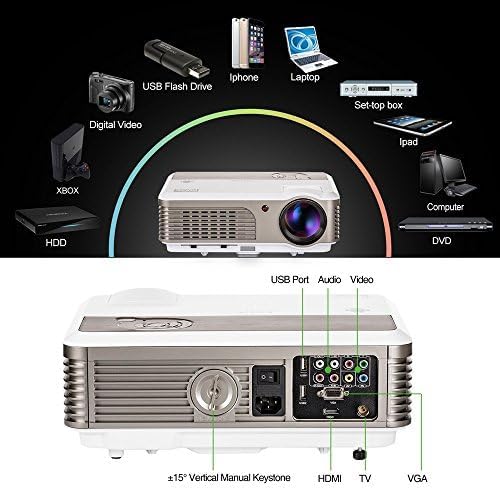
- Keystone Correction: Use the vertical keystone correction dial (typically located near the rear ports) to adjust the image shape if it appears trapezoidal. The projector supports ±15° vertical keystone correction.
- Image Flip: If ceiling mounted or rear projected, use the 360° image flip function in the projector settings to orient the image correctly.

3. Operating Instructions
3.1 Connectivity
The EUG X760+ projector offers a wide range of connectivity options:
- HDMI: Connect to laptops, PCs, gaming consoles (PS4/Xbox), and TV boxes.
- USB: Two USB ports allow direct playback of movies, videos, and images from a USB stick.
- VGA: For connecting older computers or laptops.
- TV: For connecting to television signals.
- RCA Audio Input: For analog audio connections.
- YPBPR: Component video input.
3.2 Smart Features (Android OS)
Built with an Android operating system, the projector provides smart functionalities:
- Wi-Fi Connectivity: Connect to your home network for online content.
- App Installation: Directly download and install applications for streaming, browsing, and more.
- Wireless Screen Sharing: Supports Airplay, Miracast, and DLNA for wirelessly sharing content from Android devices, iOS devices (iPad/iPhone/Mac), and laptops.


3.3 Media Playback
The projector is compatible with a wide range of media formats. You can stream movies directly from a USB stick or utilize the built-in Android system to access online content. The integrated speaker provides audio, or you can connect external audio systems via the RCA audio output.

4. Maintenance
To ensure the longevity and optimal performance of your EUG X760+ projector, follow these maintenance guidelines:
- Cleaning: Regularly clean the projector lens with a soft, lint-free cloth designed for optical surfaces. Use a can of compressed air to clear dust from ventilation grilles. Ensure the projector is turned off and unplugged before cleaning.
- Ventilation: Do not block the ventilation openings. Ensure adequate airflow around the projector to prevent overheating.
- Storage: When not in use for extended periods, store the projector in a cool, dry, dust-free environment.

5. Troubleshooting
If you encounter issues with your projector, refer to the table below for common problems and their solutions. If the problem persists, contact customer support.
| Problem | Possible Cause | Solution |
|---|---|---|
| No image projected | Power cable disconnected; Incorrect input source; Lens cap on. | Check power connection; Select correct input source (HDMI, VGA, etc.); Remove lens cap. |
| Image is blurry | Out of focus; Incorrect projection distance. | Adjust the focus ring; Ensure projector is within recommended projection distance. |
| Image is trapezoidal | Incorrect keystone adjustment. | Adjust the vertical keystone correction dial. |
| No sound | Volume too low; Muted; External audio device not connected properly. | Increase volume; Unmute; Check external audio connections. |
| Wi-Fi connection issues | Incorrect password; Router too far; Network interference. | Verify Wi-Fi password; Move projector closer to router; Reduce interference. |
6. Specifications
| Feature | Detail |
|---|---|
| Brand | EUG |
| Model Number | X760+(A) |
| Product Dimensions | 26.5 x 14 x 34 cm; 4.9 kg |
| Date First Available | 28 Feb. 2015 |
| Recommended Uses | Home Cinema, Business |
| Special Features | USB Connectivity, Built-In Wi-Fi |
| Connectivity Technology | Wi-Fi, USB, HDMI |
| Display Resolution | 1280 x 600 (Native) |
| Display Resolution Maximum | 1280 x 720 (Supported) |
| Display Type | LED |
| Form Factor | Portable |
| Mounting Type | Tabletop Mount |
| Brightness | 2600 Lumen |
| Contrast Ratio | 2500:1 |
| Keystone Correction | ±15° Vertical |
| Lamp Life | Up to 50,000 hours (LED) |
7. Warranty and Support
The EUG X760+ LED Projector comes with a manufacturer's warranty. Please refer to the warranty card included with your product for specific terms and conditions, including the warranty period and coverage details. For technical support, troubleshooting assistance, or service inquiries, please visit the official EUG website or contact their customer service department. Keep your purchase receipt as proof of purchase for warranty claims.
Ask a question about this manual
Ask about setup, troubleshooting, compatibility, parts, safety, or missing instructions. Manuals+ will review the question and use this page’s manual context to help answer it.