
MINELAB GPZ7000
Contents
Minelab GPZ 7000 Gold Nugget Metal Detector
Instruction Manual
1. Introduction
The Minelab GPZ 7000 is an advanced gold prospecting metal detector designed for extreme gold depth and maximum sensitivity. Utilizing exclusive Zero Voltage Transmission (ZVT) technology, it offers superior performance in various ground conditions, enabling the detection of gold nuggets from sub-gram sizes to larger, deeper specimens. This manual provides essential information for the assembly, operation, maintenance, and troubleshooting of your GPZ 7000 detector.

Image: A person demonstrating the use of the Minelab GPZ 7000 metal detector in an outdoor environment, highlighting its ergonomic design during operation.
2. Safety Information
Please read and understand all safety instructions before operating the GPZ 7000 to ensure safe and effective use.
- Battery Safety: Use only the specified Li-Ion rechargeable battery pack. Do not expose the battery to extreme temperatures, puncture, or disassemble it. Dispose of batteries according to local regulations.
- Waterproof Coil: The GPZ 14 coil is waterproof and submersible to 3 ft (1 meter). Ensure the control box and other non-waterproof components are not submerged.
- Environmental Awareness: Be aware of your surroundings when detecting. Avoid hazardous areas, private property without permission, and areas with unexploded ordnance.
- Hearing Protection: Prolonged exposure to loud audio signals may cause hearing damage. Adjust volume to a comfortable level.
- Transportation: Secure the detector properly during transport to prevent damage.
3. Package Contents
Verify that all components are present in your GPZ 7000 package:

Image: An overhead view displaying all components included with the Minelab GPZ 7000, such as the main detector unit, Super-D coil, harness, headphones, and wireless module.
- GPZ 7000 Control Box and Shaft Assembly
- GPZ 14 Super-D Search Coil with skidplate
- Li-Ion Rechargeable Battery Pack (7.2V DC, 72Wh)
- WM 12 Wireless Module (or WM 10 as pictured)
- KOSS UR 30 Headphones (100 ohm with 6.3 mm plug)
- Pro-Swing 45 Harness
- Charger and cables
- Instruction Manual

Image: The Pro-Swing 45 harness, designed for comfortable weight distribution during extended use.

Image: The KOSS UR 30 headphones, provided for clear audio detection signals.

Image: The WM 10 Wireless Module, enabling wireless audio transmission from the detector to headphones.
4. Assembly and Initial Setup
Follow these steps to assemble your GPZ 7000 and prepare it for use:
- Attach the Coil: Securely attach the GPZ 14 Super-D search coil to the lower shaft using the provided hardware.
- Assemble the Shaft: Connect the lower, middle, and upper shaft sections. Adjust the length to a comfortable operating position.
- Mount the Control Box: Attach the control box assembly to the upper shaft. Ensure it is firmly secured.
- Connect Cables: Connect the coil cable to the control box. Ensure all connections are tight to maintain weather resistance.
- Install Battery: Insert the fully charged Li-Ion battery pack into its compartment on the detector.
- Attach Harness: For extended use and comfort, fit the Pro-Swing 45 harness and attach the detector to it to distribute weight.

Image: The Minelab GPZ 7000 metal detector fully assembled and ready for operation, showcasing its complete form.
5. Operating Your GPZ 7000
The GPZ 7000 features an intuitive menu system and advanced technologies for optimal gold detection.
Controls and Display
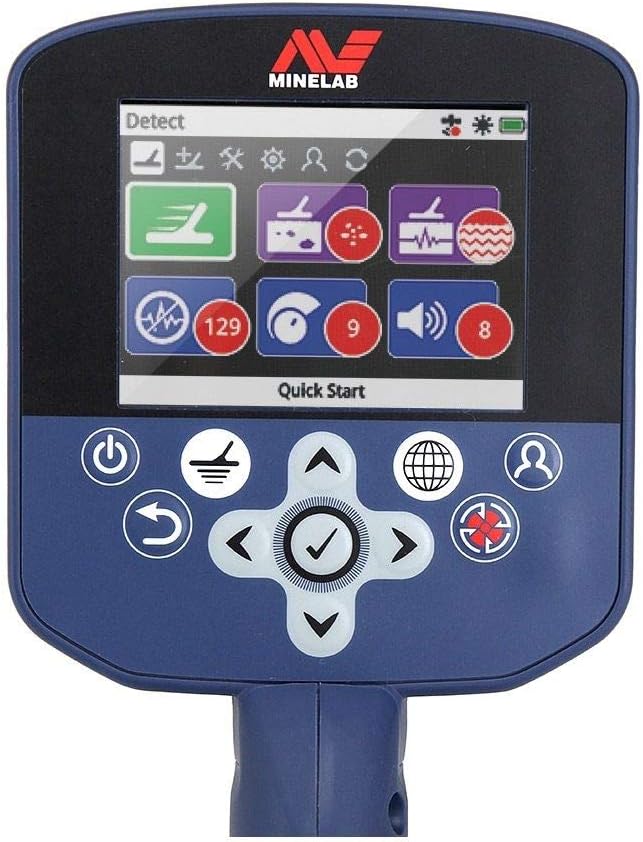
Image: A close-up view of the GPZ 7000's full-color LCD display and control buttons, illustrating the user interface for settings and detection modes.
- Power Button: Press and hold to turn the detector on or off.
- Detect Modes: Select from Gold Mode options (High Yield, General, Extra Deep) and Ground Type (Normal, Difficult, Severe) to optimize performance for different conditions.
- Ground Balance: Use Auto or Manual (Quick-Trak trigger button) to accurately balance the detector to the ground mineralization, reducing noise and improving target response.
- Noise Cancel: Utilize the 256 channels to minimize atmospheric and electrical interference, ensuring a smooth and quiet detecting experience.
- Threshold: Adjust the continuous background hum to a barely audible level. This helps in identifying faint target signals.
- Target Volume: Control the loudness of target signals.
- GPS Locating: The built-in GPS allows you to log gold finds and track your detecting path, which can be mapped using XChange 2 PC software.
Wireless Audio Freedom
The GPZ 7000 supports wireless audio via the WM 12 Wireless Module (or WM 10 as pictured). This allows you to detect without being physically tethered to the detector, providing greater freedom of movement. Simply pair the WM 12 module with your detector and connect your preferred headphones to the module.
6. Care and Maintenance
Proper care will extend the life and performance of your GPZ 7000:
- Cleaning: Wipe down the detector with a damp cloth after each use. Avoid harsh chemicals or abrasive cleaners. Ensure the coil and shaft are free of dirt and debris.
- Battery Charging: Always use the supplied charger. Charge the battery fully before storage if not used for an extended period.
- Storage: Store the detector in a cool, dry place away from direct sunlight and extreme temperatures. Disconnect the battery if storing for long periods.
- Coil Protection: Keep the skidplate on the coil to protect it from abrasion during use.
7. Troubleshooting
Refer to the table below for common issues and their solutions:
| Problem | Possible Cause | Solution |
|---|---|---|
| No power | Battery not charged or improperly installed. | Ensure battery is fully charged and correctly seated. Check connections. |
| Excessive noise/chatter | Poor ground balance, electromagnetic interference (EMI), or incorrect sensitivity. | Perform a ground balance. Use Noise Cancel. Reduce Sensitivity setting. Move away from power lines or other electronic devices. |
| No target response | Coil cable loose, incorrect detect mode, or target too deep/small. | Check coil cable connection. Adjust detect mode and sensitivity. Ensure target is within detection capabilities. |
| Display not working | Power issue or internal fault. | Check battery and power connection. If problem persists, contact Minelab support. |
8. Technical Specifications
| Feature | Specification |
|---|---|
| Technology | Zero Voltage Transmission (ZVT) |
| Application | Gold Prospecting (Waterproof coil to 3ft) |
| Coil (Standard) | 14" x 13" Super-D Configuration with skidplate (waterproof to 3 ft) |
| Audio Output | 1/4" non waterproof socket, Wi-Stream wireless signal transmission |
| Headphones Supplied | KOSS UR 30 100 ohm with 6.3 mm plug (non waterproof) |
| Visual Display | Full colour LCD (320 x 240 pixels) |
| Detect Modes | Gold Mode (High Yield, General, Extra Deep), Ground Type (Normal, Difficult, Severe) |
| Discrimination | All Metal |
| Ground Balance | Auto and Manual (Quick-Trak trigger button) |
| Noise Cancel | Auto and Manual (256 channels) |
| Battery | Li-Ion Rechargeable Pack (7.2V DC, 72Wh) |
| Weight | 7.32 lb (Including GPZ 14 coil, skidplate and 72Wh battery) |
| Length (Collapsed) | 46.1 inches |
| Length (Extended) | 60.1 inches |
9. Warranty and Support
The Minelab GPZ 7000 comes with a 3-year warranty covering the control box and coil. For warranty claims, technical assistance, or further support, please contact Minelab customer service or visit their official website. Keep your proof of purchase for warranty validation.
For additional resources and frequently asked questions, please visit the official Minelab support page.
Ask a question about this manual
Ask about setup, troubleshooting, compatibility, parts, safety, or missing instructions. Manuals+ will review the question and use this page’s manual context to help answer it.