1. Introduction
This manual provides essential information for the proper installation, operation, and maintenance of your Allux 100 Mailbox, Model F54102. Please read these instructions carefully before beginning installation or use to ensure safe and efficient operation and to prolong the life of your product. Keep this manual for future reference.
2. Product Overview
The Allux 100 Mailbox F54102 is a durable and modern wall-mounted mailbox designed for secure mail reception. Constructed from galvanized alloy steel with a black finish, it offers robust protection against weather elements and ensures the safety of your mail.
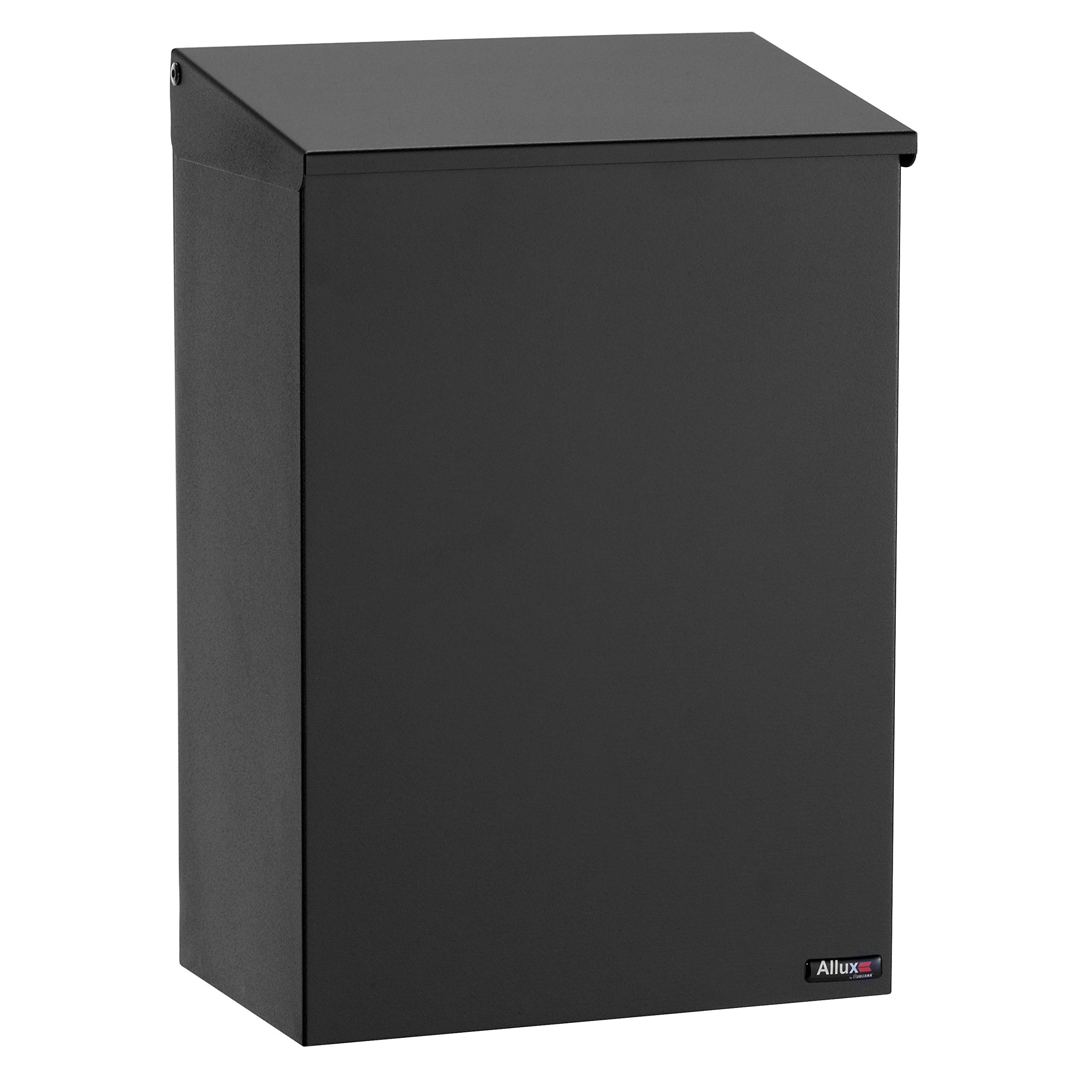
Figure 2.1: Front view of the Allux 100 Mailbox F54102. This image shows the sleek black finish and the overall design of the mailbox, suitable for wall or post mounting.
3. Specifications
| Manufacturer: | Juliana |
| Model Number: | F54102 |
| Material: | Galvanized Alloy Steel |
| Color: | Black |
| Style: | Modern |
| Product Dimensions (H x W x D): | 390 mm x 258 mm x 155 mm (approx. 15.35 x 10.16 x 6.1 inches) |
| Package Dimensions: | 2.54 x 2.54 x 2.54 cm (approx. 1 x 1 x 1 inch) - Note: These are likely shipping dimensions for a small component, not the full mailbox. |
| Weight: | 2.9 kg (approx. 6.4 lbs) |
| Mounting Profile: | Post Mounting (also suitable for wall mounting) |
| Batteries Required: | No |
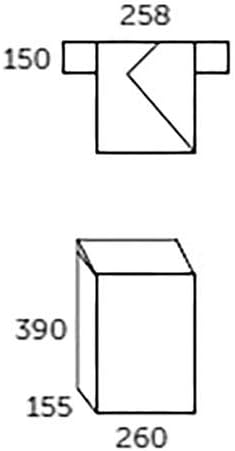
Figure 3.1: Technical drawing showing the dimensions of the Allux 100 Mailbox. All measurements are in millimeters.
4. Setup and Installation
The Allux 100 Mailbox is designed for post mounting, but can also be securely wall-mounted. Ensure you have the necessary tools and hardware before beginning. Always prioritize safety during installation.
4.1 Tools and Materials (Not Included):
- Drill with appropriate drill bits
- Screwdriver (Phillips or flathead, depending on hardware)
- Measuring tape
- Level
- Pencil or marker
- Safety glasses
- Mounting post (if post mounting) or wall anchors/screws (if wall mounting)
4.2 Installation Steps:
- Choose Location: Select a suitable location for your mailbox. Ensure it is easily accessible for mail delivery and retrieval, and complies with any local regulations regarding mailbox placement.
- Mark Drilling Points: Hold the mailbox in the desired position (or hold the mounting bracket if separate) and use a pencil to mark the drilling points for the mounting screws. Use a level to ensure the mailbox is straight.
- Drill Pilot Holes: Using an appropriate drill bit for your chosen surface (wood, brick, concrete, etc.), drill pilot holes at the marked locations. If mounting to masonry, insert wall anchors into the pilot holes.
- Secure Mailbox: Align the mailbox with the drilled holes. Insert screws through the mailbox's mounting holes and into the pilot holes/anchors. Tighten the screws securely, but do not overtighten, which could damage the mailbox or mounting surface.
- Test Stability: Gently tug on the installed mailbox to ensure it is firmly attached and stable.
Note: If using a separate mounting post, follow the post manufacturer's instructions for assembly and ground installation before attaching the mailbox.
5. Operating Instructions
Using your Allux 100 Mailbox is straightforward. It features a secure locking mechanism to protect your mail.
5.1 Receiving Mail:
- Mail is typically delivered through a top slot or front flap, which may or may not be lockable. For this model, mail is inserted through the top opening.
- The design allows mail to drop into the secure compartment, preventing unauthorized retrieval from the outside.
5.2 Retrieving Mail:
- Insert the provided key into the lock on the front access door.
- Turn the key to unlock the door.
- Open the door to access the mail compartment.
- Remove your mail.
- Close the door firmly and turn the key to lock it. Ensure the door is fully secured before leaving.
6. Maintenance
Regular maintenance will help preserve the appearance and functionality of your Allux 100 Mailbox.
6.1 Cleaning:
- Wipe the exterior surfaces with a soft, damp cloth to remove dust and dirt.
- For stubborn marks, use a mild soap solution and rinse thoroughly with clean water.
- Avoid abrasive cleaners, harsh chemicals, or scouring pads, as these can damage the finish.
- Dry the mailbox completely after cleaning to prevent water spots.
6.2 Lock Care:
- Periodically apply a small amount of graphite lubricant or a silicone-based spray to the lock mechanism to ensure smooth operation.
- Do not use oil-based lubricants, as they can attract dirt and grime.
6.3 Rust Prevention:
- Although made from galvanized steel, prolonged exposure to harsh conditions or damage to the coating can lead to rust.
- Inspect the mailbox periodically for any signs of rust or damage to the finish.
- Address any minor rust spots promptly with appropriate rust-treatment products designed for galvanized steel.
7. Troubleshooting
Here are some common issues and their potential solutions:
| Problem | Possible Cause | Solution |
|---|---|---|
| Door is difficult to open/close or lock. | Dirt or debris in the lock mechanism; misalignment; worn key. | Clean the lock with a soft brush and apply graphite lubricant. Check for any obstructions. Ensure the door is properly aligned. Try a spare key if available. |
| Mailbox feels loose after installation. | Screws are not tight enough; mounting surface is unstable; incorrect anchors used. | Retighten all mounting screws. If the surface is unstable, consider reinforcing it or using different mounting hardware. Ensure appropriate wall anchors were used for the material. |
| Rust spots appear on the surface. | Damage to the galvanized coating; prolonged exposure to corrosive elements. | Clean the affected area thoroughly. Apply a rust-inhibiting primer and paint designed for galvanized steel. Regular cleaning and inspection can prevent this. |
8. Warranty and Support
For information regarding warranty coverage, please refer to the documentation provided at the time of purchase or contact your retailer. If you require technical assistance or have questions not covered in this manual, please contact Allux customer support or the seller from whom you purchased the product.
Manufacturer: Juliana
Model: Allux 100 Mailbox F54102
Contact Information: Please refer to the manufacturer's official website or your purchase receipt for the most current support contact details.
