
1. Introduction
Thank you for purchasing the COMTEC ZERO 700V Radar Detector. This device is designed to enhance your driving awareness by providing alerts for various traffic enforcement systems and road conditions. It features a 3.2-inch MVA LCD, G-sensor, and multiple control interfaces for intuitive operation. Please read this manual thoroughly before use to ensure correct installation and operation.

Figure 1: Front view of the COMTEC ZERO 700V Radar Detector.
2. Key Features
The COMTEC ZERO 700V is equipped with a range of advanced features to provide comprehensive traffic information and alerts.
2.1. Mobile Small Orbis Support
The device provides alerts for mobile small orbis (speed cameras) that can be set up in locations previously difficult to monitor, such as residential streets. Warnings are displayed using maps and actual images.
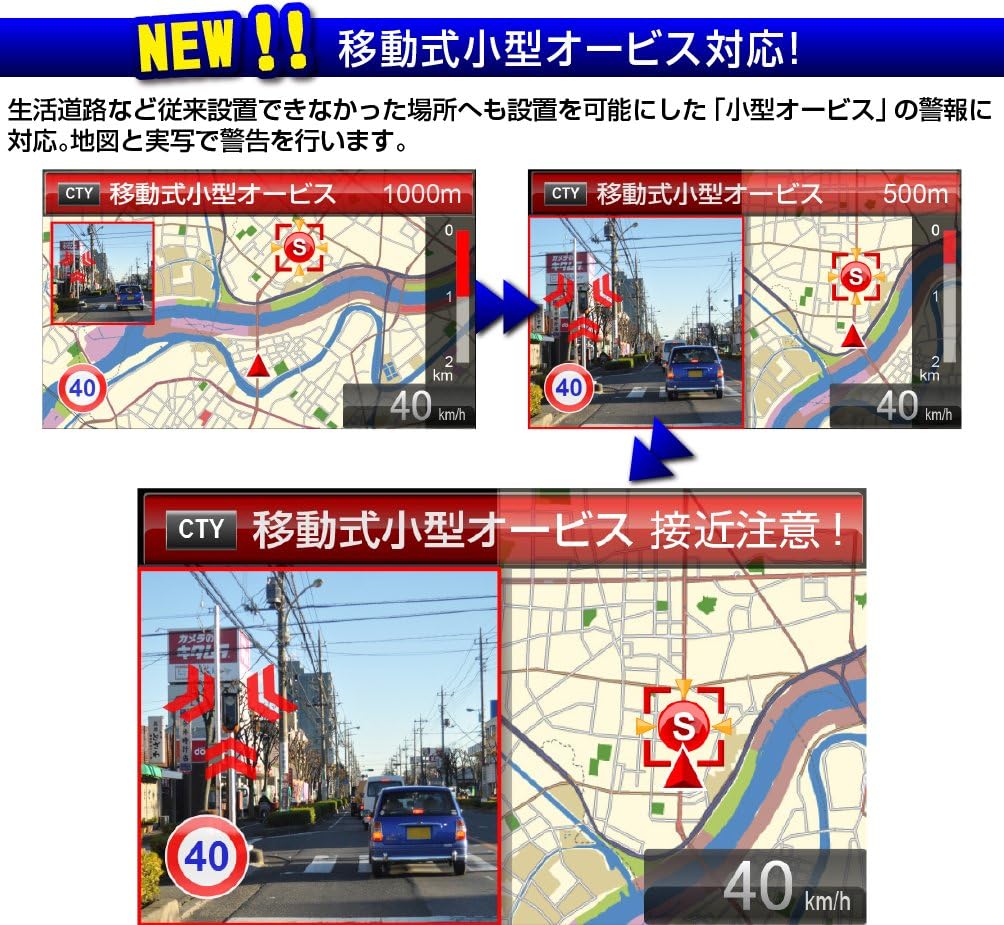
Figure 2: Example of a Mobile Small Orbis alert display. The screen shows a map and a real-world image indicating the approaching enforcement point.
2.2. Roundabout (Circular Intersection) Support
The ZERO 700V alerts you to roundabouts, which are circular intersections without traffic lights or stop signs, to help you pay attention to the direction of travel. Note that some roundabouts may still have temporary stop regulations.

Figure 3: Example of a Roundabout alert display, showing a graphical representation of the intersection.
2.3. New Traffic Regulation "Zone 30" Support
The device supports the new "Zone 30" traffic regulation, which limits the maximum speed to 30 km/h in areas with dense residential roads. When entering such an area, the device provides alerts via a warning screen and announcements. An icon is displayed while driving within the zone.
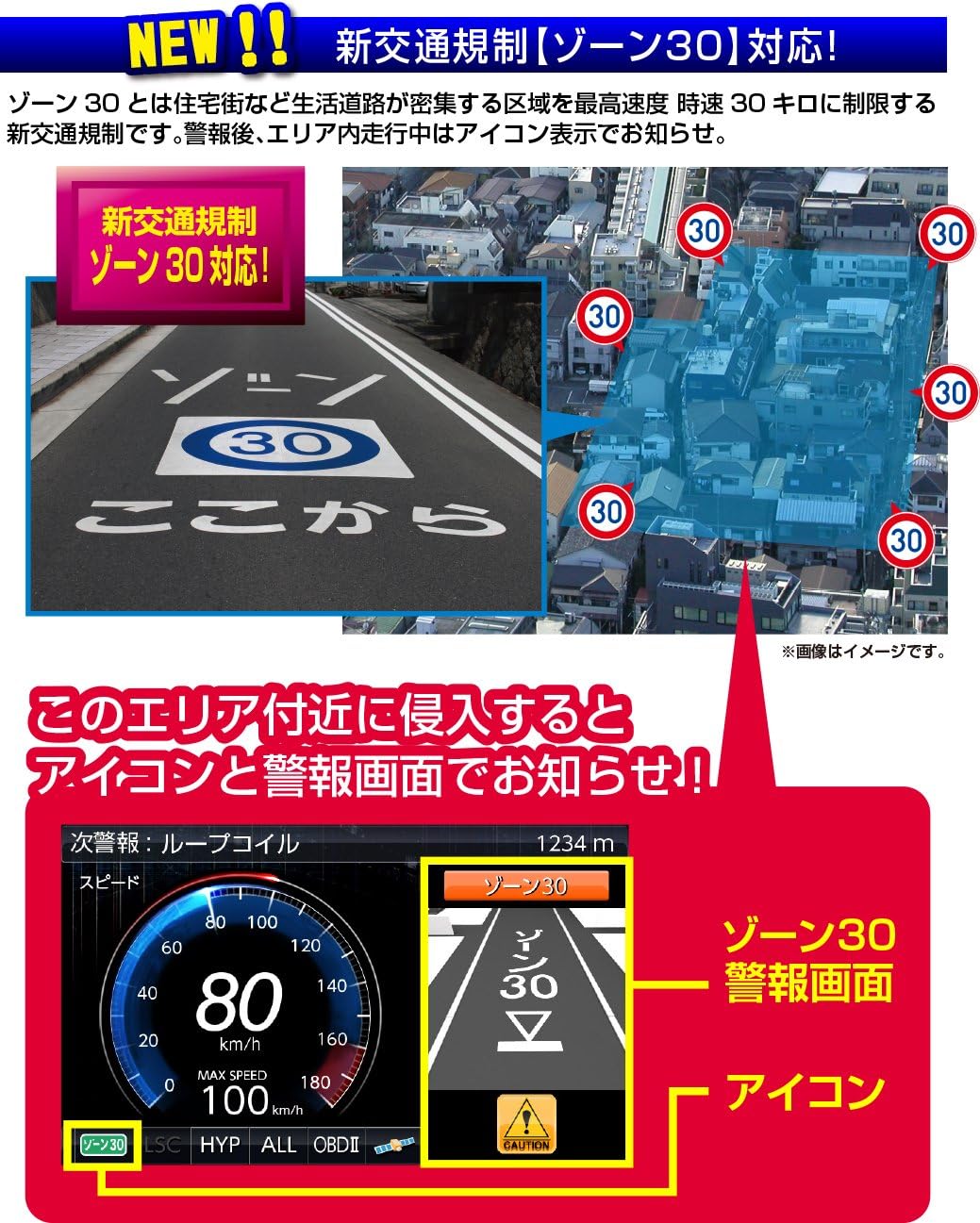
Figure 4: Example of a Zone 30 alert display, showing a warning screen and icon when entering a regulated area.
2.4. BrilliantLED Illumination
BrilliantLED flashes provide clear and easy-to-understand alerts. The LED color can be selected from 5 options to match your vehicle's interior illumination. It can also be set to light up or flash in conjunction with vehicle speed or alerts.
2.5. Glonass & Michibiki Reception & Fastest GPS Positioning
In addition to traditional GPS, the device supports reception from quasi-zenith satellite Michibiki, Glonass, Himawari, and GAGAN. The number of receivable satellites has increased to 59, significantly improving reception accuracy and speed.
2.6. OBD2 Connection Support
When connected to an optional OBD2 adapter (sold separately), the device can display up to 6 patterns and 138 items of vehicle information. OBD2 connection also allows for accurate vehicle speed acquisition, preventing loss of vehicle position even when GPS signals are interrupted in tunnels.
2.7. 3-Interface Operation
Operation is enhanced with three interfaces: remote control, touch panel, and touch switches. The device can be operated using only the main unit even without the remote control.

Figure 5: The included remote control for the ZERO 700V.
2.8. Basic Performance
- 3.2-inch wide MVA LCD: Offers significantly clearer display and wider viewing angles compared to TFT LCDs.
- G-sensor/Gyro sensor/Brightness sensor equipped.
- Compatible with idling stop vehicles and hybrid vehicles.
- Supports Toyota hybrid display.
- Free monthly updates for GPS data and public enforcement information.
- Industry-leading 18 reception bands.
- Over 39,000 enforcement and inspection data points recorded.
- Brightness Sensor ON/OFF switchable: Automatically adjusts LCD brightness based on external light, reducing glare in tunnels or underground parking.
- Auto Mode function: Automatically distinguishes between general roads and highways to cut unnecessary alerts.
- Super high sensitivity triple engine: Equipped with super high sensitivity GPS, radar, and wireless for accurate reception.
- Radar Cancel Point Detection: Automatically recognizes locations that receive false radar signals (e.g., automatic doors) and allows registration as false alert points. Alerts are muted when passing these registered points again.
- Opposing Lane Orbis Radar Cancel Function: Automatically mutes alerts if radar waves from opposing lane orbis or H-systems are detected, recognizing them as opposing lane enforcement.
3. Setup
3.1. Package Contents
Before installation, ensure all items are present:
- Main Unit (Radar Detector)
- Remote Control
- Mounting Bracket
- 12V Cigarette Lighter Plug Cord (4m length)
- Double-sided Tape
- Adhesive Sheet
- Sun Visor Clip
- Fastener for Remote Control Fixing
- microSD Card
- Instruction Manual (with Warranty)
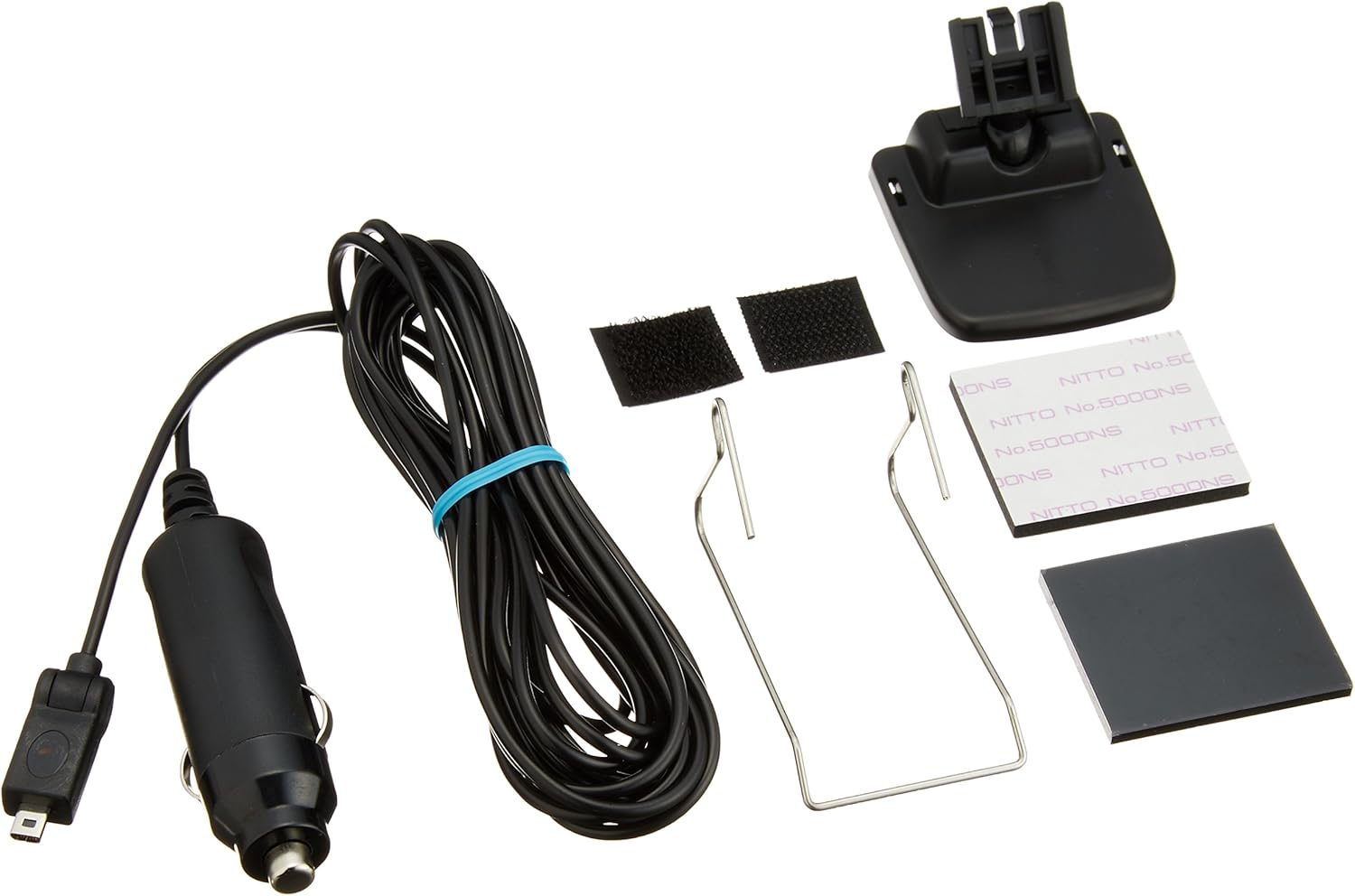
Figure 6: Included accessories for the COMTEC ZERO 700V.
3.2. Mounting the Unit
Choose a location on your dashboard that does not obstruct your view or interfere with airbag deployment. Ensure the GPS antenna has a clear view of the sky. Use the provided mounting bracket and double-sided tape to secure the unit.
3.3. Power Connection
Connect the 12V cigarette lighter plug cord to the DC 12V input port on the back of the main unit and then plug it into your vehicle's cigarette lighter socket.

Figure 7: Back view of the main unit, showing the DC 12V input port and ON/OFF switch.
3.4. microSD Card Insertion
Insert the included microSD card into the designated slot on the side of the unit. Ensure it is inserted correctly until it clicks into place.

Figure 8: Close-up of the microSD card slot.
4. Operation
4.1. Power On/Off
To power on the device, ensure it is connected to a 12V power source and flip the ON/OFF switch on the back of the unit to 'ON'. To power off, flip the switch to 'OFF'.
4.2. Display Modes
The ZERO 700V offers various display modes, including main/mini-meter, main/bar graph, main/text, 3-mini-meter, bar graph list, and text list. You can switch between these modes using the remote control or touch panel to view information such as speed, engine RPM, water temperature, and more.
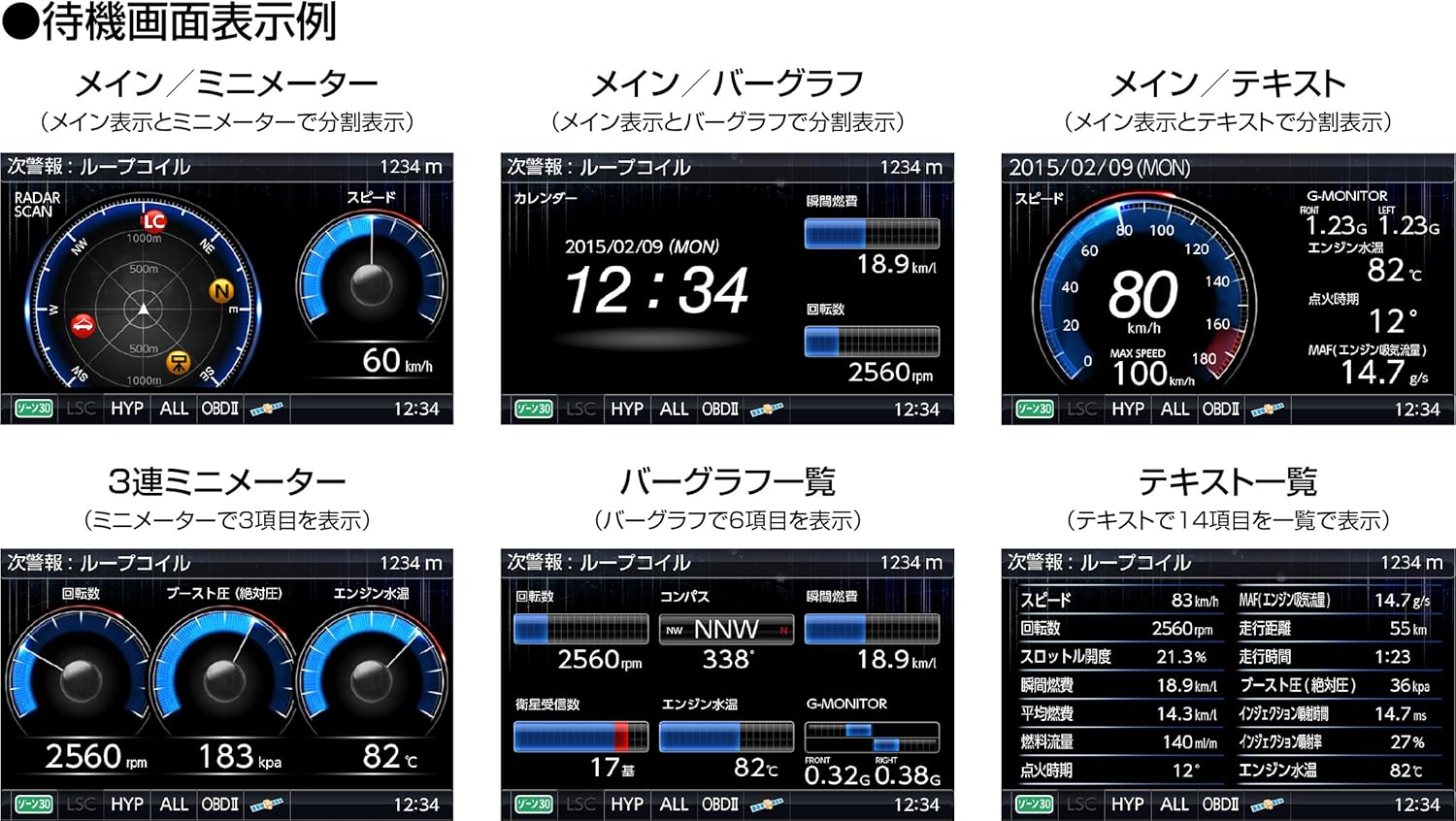
Figure 9: Examples of various display modes, showing different information layouts.
4.3. Alert System
The device provides clear visual and audio alerts for various enforcement points and road conditions. Alerts are displayed with graphics, maps, and real images, often accompanied by voice announcements. The alert distance can be adjusted in settings.

Figure 10: Examples of alert displays, showing how warnings are presented as you approach an enforcement point.
4.4. Settings and Customization
Access the settings menu via the remote control or touch panel to customize various parameters, including:
- Alert volume and type
- Display brightness and LED color
- Radar cancel point registration
- Auto mode activation
- OBD2 display items (if connected)
5. Maintenance
5.1. Cleaning the Unit
Wipe the unit with a soft, dry cloth. Do not use abrasive cleaners or solvents, as they may damage the surface.
5.2. Data Updates
COMTEC provides free monthly updates for GPS data and public enforcement information. To update the data:
- Download the latest data from the COMTEC website to your computer.
- Transfer the downloaded data to the microSD card using a card reader.
- Insert the updated microSD card into the radar detector unit. The unit will automatically update the data upon startup.
A computer capable of writing data to a microSD card is required. Compatible OS: Microsoft Windows 8/7/Vista/XP/2000 (32/64bit compatible). Data download via mobile phone is not supported. The number of annual GPS data updates may change without prior notice.
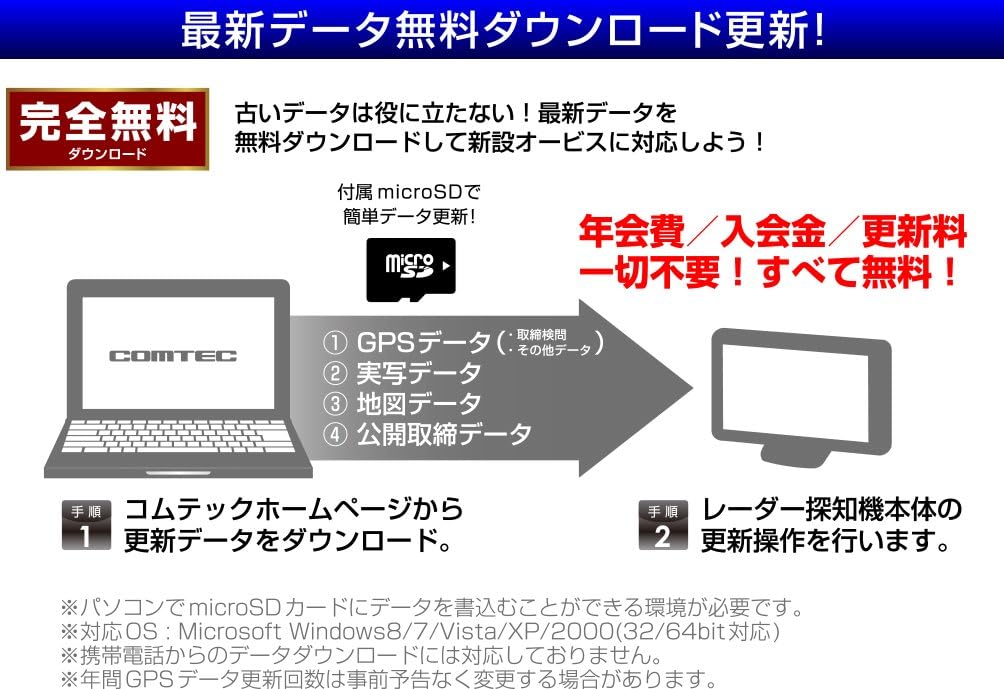
Figure 11: Illustration of the free data update process.
6. Troubleshooting
6.1. No Power
- Check if the power cord is securely connected to both the unit and the cigarette lighter socket.
- Ensure the ON/OFF switch on the back of the unit is in the 'ON' position.
- Verify that the vehicle's cigarette lighter socket is functioning.
6.2. No GPS Signal
- Ensure the unit is mounted in a location with a clear view of the sky, away from metallic objects or tinted windows that may block signals.
- Allow sufficient time for the unit to acquire GPS satellites, especially after initial setup or moving to a new location.
6.3. Frequent False Alerts
- Utilize the Radar Cancel Point Detection feature to register locations with known false signals (e.g., automatic doors).
- Ensure the Auto Mode function is enabled to differentiate between general roads and highways, reducing unnecessary GPS alerts.
- Check settings for radar sensitivity and adjust if necessary.
6.4. microSD Card Error
- Ensure the microSD card is inserted correctly and fully into the slot.
- Try reformatting the microSD card (this will erase all data, so back up if necessary) or using a different compatible microSD card.
7. Specifications
| Specification | Detail |
|---|---|
| Manufacturer | COMTEC |
| Model Name | ZERO 700V |
| Product Dimensions (D x W x H) | 22 x 99 x 57 mm |
| Product Weight | 109 g |
| Material | Heat-resistant ABS resin |
| Power Voltage | 12 Volts |
| Display Type | LCD (3.2-inch MVA) |
| Frequency Band | 18 bands |
| Sensors | G-sensor, Gyro sensor, Brightness sensor |
| GPS Reception | GPS, Glonass, Michibiki, Himawari, GAGAN (59 satellites) |
| Control Interface | Remote control, Touch panel, Touch switches |
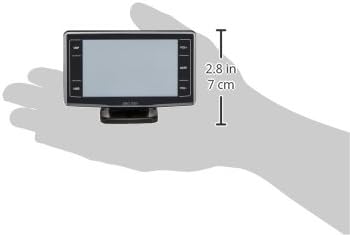
Figure 12: Size comparison of the COMTEC ZERO 700V in hand.
8. Important Notes and Disclaimer
Please read the following carefully:
- In the unlikely event of initial operational failure under correct usage conditions, we will respond by refunding the product price.
- Installation should be performed by a specialist. We do not provide support for self-installation.
- This device is intended as an auxiliary driving aid. Always drive safely and obey all traffic laws.
- The accuracy of GPS data and radar detection may be affected by environmental factors, such as tall buildings, tunnels, or weather conditions.