
1. Introduction
This manual provides detailed instructions for the installation, operation, and maintenance of the AUTONICS S2SR-S8W2A selector switch. This device is a 3-position, fixed-position lever selector switch designed for industrial control applications, featuring 2 normally open contacts and rated for 110VAC/10A and 220VAC/5A. It is suitable for Ø22/25 panel cutouts and comes in a white color.
2. Safety Information
Please read and understand all safety precautions before installing or operating this product. Failure to follow these instructions may result in electric shock, fire, or serious injury.
- Electrical Hazard: Ensure all power is disconnected before performing any installation, wiring, or maintenance. Only qualified personnel should perform electrical work.
- Proper Wiring: Use appropriate wire gauges and insulation for the specified voltage and current ratings. Ensure all connections are secure to prevent short circuits or overheating.
- Environmental Conditions: Do not expose the switch to excessive moisture, dust, corrosive gases, or extreme temperatures outside its specified operating range.
- Intended Use: Use this product only for its intended purpose as a selector switch in industrial control circuits. Do not modify the product.
3. Product Features and Overview
The AUTONICS S2SR-S8W2A selector switch is engineered for reliable performance in demanding industrial environments. Key features include:
- 2 Normally Open (NO) contacts
- Voltage ratings: 110VAC/10A and 220VAC/5A
- 3 distinct fixed positions for precise control
- Durable lever mechanism
- Designed for Ø22/25mm panel mounting
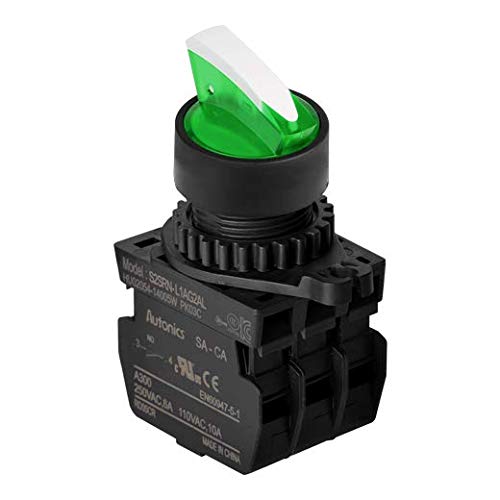
An image showing the AUTONICS S2SR-S8W2A selector switch. It features a black body with a green and white lever handle. The base of the switch shows electrical connection points and product labeling including 'Model: S2SRN-L1AG2AL', 'Autonics SA-CA', 'A300', '250VAC 6A 110VAC, 10A', 'EN60947-5-1', and 'MADE IN CHINA'.
4. Setup and Installation
Follow these steps for proper installation of the selector switch:
- Panel Preparation: Create a Ø22mm or Ø25mm cutout in the control panel where the switch is to be mounted. Ensure the panel thickness is within the specified limits for the switch's mounting mechanism.
- Mounting: Insert the switch body through the cutout from the front of the panel. Secure it in place using the provided locking nut or collar on the rear side of the panel. Tighten firmly but do not overtighten.
- Wiring: Identify the contact terminals. This switch has 2 Normally Open (NO) contacts. Connect the control circuit wires to the appropriate screw terminals. Refer to your system's wiring diagram for correct connections. Ensure all wire ends are stripped to the correct length and securely fastened under the screw terminals to prevent loose connections.
- Verification: After wiring, visually inspect all connections for correctness and security. Ensure no bare wires are exposed that could cause a short circuit.
5. Operating Instructions
The AUTONICS S2SR-S8W2A is a 3-position selector switch with a fixed lever. The lever can be rotated to one of three distinct positions to control the connected circuit.
- Position 1 (e.g., Leftmost): In this position, the contacts will be in a specific state (e.g., open or closed depending on the internal configuration and wiring).
- Position 2 (e.g., Center): Rotating the lever to the center position will change the state of the contacts. This position typically represents an 'OFF' or 'Neutral' state.
- Position 3 (e.g., Rightmost): Further rotation to the third position will again change the contact state, often representing an 'ON' or alternative function.
The fixed positions ensure that the lever snaps into place, providing clear tactile feedback for each selection.
6. Maintenance
The AUTONICS S2SR-S8W2A selector switch is designed for minimal maintenance. However, periodic checks can ensure long-term reliable operation:
- Cleaning: Gently wipe the exterior of the switch with a clean, dry, soft cloth to remove dust and debris. Do not use abrasive cleaners or solvents.
- Connection Check: Periodically inspect the wiring connections at the terminals to ensure they remain tight and free from corrosion. Loose connections can lead to overheating or intermittent operation.
- Lever Operation: Verify that the lever moves smoothly between its three fixed positions and snaps securely into each.
- Environmental Inspection: Ensure the operating environment remains within the specified conditions (temperature, humidity, absence of corrosive substances).
7. Troubleshooting
If you encounter issues with your selector switch, refer to the following table for common problems and their potential solutions:
| Problem | Possible Cause | Solution |
|---|---|---|
| Switch does not activate circuit | No power to circuit; Incorrect wiring; Faulty contact; Loose connection | Check power supply; Verify wiring against diagram; Inspect contacts for damage; Tighten terminal screws |
| Lever is stiff or does not snap into position | Debris accumulation; Mechanical damage; Incorrect mounting | Clean the switch exterior; Inspect for physical damage; Re-check mounting tightness and alignment |
| Intermittent operation | Loose wiring connections; Excessive vibration; Contact wear | Secure all terminal connections; Reduce vibration if possible; Consider replacing switch if contacts are worn |
8. Specifications
Detailed technical specifications for the AUTONICS S2SR-S8W2A selector switch:
| Specification | Value |
|---|---|
| Model Number | S2SR-S8W2A |
| Contact Configuration | 2 Normal Open (NO) |
| Current Rating (110VAC) | 10 Amps |
| Current Rating (220VAC) | 5 Amps |
| Operating Voltage | 220 Volts (AC) |
| Number of Positions | 3 |
| Position Type | Fixed Position |
| Actuator Type | Lever |
| Connector Type | Screw |
| Circuit Type | 3-way |
| International Protection Rating | IP54 |
| Color | White |
| Product Dimensions (L x W x H) | 36 x 24 x 36 inches |
| Item Weight | 1 Pound |
| Manufacturer | AUTONICS |
9. Warranty and Support
For information regarding warranty coverage, technical support, or service for your AUTONICS S2SR-S8W2A selector switch, please refer to the official AUTONICS website or contact their customer service directly. Keep your purchase receipt for warranty claims.
Official AUTONICS Website: www.autonics.com