
1. Introduction
Thank you for purchasing the iBall UFO Bluetooth Portable Speaker. This manual provides essential information for the safe and efficient operation of your device. Please read it thoroughly before use and retain it for future reference.
2. Safety Information
- Do not expose the speaker to extreme temperatures, humidity, or direct sunlight.
- Avoid dropping or subjecting the speaker to strong impacts.
- Do not disassemble, repair, or modify the speaker yourself. Refer to qualified service personnel.
- Keep the speaker away from water and other liquids. While the product is indicated as waterproof, prolonged submersion or exposure to high-pressure water jets should be avoided.
- Use only the provided or recommended charging cable.
- Do not operate the speaker at excessively high volumes for extended periods to prevent hearing damage.
3. Package Contents
Please check the box for the following items:
- iBall UFO Bluetooth Portable Speaker
- USB Charging Cable
- 3.5mm Audio Cable
- Carry Pouch
- User Manual
4. Product Overview
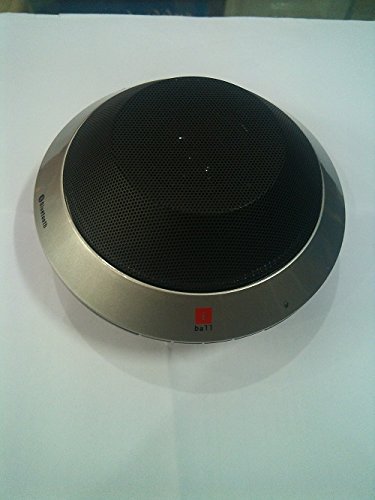
Image: The iBall UFO Bluetooth Portable Speaker, showcasing its distinctive silver UFO-shaped design and black speaker grille. The iBall logo is visible on the front edge.
The iBall UFO is a compact and stylish portable Bluetooth speaker designed for hands-free audio playback and calls. It features a unique UFO-inspired design and delivers clear sound through its 2-inch full-range driver.
Key Features:
- Bluetooth Connectivity for wireless audio streaming.
- Hands-free conversation support with built-in microphone.
- Attractive UFO design.
- Rechargeable Lithium Battery (1050mAH).
- Auxiliary input for wired connections.
5. Setup
5.1 Charging the Speaker
- Connect the small end of the USB charging cable to the charging port on the speaker.
- Connect the large end of the USB charging cable to a USB power adapter (not included) or a computer's USB port.
- The charging indicator light will illuminate.
- A full charge takes approximately 4 hours. The indicator light will change or turn off once charging is complete.
5.2 Bluetooth Pairing
- Ensure the speaker is fully charged.
- Press and hold the Power button to turn on the speaker. It will automatically enter Bluetooth pairing mode, indicated by a flashing LED light.
- On your Bluetooth-enabled device (smartphone, tablet, PC), go to the Bluetooth settings and enable Bluetooth.
- Search for available devices. You should see "iBall UFO" or a similar name in the list.
- Select "iBall UFO" to connect. Once paired, the speaker will emit a confirmation sound, and the LED light will stop flashing and remain solid.
- If prompted for a password, enter "0000".
6. Operating Instructions
6.1 Power On/Off
- To Power On: Press and hold the Power button until the indicator light illuminates.
- To Power Off: Press and hold the Power button until the indicator light turns off.
6.2 Music Playback
- Once paired via Bluetooth, you can play music from your connected device.
- Use the controls on your connected device to play, pause, skip tracks, and adjust volume.
- Alternatively, connect your device using the 3.5mm audio cable to the AUX input for wired playback.
6.3 Hands-Free Calling
The iBall UFO speaker supports hands-free calls when connected to a Bluetooth-enabled mobile phone.
- To Answer a Call: Press the Multi-function button (usually the Play/Pause button).
- To End a Call: Press the Multi-function button again.
- To Reject a Call: Press and hold the Multi-function button.
- To Redial Last Number: Double-press the Multi-function button.
7. Maintenance
- Clean the speaker with a soft, dry cloth. Do not use abrasive cleaners or solvents.
- Store the speaker in a cool, dry place when not in use.
- Avoid exposing the speaker to dust or dirt, which can affect performance.
8. Troubleshooting
| Problem | Possible Cause | Solution |
|---|---|---|
| Speaker does not turn on. | Battery is low or depleted. | Charge the speaker fully. |
| Cannot pair with Bluetooth device. | Speaker is not in pairing mode; device Bluetooth is off; too far from speaker. | Ensure speaker is in pairing mode (flashing LED). Turn on Bluetooth on your device. Move device closer to speaker (within 10 meters). Forget previous pairings on your device and try again. |
| No sound. | Volume too low; speaker not connected; incorrect audio source. | Increase volume on both speaker and connected device. Ensure successful Bluetooth connection or AUX cable is properly inserted. Check if the correct audio output is selected on your device. |
| Poor sound quality. | Interference; low battery; device too far. | Move speaker away from other electronic devices. Charge the speaker. Move device closer to speaker. |
9. Specifications
- Model: UFO
- Brand: iBall
- Connectivity Technology: Bluetooth, Auxiliary
- Speaker Type: Bookshelf (Portable)
- Power Source: Battery Powered
- Battery Life: Up to 4 Hours
- Charging Time: Approximately 4 Hours
- Driver Size: 2-inch full range
- Battery Capacity: 1050mAH Lithium Rechargeable Battery
- Special Feature: Built-in Microphone for hands-free calls
- Color: Silver
- Item Weight: 500 g
- Package Dimensions: 16.6 x 16.4 x 7.4 cm
10. Warranty and Support
The iBall UFO Bluetooth Portable Speaker comes with a standard manufacturer's warranty. Please refer to the warranty card included in your package for specific terms and conditions, including the warranty period and coverage details.
For technical support, service, or warranty claims, please contact iBall customer service through their official website or the contact information provided in your product documentation. Keep your purchase receipt and product serial number handy when contacting support.
Legal Disclaimer: Please check your local laws before purchasing and using this product.
