
Introduction
This manual provides essential information for the safe and efficient use of your Sharp LC-48LE653U 48-Inch 1080p 60Hz Smart LED TV. Please read these instructions thoroughly before operating the television and retain them for future reference. This television offers reliable performance with AquoMotion 120 technology for smooth motion, reduced blur, and access to SmartCentral Apps for various streaming services. It features an ultra-narrow bezel, a sleek modern design, Wallpaper Mode, three HDMI inputs (including MHL support), and built-in 20W audio.
What's in the Box
Verify that all components are present before proceeding with the setup.
- Sharp LC-48LE653U 48-Inch Smart LED TV
- Remote Control
- TV Stand
- AA Batteries (2)
- Power Cord
- Documentation (Quick Start Guide, Warranty Card)
Setup
1. Unpacking and Placement
Carefully remove the television from its packaging. Place the TV on a stable, level surface or mount it on a wall using a compatible VESA mount (sold separately). Ensure adequate ventilation around the television.
2. Attaching the Stand
If using the included stand, align the stand with the mounting holes on the bottom of the TV. Secure it with the provided screws. Refer to the diagram below for proper orientation.

Figure 1: Television with stand and dimensions (10.55"D x 42.56"W x 26.28"H).
3. Connecting Devices
Connect your external devices (e.g., cable box, Blu-ray player, gaming console) to the appropriate ports on the back or side of the TV. The TV features 3 HDMI inputs (one with MHL support), 1 USB port, and component/composite video inputs.

Figure 2: Detail of TV input ports.
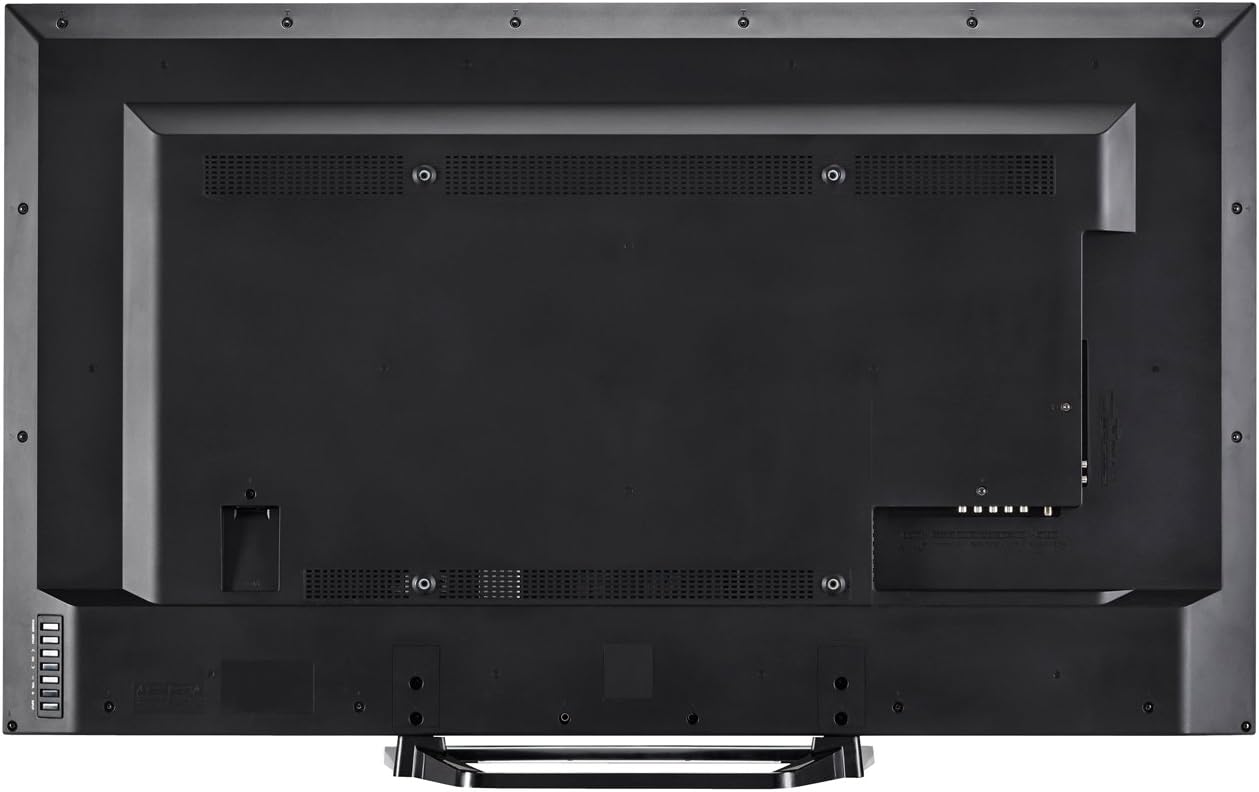
Figure 3: Rear view of the television with all connections.
4. Power Connection
Plug the power cord into the TV's power input, then into a standard electrical outlet (110 VAC, 60 Hz).
5. Initial Power On and Setup Wizard
Press the Power button on the TV or remote control. Follow the on-screen instructions to complete the initial setup, including language selection, network connection (Wi-Fi or Ethernet), and channel scanning.
Operating Instructions
1. Remote Control Functions
The included remote control allows you to navigate menus, change channels, adjust volume, and access smart features. Insert the two AA batteries into the remote control, observing polarity.

Figure 4: Remote Control Layout.
- Power: Turns the TV on or off.
- Input: Selects the input source (HDMI, Component, etc.).
- Volume (+/-): Adjusts the sound level.
- Channel (CH +/-): Changes channels.
- Smart: Accesses SmartCentral Apps.
- Menu: Opens the main settings menu.
- Navigation Buttons (Up/Down/Left/Right/Enter): Navigates menus and confirms selections.
- Netflix, YouTube, Pandora, Vudu: Dedicated buttons for quick access to these streaming services.
2. SmartCentral Apps
Your Sharp Smart LED TV comes with built-in Wi-Fi and SmartCentral Apps, providing access to popular streaming services and a web browser. Press the 'Smart' button on your remote or select the SmartCentral Apps icon from the home screen.

Figure 5: SmartCentral Apps Interface.
- Accessing Apps: Use the navigation buttons on the remote to select and launch applications like Netflix, Hulu Plus, Pandora, Vudu, and YouTube.
- Web Browser: Utilize the built-in web browser for general internet browsing.
- Network Connection: Ensure your TV is connected to a stable internet connection via Wi-Fi or Ethernet for optimal Smart TV functionality.
3. Picture and Sound Settings
Access the TV's menu to customize picture and sound settings. Adjust brightness, contrast, color, and sharpness for picture quality. For audio, select sound modes or adjust bass/treble settings.
4. Wallpaper Mode
When the TV is turned off, Wallpaper Mode allows it to display virtually any image, transforming your TV into a large-format display for photos or artwork. Configure this feature through the TV's settings menu.
Maintenance
1. Cleaning the Screen
Gently wipe the screen with a soft, dry, lint-free cloth. For stubborn marks, lightly dampen the cloth with water or a specialized screen cleaner. Avoid harsh chemicals or abrasive materials.
2. Cleaning the Cabinet
Wipe the TV cabinet with a soft, dry cloth. Do not use liquid cleaners directly on the cabinet.
3. Software Updates
Periodically check for software updates through the TV's settings menu to ensure optimal performance and access to the latest features. A stable internet connection is required for updates.
Troubleshooting
If you encounter issues with your television, refer to the following common solutions:
- No Power: Ensure the power cord is securely plugged into both the TV and the electrical outlet. Test the outlet with another device.
- No Picture/Sound: Verify the correct input source is selected. Check all cable connections to external devices. If using an antenna, ensure it is properly connected and channels are scanned.
- No Sound (intermittent): If sound occasionally cuts out, try unplugging the TV from the power outlet for a few minutes, then plugging it back in. This can reset internal components.
- Poor Picture Quality: Adjust picture settings (brightness, contrast, sharpness). Ensure the input source is providing a high-quality signal.
- Network Connectivity Issues: Check your Wi-Fi router or Ethernet cable connection. Restart your router and the TV. Ensure Wi-Fi settings on the TV are correctly configured.
- Remote Control Not Working: Replace the batteries. Ensure there are no obstructions between the remote and the TV's IR sensor.
For persistent issues, contact Sharp customer support.
Specifications
| Feature | Specification |
|---|---|
| Model Number | LC-48LE653U |
| Screen Size | 48 Inches |
| Display Technology | LCD with LED Backlight |
| Resolution | 1080p (1920 x 1080) |
| Refresh Rate | 60 Hz (AquoMotion 120) |
| Connectivity | Built-in Wi-Fi, Ethernet |
| HDMI Ports | 3 (one with MHL) |
| USB Ports | 1 |
| Supported Internet Services | Hulu Plus, Netflix, Pandora, Vudu, YouTube |
| Audio Output Power | 20 Watts |
| Product Dimensions (D x W x H) | 10.55" x 42.56" x 26.28" |
| Item Weight | 21 Pounds |
| Voltage | 110 VAC 60 Hz |
Warranty Information
This Sharp LC-48LE653U television is covered by a 1-year limited warranty from the date of purchase. This warranty covers manufacturing defects in materials and workmanship under normal use. It does not cover damage caused by misuse, accidents, unauthorized modifications, or external causes. Please retain your proof of purchase for warranty claims.
Support
For technical assistance, troubleshooting beyond this manual, or warranty service, please contact Sharp customer support. Refer to the contact information provided in your product documentation or visit the official Sharp website.
Online Support: www.sharpusa.com/support
Phone Support: Refer to your warranty card or Sharp's official website for the most current contact numbers.


