1. Introduction
The Logickeyboard Sabre Travel Reservation Slim Line PC Keyboard is specifically engineered to enhance efficiency and accuracy when interacting with the Sabre Travel Network System on a Windows PC. This keyboard features laser-etched, color-coded keys that correspond to Sabre commands, eliminating the need for extensive memorization and reducing input errors. It is suitable for both experienced Sabre users and those new to the system.
This manual provides essential information for setting up, operating, and maintaining your Logickeyboard Sabre keyboard.
2. Package Contents
- Logickeyboard Sabre Travel Reservation Slim Line PC Keyboard
- User Documentation (this manual)
3. Setup
3.1 System Requirements
- Operating System: Windows PC
- Available USB-A Port
3.2 Connecting the Keyboard
- Locate an available USB-A port on your Windows PC.
- Plug the USB connector from the Logickeyboard Sabre keyboard into the USB-A port.
- The keyboard is plug-and-play; your operating system should automatically detect and install the necessary drivers. No additional software installation is typically required.
4. Operating Instructions
The Logickeyboard Sabre keyboard is designed to streamline your workflow within the Sabre Travel Network System. Its keys are clearly labeled with Sabre commands and color-coded for quick visual identification.
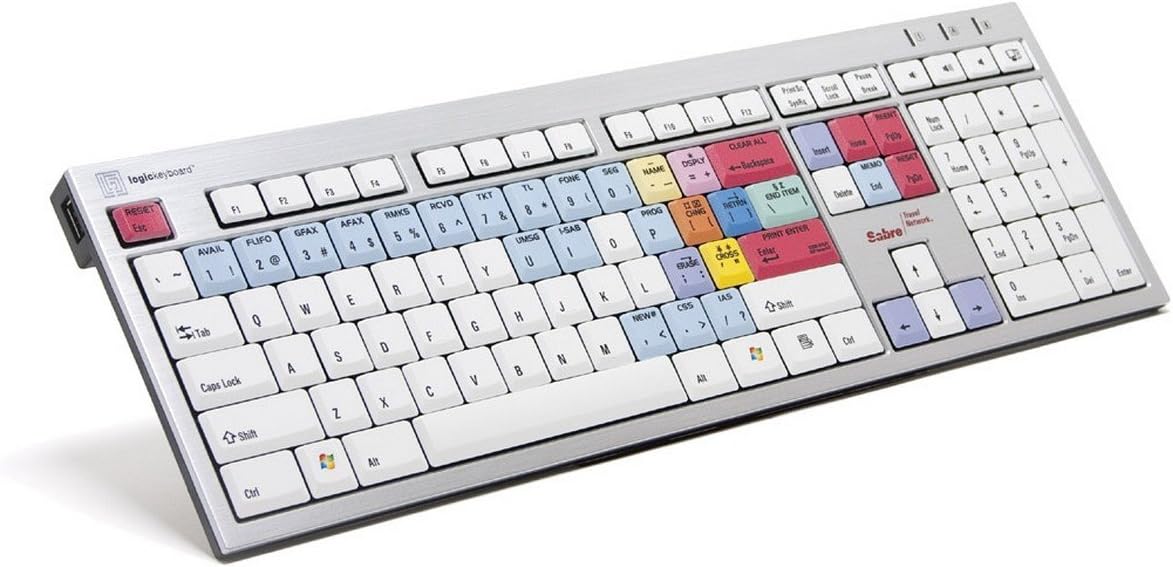
Figure 1: Logickeyboard Sabre Travel Reservation Slim Line PC Keyboard layout, showing various color-coded command keys.
4.1 Understanding Color-Coded Keys
The keyboard features distinct color zones to group related Sabre commands, making them easier to locate and use:
- Blue Keys: Often represent common Sabre functions like AVAIL (Availability), FLIFO (Flight Information), GFAX (General Fax), AFAX (Airline Fax), RMKS (Remarks), RCVD (Received), TKT (Ticket), TL (Time Limit), FONE (Phone), SEG (Segment), NAME, DSPLY (Display), PROG (Program), CHNG (Change), RETRN (Return), NEW, CSS, IAS.
- Red Keys: Typically indicate critical actions or commands such as RESET Esc, CLEAR ALL, END ITEM, PRINT ENTER, MEMO, RESET PNR.
- Yellow Keys: May denote specific actions like ERASE or CROSS.
- Standard White Keys: Function as a regular QWERTY keyboard for text input.
4.2 General Operation
- To execute a Sabre command, simply press the corresponding labeled key.
- For standard text entry, use the white QWERTY keys as you would on any conventional keyboard.
- The numeric keypad on the right functions identically to a standard numeric keypad.
5. Maintenance
5.1 Cleaning
To maintain the keyboard's performance and appearance:
- Disconnect the keyboard from your computer before cleaning.
- Use a soft, lint-free cloth lightly dampened with water or a mild, non-abrasive cleaning solution.
- Avoid spraying liquids directly onto the keyboard.
- Do not use harsh chemicals, solvents, or abrasive cleaners, as these can damage the key legends and surface.
5.2 Spill Resistance
This keyboard features a spill-proof design, offering protection against accidental liquid spills. While designed to resist spills, it is recommended to clean up any liquid immediately to prevent potential damage and ensure longevity.
6. Troubleshooting
6.1 Keyboard Not Responding
- Check USB Connection: Ensure the keyboard's USB cable is securely plugged into a functioning USB-A port on your computer. Try a different USB port if available.
- Restart Computer: Sometimes a simple system restart can resolve connectivity issues.
- Test on Another Computer: If possible, connect the keyboard to another computer to determine if the issue is with the keyboard or your original system.
6.2 Specific Keys Not Working
- Inspect for Obstructions: Check if any debris or foreign objects are lodged under the non-functioning keys.
- Clean Keyboard: Follow the cleaning instructions in Section 5.1.
- Software Conflict: Ensure no other software or drivers are interfering with keyboard input.
7. Specifications
| Model Number | LKBU-SABRE-AJPU-US |
| Brand | Logickeyboard |
| Product Dimensions | 25 x 6 x 10 inches |
| Item Weight | 5 pounds |
| Compatible Devices | PC |
| Connectivity Technology | USB-A |
| Keyboard Type | USB |
| Intended Use | Sabre Travel Network System |
| Special Feature | Spill Proof |
| Key Color Coding | Red, Blue, Yellow for Sabre commands |
| Style | Modern |
| Hand Orientation | Ambidextrous |
8. Warranty and Support
Logickeyboard products are covered by a manufacturer's warranty. For detailed warranty information, technical support, or to contact customer service, please visit the official Logickeyboard website or refer to the warranty card included with your product.
You can find more information and support resources at the Logickeyboard Store on Amazon.


