
1. Product Overview
The Fulgor Milano F4SP301 is a 30-inch wide, 4.4 cubic foot electric oven designed for modern kitchens. It features true convection for efficient and even cooking, a pyrolytic self-clean function for easy maintenance, and a cool-to-the-touch oven door for enhanced safety. The oven is equipped with halogen lighting and a large viewing window, allowing you to monitor your food without opening the door. Its combination of knob and electronic controls provides an intuitive user experience, offering 7 different cooking functions to cater to various culinary needs. The interior is beautifully enameled porcelain for durability and easy cleaning.
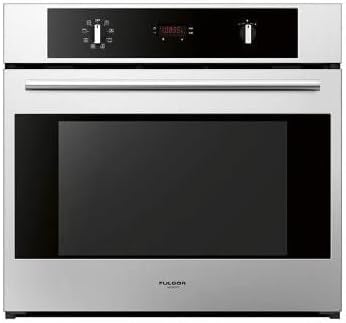
Figure 1: Front view of the Fulgor Milano F4SP301 Electric Oven, showcasing its stainless steel finish and control panel.
2. Important Safety Instructions
Please read all instructions carefully before using the appliance to reduce the risk of fire, electric shock, injury to persons, or damage when using the oven.
- Always ensure the oven is properly grounded before use.
- Do not touch hot surfaces. Use oven mitts or pot holders when handling hot items.
- Never use water on grease fires; smother fire or flame or use dry chemical or foam-type extinguisher.
- Do not store flammable materials in or near the oven.
- Keep children away from the oven during operation and cooling. The oven door remains cool to the touch, but internal components are hot.
- Ensure proper ventilation when operating the oven.
- Disconnect power before servicing or cleaning the oven.
3. Installation and Setup
The Fulgor Milano F4SP301 is designed for freestanding installation. Proper installation is crucial for safe and efficient operation. It is recommended that installation be performed by a qualified technician.
3.1 Unpacking
- Carefully remove all packaging materials and protective films from the oven.
- Inspect the oven for any shipping damage. Report any damage immediately to your dealer.
- Retain packaging materials for future transport if needed.
3.2 Electrical Connection
Ensure the electrical supply meets the requirements specified on the oven's rating plate. The oven must be properly grounded in accordance with local codes and ordinances.
3.3 Placement
Place the oven on a stable, level surface. Ensure adequate clearance around the appliance for ventilation and servicing.
4. Operating Instructions
Familiarize yourself with the oven's controls and functions before first use.
4.1 Control Panel
The oven features a combination of intuitive knobs and electronic controls for selecting cooking functions, temperature, and time settings.
4.2 Cooking Functions
The F4SP301 offers 7 distinct cooking functions, including:
- True Convection: Utilizes a third heating element and a fan for even heat distribution, ideal for multi-rack baking and roasting.
- Bake: Standard baking function for cakes, cookies, and casseroles.
- Broil: High heat from the top element for searing and browning.
- Roast: Combines baking and broiling for optimal roasting results.
- Defrost: Gentle air circulation to thaw frozen foods.
- Warm: Maintains food at serving temperature.
- Proof: Provides a low, consistent temperature for rising dough.
Refer to the specific function icons on your control panel for detailed usage.
4.3 Setting Temperature and Time
Use the temperature knob to select the desired cooking temperature. The electronic display will show the current temperature and allow you to set cooking times or use preset programmable cooking temperatures for each function.
4.4 Using the Oven Racks
The oven comes with double chrome-plated racks and a third telescopic rack for flexible placement of bakeware. The telescopic rack allows for easy access to dishes without reaching deep into the hot oven.
5. Care and Maintenance
Regular cleaning and maintenance will ensure the longevity and optimal performance of your oven.
5.1 Pyrolytic Self-Clean Function
The pyrolytic self-clean cycle heats the oven to a very high temperature, turning food residues into ash. Before starting the cycle, remove all racks and accessories. After the cycle, allow the oven to cool completely, then simply wipe away the loosened ash with a damp cloth.
5.2 Interior Cleaning
For light spills or general cleaning, wipe the beautifully enameled porcelain interior with a soft cloth and mild detergent. Avoid abrasive cleaners or scouring pads that could damage the surface.
5.3 Exterior Cleaning
Clean the stainless steel exterior with a soft cloth and a stainless steel cleaner. Always wipe in the direction of the grain to prevent streaking.
6. Troubleshooting
Before contacting customer service, refer to the following table for common issues and their solutions.
| Problem | Possible Cause | Solution |
|---|---|---|
| Oven not heating | No power supply; circuit breaker tripped; oven not set correctly. | Check power cord connection; reset circuit breaker; ensure function and temperature are set. |
| Uneven cooking | Improper rack position; overloaded oven; convection fan issue. | Adjust rack position; avoid overcrowding; ensure convection fan is operating. |
| Self-clean not working | Oven door not fully closed; cycle interrupted. | Ensure door is latched; restart self-clean cycle. |
| Oven light not working | Bulb burnt out. | Replace halogen bulb (refer to service manual for specific instructions). |
7. Technical Specifications
| Specification | Value |
|---|---|
| Model Number | F4SP301 |
| Brand | Fulgor Milano |
| Type | Electric Oven |
| Installation Type | Freestanding |
| Oven Capacity | 4.4 cu. ft. |
| Width | 29-3/4 inches (approx. 75.6 cm) |
| Height | 27-7/8 inches (approx. 70.8 cm) |
| Depth | 24 inches (approx. 61 cm) |
| Product Weight | 181 lbs (approx. 82.1 kg) |
| Color | Stainless Steel |
| Heating Method | Convection |
| Self-Cleaning | Yes (Pyrolytic) |
| Viewing Window | Yes |
| Child Lock | No |
8. Warranty and Customer Support
For warranty information, please refer to the warranty card included with your product or visit the official Fulgor Milano website. Keep your proof of purchase for any warranty claims.
For technical assistance, spare parts, or to schedule service, please contact Fulgor Milano customer support. Contact details can typically be found on the manufacturer's website or in your purchase documentation.


