
Clarity D702 + (1) D702HS
Clarity D702 Cordless Phone User Manual
Model: D702 + (1) D702HS
Introduction
This manual provides comprehensive instructions for the setup, operation, and maintenance of your Clarity D702 Cordless Phone system. Designed for individuals with moderate hearing loss, this phone utilizes DECT 6.0 technology to deliver clear, interference-free communication. Please read this manual thoroughly before using your phone.
Package Contents
Verify that all items are present in your package:
- Clarity D702 Base Unit
- Clarity D702 Handset
- Clarity D702HS Expandable Handset (if included in your package)
- AC Power Adapter
- Telephone Line Cord
- Rechargeable Batteries (for handset)
- User Manual (this document)
Setup
1. Installing the Batteries
The handset requires 4 AA batteries (included). Ensure correct polarity when inserting the batteries into the handset's battery compartment.
2. Connecting the Base Unit
- Connect one end of the telephone line cord to the TEL LINE jack on the base unit.
- Connect the other end of the telephone line cord to a telephone wall jack.
- Connect the AC power adapter to the POWER jack on the base unit.
- Plug the AC power adapter into a standard electrical outlet.
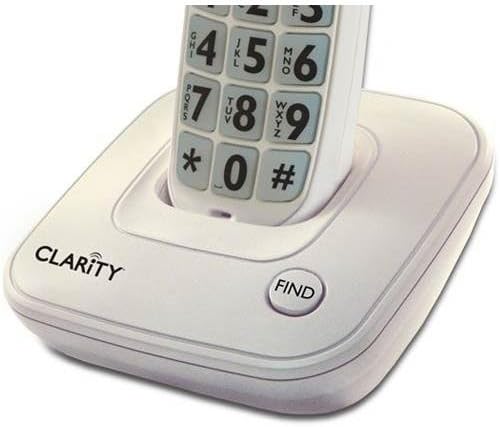 Image: The Clarity D702 cordless phone handset resting in its charging base. The base features the "CLARITY" brand logo and a "FIND" button. The handset displays large, easy-to-read numeric keypad buttons.
3. Charging the Handset
Place the handset in the base unit. The charge indicator light on the handset should illuminate, indicating that it is charging. Allow the handset to charge for at least 12 hours before initial use to ensure optimal battery performance.
Operating Instructions
Making a Call
- Pick up the handset or press the TALK button.
- Dial the desired phone number using the large, backlit keypad.
- Press the TALK button again or place the handset back in the base to end the call.
Answering a Call
When the phone rings, pick up the handset or press the TALK button.
Adjusting Volume and Tone
During a call, use the volume control buttons on the side of the handset to adjust the listening volume. The phone offers four (4) tone settings to customize your listening experience. Refer to the handset's menu for tone adjustment options.
Using the Speakerphone
To activate the speakerphone during a call, press the SPEAKER button. Press it again to return to handset mode.
Caller ID
The large font and high contrast caller ID screen displays incoming call information. The keypad and CID display also light up as a super bright visual ringer.
Finding a Lost Handset
If you misplace your handset, press the FIND button on the base unit. The handset will emit a paging tone.
Maintenance
- Clean the phone surfaces with a soft, damp cloth. Do not use abrasive cleaners or solvents.
- Avoid exposing the phone to excessive moisture, direct sunlight, or extreme temperatures.
- Ensure the handset's charging contacts are clean for proper charging.
Troubleshooting
| Problem | Possible Cause | Solution |
|---|---|---|
| No dial tone | Telephone line cord is disconnected. | Ensure the telephone line cord is securely connected to the base unit and the wall jack. |
| Handset not charging | Handset not properly seated in base; dirty charging contacts. | Reseat the handset in the base. Clean the charging contacts on both the handset and base with a dry cloth. |
| Poor sound quality / Static | Interference from other electronic devices; handset too far from base. | Move the base unit away from other electronic devices. Ensure the handset is within range of the base. |
| Handset not ringing | Ringer volume is off or set too low. | Adjust the ringer volume setting on the handset. |
Specifications
- Model: D702 + (1) D702HS
- Brand: Clarity
- Dimensions (Base Unit): 9.1 x 7.7 x 5.8 inches
- Item Weight: 2.6 pounds
- Telephone Type: Cordless
- Technology: DECT 6.0
- Power Source: Corded Electric
- Batteries: 4 AA batteries (for handset)
- Color: Off-White
- Material: Plastic
- Answering System: Digital
Related documentsD702 + (1) D702HS


Ask a question about this manual
Ask about setup, troubleshooting, compatibility, parts, safety, or missing instructions. Manuals+ will review the question and use this page’s manual context to help answer it.