
Raypak H000029
Raypak H000029 Digital Control Board User Manual
For RHP 5350, 6350, and 8350 Heat Pumps
1. Introduction
This manual provides detailed instructions for the installation, operation, and maintenance of the Raypak H000029 Digital Control Board. This control board is a critical replacement component designed for specific Raypak RHP series heat pumps, ensuring proper functionality and control of your heating system.
2. Safety Information
WARNING: Electrical Shock Hazard
- Always disconnect power to the heat pump before installing, servicing, or removing the control board. Failure to do so can result in serious injury or death.
- Installation and service must be performed by a qualified technician in accordance with all local and national electrical codes.
- Do not operate the heat pump with damaged wiring or components.
Read all instructions carefully before proceeding. Keep this manual for future reference.
3. Product Features
- Direct replacement part for Raypak 2350, 5350, 6350, and 8350 heat pumps.
- Includes the digital control board and comprehensive installation instructions.
- Designed to restore full digital control and diagnostic capabilities to compatible heat pump models.
4. Setup and Installation
The Raypak H000029 Digital Control Board is designed for straightforward replacement, but professional installation is highly recommended due to the electrical nature of the component and the complexity of heat pump systems. The package includes detailed installation instructions specific to the control board.
Important: Refer to the specific installation instructions provided with your control board for wiring diagrams and programming steps. While the physical installation may appear simple, proper programming and configuration are crucial for correct heat pump operation.
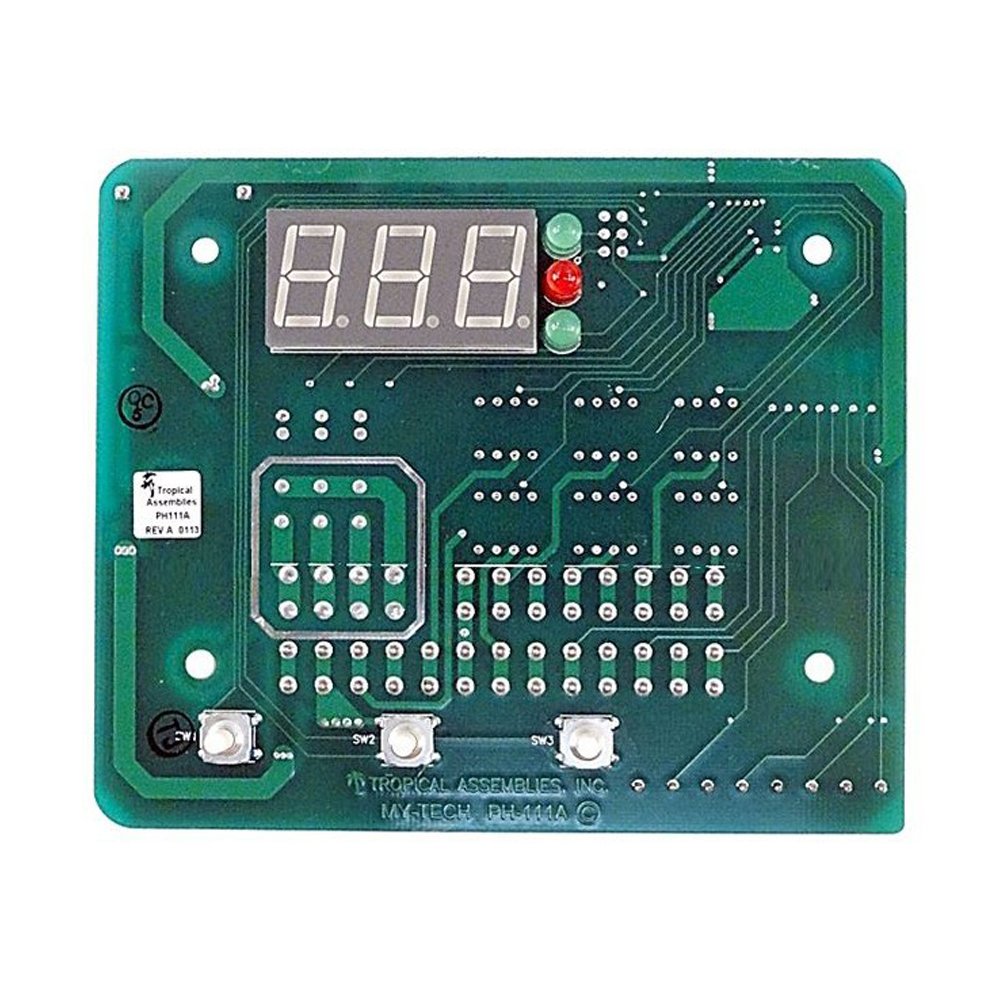
Figure 4.1: Front view of the Raypak H000029 Digital Control Board, showing the digital display and various circuit pathways. This board is the central electronic component for managing heat pump functions.
Figure 4.2: Angled view of the Raypak H000029 Digital Control Board, providing a closer look at the various connection points and electronic components essential for its operation within the heat pump system.
Installation Steps (General Overview):
- Power Disconnection: Ensure all power to the heat pump is completely disconnected at the circuit breaker.
- Access Control Panel: Open the heat pump's control panel access cover.
- Document Wiring: Carefully photograph or sketch the existing wiring connections to the old control board before removal.
- Remove Old Board: Disconnect all wires and mounting screws securing the old control board.
- Install New Board: Mount the new Raypak H000029 control board in place and reconnect all wires according to your documentation and the included instructions. Ensure all connections are secure.
- Close Panel: Securely close the control panel access cover.
- Restore Power & Test: Restore power to the heat pump and follow the specific programming and testing procedures outlined in the included instructions to verify correct operation.
5. Operating Instructions
Once the Raypak H000029 Digital Control Board is correctly installed and programmed, the operation of your heat pump will typically revert to its standard user interface. Refer to your specific Raypak RHP 5350, 6350, or 8350 heat pump user manual for detailed operating instructions, including setting desired temperatures, modes, and timers.
The digital control board processes inputs from sensors and user commands, then controls the various components of the heat pump to achieve the desired heating or cooling (if applicable) of your pool or spa water.
6. Maintenance
The Raypak H000029 Digital Control Board itself requires minimal maintenance. However, regular inspection of the heat pump system is recommended to ensure its longevity and optimal performance.
- Visual Inspection: Periodically inspect the control board and its connections for any signs of corrosion, loose wires, or physical damage.
- Cleanliness: Ensure the area around the control board is free from dust, debris, and moisture. Use a soft, dry brush or compressed air to gently clean the board if necessary, with power disconnected.
- Environmental Protection: Ensure the heat pump's enclosure is properly sealed to protect the control board from environmental elements like excessive moisture, insects, and rodents.
For comprehensive heat pump maintenance, consult your heat pump's primary user manual.
7. Troubleshooting
If your heat pump is not functioning correctly after replacing the control board, consider the following troubleshooting steps:
- Power Check: Verify that the heat pump is receiving power and that circuit breakers are not tripped.
- Wiring Connections: Double-check all wiring connections to the control board against the provided instructions and your documentation. Ensure they are secure and correctly seated.
- Programming: Confirm that the control board has been correctly programmed and configured for your specific heat pump model as per the included instructions. Incorrect programming can lead to operational issues.
- Error Codes: If the digital display shows an error code, consult your heat pump's main user manual for the meaning of the code and recommended solutions.
- Other Components: The issue might not be with the control board itself but with other heat pump components (e.g., sensors, compressor, fan). A qualified technician can diagnose these issues.
If problems persist after performing these checks, contact a qualified HVAC or pool equipment technician for further diagnosis and repair.
8. Specifications
| Attribute | Value |
|---|---|
| Product Dimensions | 5.6 x 5.4 x 5.3 inches |
| Item Weight | 1 pounds |
| Manufacturer | Raypak |
| ASIN | B00T8O7VPQ |
| Item Model Number | H000029 |
| Compatibility | Raypak RHP 2350, 5350, 6350, and 8350 Heat Pumps |
9. Warranty and Support
For information regarding the warranty of your Raypak H000029 Digital Control Board, please refer to the warranty documentation included with your purchase or visit the official Raypak website. Warranty terms typically cover manufacturing defects for a specified period.
For technical support, service, or to locate an authorized service center, please contact Raypak customer service directly or visit their official support portal. Ensure you have your product model number (H000029) and heat pump model information readily available when seeking support.
Raypak Official Website: www.raypak.com
Ask a question about this manual
Ask about setup, troubleshooting, compatibility, parts, safety, or missing instructions. Manuals+ will review the question and use this page’s manual context to help answer it.