
1. Introduction
The Janome CoverPro 1000CPX is a high-speed, long arm, heavy-duty coverstitch machine designed for professional-quality finishing on various fabrics. It combines industrial-style cover hem capabilities with the convenience of a home machine. Key features include an extra-large bed space, a Seam Tightening System (STS), and a versatile 3-needle, 4-thread configuration. This manual provides essential information for the safe and effective use, maintenance, and troubleshooting of your machine.

Figure 1: The Janome CoverPro 1000CPX machine with thread spools.
2. Safety Information
Always observe basic safety precautions when using electrical appliances to reduce the risk of fire, electric shock, or injury. Read all instructions before using this machine.
- Ensure the machine is unplugged from the electrical outlet when not in use, when changing needles, or during maintenance.
- Keep fingers away from all moving parts, especially the needle area.
- Use only accessories recommended by the manufacturer.
- Never operate the machine if it has a damaged cord or plug, if it is not working properly, or if it has been dropped or damaged.
- Keep the work area well-lit and free of obstructions.
3. Setup
3.1 Unpacking and Placement
Carefully remove the machine from its packaging. Place the machine on a stable, level surface. Ensure adequate space around the machine for comfortable operation and fabric handling.
3.2 Power Connection
Connect the power cord to the machine and then to a suitable electrical outlet. The machine is designed for standard household electrical current.
3.3 Spool and Thread Stand Setup
Place your thread spools on the designated pins on the thread stand. Ensure the thread unwinds smoothly from each spool. The machine supports up to four threads for various stitch types.

Figure 2: Janome CoverPro 1000CPX set up on a workspace.
3.4 Threading the Machine
Proper threading is crucial for optimal stitch quality. Refer to the color-coded threading guides located inside the machine's front cover and on the side panel for assistance. Always thread the machine with the presser foot raised and the tension dials set to zero to ensure the thread seats correctly in the tension discs.

Video 1: This video demonstrates the stitch selection diagrams and threading paths for the Janome CoverPro 1000CPX, highlighting its user-friendly features for beginners.

Video 2: This video provides a detailed walkthrough of the threading process for the Janome CoverPro 1000CPX, including how to set up the spools and guide the threads through the machine's various points.
4. Operating Instructions
4.1 Stitch Selection
The machine features pattern selection dials with a stitch information display. Use these dials to select the desired coverstitch type (e.g., 3-needle, 4-thread triple cover stitch, narrow cover stitch, wide cover stitch, or chain stitch). The quick reference sticker on the machine's side panel provides visual guidance for each stitch and recommended tension settings.
4.2 Differential Feed Adjustment
The differential feed system allows you to adjust the feeding of fabric to prevent stretching or puckering, especially on knit fabrics. The differential feed ratio can be adjusted from 0.5 to 2.25. A ratio below 1.0 will stretch the fabric slightly, while a ratio above 1.0 will gather it. Experiment with different settings to achieve the desired result for your specific fabric.
4.3 Presser Foot
The machine is equipped with a snap-on presser foot for easy attachment and removal. Ensure the presser foot is securely in place before beginning to sew. The presser foot helps hold the fabric flat as it is fed through the machine.
4.4 Sewing with the Machine
Place your fabric under the presser foot, lower the foot, and begin sewing. The machine operates at speeds up to 1,000 stitches per minute (spm). Adjust the stitch length between 1 to 4mm as needed for your project. The Seam Tightening System (STS) helps create flat, tight, and sturdy stitches.
5. Maintenance
5.1 Cleaning
Regularly clean lint and dust from the machine, especially around the needle plate, feed dogs, and looper area. Use a soft brush or a small vacuum cleaner attachment. Always unplug the machine before cleaning.
5.2 Feed Dog Adjustment
If you experience issues with fabric feeding, such as skipped stitches or uneven feeding, it may be necessary to adjust the feed dogs. The Janome CoverPro 1000CPX has two sets of feed dogs that work in tandem. Ensure they are properly aligned and at the correct height for effective fabric movement. Refer to the video below for guidance on adjusting the feed dogs.

Video 3: This video explains how to adjust the feed dogs on the Janome CoverPro 1000CPX to resolve issues like skipped stitches and fabric bunching, ensuring smooth fabric feeding.
6. Troubleshooting
This section addresses common issues you might encounter. For more detailed troubleshooting, consult the full instruction manual provided with your machine.
- Skipped Stitches: Often caused by incorrect needle type, improper threading, or misaligned feed dogs. Ensure you are using the correct needles for your fabric, re-thread the machine carefully, and check the feed dog adjustment as shown in the maintenance section.
- Uneven Tension: Verify that all threads are correctly seated in their tension discs. Adjust individual tension dials as needed, referring to the stitch guide on the machine.
- Fabric Bunching/Stretching: Adjust the differential feed ratio to match your fabric type and desired effect. For knit fabrics, a slight adjustment can prevent distortion.
- Thread Breakage: Check for proper threading, ensure no burrs or rough spots on the machine's thread path, and use good quality thread.
7. Specifications
| Feature | Specification |
|---|---|
| Product Dimensions | 16.5 x 14.25 x 19.25 inches (14.25"D x 16.5"W x 19.25"H) |
| Item Weight | 23.1 pounds |
| Stitch Speed | Up to 1,000 stitches per minute (spm) |
| Stitch Length | 1 to 4mm |
| Differential Feed Ratio | 0.5 to 2.25 |
| Needle Configuration | 3-needle, 4-thread |
| Bed Space | Extra large (4-inch x 5.5-inch) |
| Manufacturer | Janome |
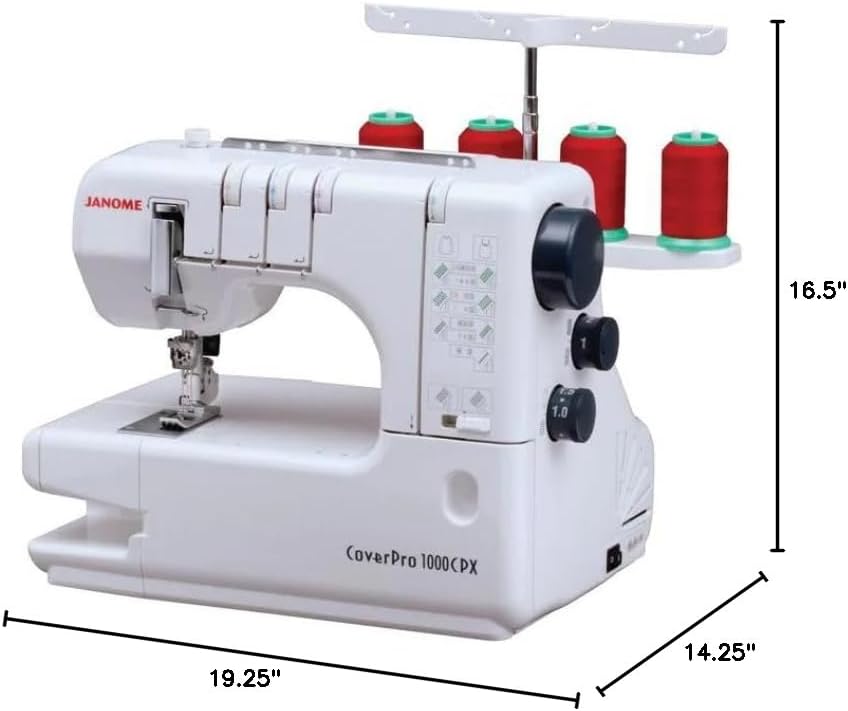
Figure 3: Dimensions of the Janome CoverPro 1000CPX machine.
8. Warranty and Support
For warranty information and technical support, please refer to the official Janome website or contact Janome customer service directly. Keep your purchase receipt as proof of purchase for warranty claims.