
BAOFENG GT-3TP Mark-III+Speaker
Contents
BaoFeng Pofung GT-3TP Mark-III Two-Way Radio User Manual
Model: GT-3TP Mark-III+Speaker
1. Introduction
The BaoFeng Pofung GT-3TP Mark-III is an advanced tri-power (8W/4W/1W) two-way radio designed for reliable communication across various environments. This upgraded version features a 23CM high-gain antenna for extended range, improved internal components for enhanced performance, and a robust design for durability. This manual provides essential information for setting up, operating, and maintaining your GT-3TP Mark-III radio.

The GT-3TP Mark-III is designed for versatile use, offering clear communication in various settings.
2. Package Contents
Please verify that all items listed below are included in your package:
- 1x GT-3TP Mark III Two-Way Radio
- 1x 7.4V 1800mAh Li-ion Battery
- 1x 23CM Antenna
- 1x Car Charger
- 1x Belt Clip
- 1x User Manual (this document)
- 1x AC Adapter
- 1x Desktop Charger
- 1x Headset
- 1x Speaker Mic

Contents of the GT-3TP Mark-III package, including the radio, battery, antenna, and various accessories.
3. Product Overview
Familiarize yourself with the main components and controls of your GT-3TP Mark-III radio.

The GT-3TP Mark-III radio shown with its speaker microphone and car charger.

Detailed diagram illustrating the various parts and controls of the GT-3TP Mark-III radio.
4. Setup
4.1 Battery Installation
To install the 7.4V 1800mAh Li-ion Battery, align the battery with the grooves on the back of the radio and slide it upwards until it clicks into place. Ensure it is securely fastened.

The 1800mAh Li-ion battery, essential for powering the radio.
4.2 Antenna Attachment
Screw the 23CM High Gain Antenna clockwise onto the antenna connector at the top of the radio until it is finger-tight. Do not overtighten.

The 23CM high-gain antenna provides a longer and clearer talking range compared to standard antennas.
4.3 Charging the Battery
Place the radio with the installed battery into the Desktop Charger. Connect the AC Adapter to the desktop charger and a power outlet. The indicator light on the charger will show the charging status. A Car Charger is also included for convenient charging on the go.

The included car charger allows for convenient power replenishment while traveling.
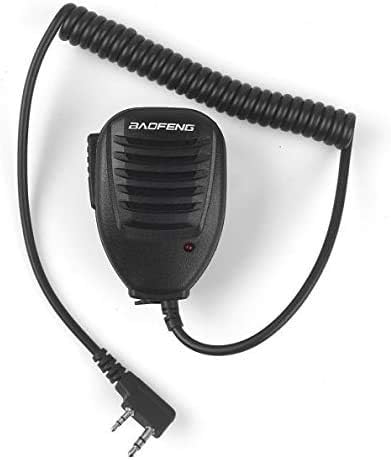
The speaker microphone provides hands-free communication and is included with the radio.
5. Operating Instructions
5.1 Power On/Off and Volume
Rotate the top knob clockwise to power on the radio and adjust the volume. Rotate counter-clockwise to decrease volume and power off.
5.2 Channel/Frequency Selection
Use the VFO/MR button to switch between Frequency Mode (VFO) and Channel Mode (MR). In Frequency Mode, enter frequencies directly using the keypad. In Channel Mode, use the UP/DOWN arrow keys to navigate through programmed channels.
5.3 Push-to-Talk (PTT) Button
Press and hold the PTT button on the side of the radio to transmit. Release the button to receive.
5.4 Programmable LCD Display
The radio features a programmable three-color LCD display, allowing for customization of the backlight color for different operating conditions or personal preference.
5.5 FM Radio Reception
The GT-3TP Mark-III can receive commercial FM radio broadcasts within the 65-108 MHz frequency range. Refer to the full user manual for specific instructions on activating and tuning the FM radio function.
6. Advanced Features
6.1 Tri-Power Settings
The GT-3TP Mark-III offers three selectable power levels: High (8W), Medium (4W), and Low (1W). This allows users to optimize battery life and transmission range based on their communication needs. Consult the radio's menu for power level selection.
6.2 CTCSS and DCS Tones
The radio supports 50 CTCSS (Continuous Tone-Coded Squelch System) and 104 DCS (Digital-Coded Squelch) tones. These tones help filter out unwanted signals and allow for private group communication on shared frequencies.
6.3 VOX Function (Voice Operated Transmission)
The VOX function enables voice-activated transmission, allowing for hands-free operation when using a compatible headset. The radio will automatically transmit when it detects your voice.
6.4 OFFSET (Frequency Offset for Repeater Access)
The OFFSET function is used to set the frequency difference between the transmit and receive frequencies when communicating through a repeater. This is crucial for extending communication range.
6.5 Programming
The GT-3TP Mark-III can be programmed via computer using compatible software such as CHIRP. This allows for easy management of channels, frequencies, and other advanced settings. A programming cable (not included in all packages) is required for this process. Software download links may be available from the manufacturer's website.
7. Maintenance
7.1 General Care
Keep the radio clean and free from dust and moisture. Use a soft, damp cloth for cleaning. Avoid using harsh chemicals or abrasive cleaners. The radio is designed with dustproof, waterproof, and drop resistance capabilities, but it is not fully submersible.
7.2 Battery Care
To maximize battery life, avoid fully discharging the battery regularly. Charge the battery using only the provided charger and adapter. Store the battery in a cool, dry place when not in use for extended periods.
8. Troubleshooting
If you encounter issues with your GT-3TP Mark-III, refer to the following common problems and solutions:
| Problem | Possible Cause | Solution |
|---|---|---|
| Radio does not power on | Low or dead battery; improperly installed battery | Charge the battery; ensure battery is correctly installed. |
| Poor reception or transmission | Antenna not properly attached; out of range; interference | Check antenna connection; move closer to other radios/repeater; check for local interference. |
| Speaker mic not working | Loose connection; faulty mic | Ensure speaker mic is fully plugged into the accessory jack. |
| Cannot communicate with other radios | Incorrect frequency/channel; CTCSS/DCS mismatch; power level too low | Verify all radios are on the same frequency/channel and have matching CTCSS/DCS settings. Increase power level if necessary. |
9. Specifications
| Feature | Specification |
|---|---|
| Product Dimensions | 4.5 x 1.4 x 2.3 inches |
| Item Weight | 1 pounds |
| Model Number | GT-3TP Mark-III+Speaker |
| Battery Type | 1 Lithium Ion battery (included) |
| Frequency Range | 65-108 MHz (FM radio), VHF: 136-174 MHz (Rx/TX), UHF: 400-520 MHz (Rx/TX) |
| Number of Channels | 128 |
| Talking Range Maximum | 11 Kilometers |
| Power Output | 8W/4W/1W (Tri-Power) |
| Water Resistance Level | Waterproof (design) |
10. Warranty and Support
For warranty information, technical support, or service inquiries, please refer to the warranty card included with your product or contact BAOFENG customer service directly. Contact details can typically be found on the manufacturer's official website or on the product packaging.
Documents and downloads
Ask a question about this manual
Ask about setup, troubleshooting, compatibility, parts, safety, or missing instructions. Manuals+ will review the question and use this page’s manual context to help answer it.