
Urmet 1750/1
Urmet 1750/1 Video Intercom System User Manual
Model: 1750/1 | Brand: Urmet
1. Introduction
This manual provides comprehensive instructions for the installation, operation, and maintenance of your Urmet 1750/1 Video Intercom System. Please read this manual thoroughly before installation and use to ensure proper function and safety.
The Urmet 1750/1 is a color video intercom system designed for residential and commercial applications, offering enhanced security and communication features. It includes a backlit door opener button and three additional buttons for various auxiliary functions.

Figure 1: Front view of the Urmet 1750/1 Video Intercom System.
2. Safety Information
Always adhere to local electrical codes and regulations during installation. Installation should only be performed by qualified personnel. Disconnect power before performing any installation or maintenance. Do not expose the unit to moisture or extreme temperatures. Use only Urmet-approved accessories and replacement parts.
3. Package Contents
The Urmet 1750/1 package includes the following items:
- 1x Urmet 1750/1 Video Intercom Unit
- User Manual (this document)
Please verify all components are present and undamaged before proceeding with installation.
4. Setup
4.1 Mounting the Unit
The Urmet 1750/1 unit is designed for wall mounting. Ensure the mounting surface is stable and can support the unit's weight. Refer to the back panel of the unit for mounting points.

Figure 2: Back view of the intercom unit, showing mounting points and connection terminal.
4.2 Wiring Connections
Connect the intercom unit to your 2Voice system (e.g., 1083/55 LINE1 - LINE 4) as per the wiring diagram. Ensure all connections are secure and correctly polarized. Additional connections for an extension sounder (Urmet 1072/59) and an apartment doorbell button are also shown.
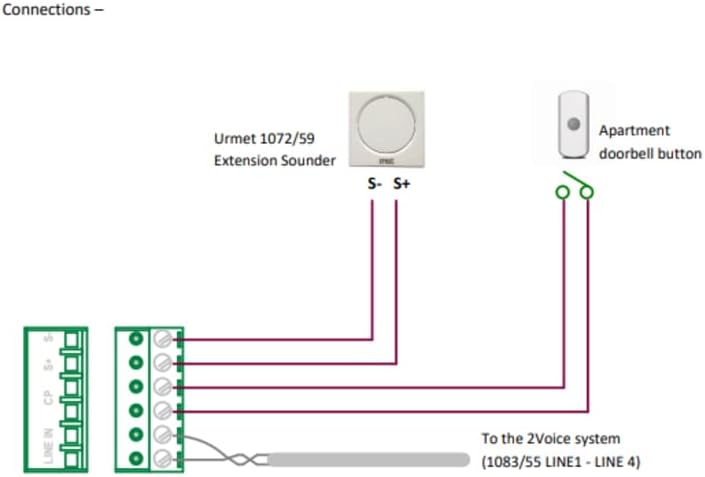
Figure 3: Wiring diagram for the Urmet 1750/1 system.
4.3 Handset Connection
Connect the coiled cord of the handset to the designated port on the main unit. Ensure the connection is firm. The handset is essential for audio communication.

Figure 4: Urmet 1750/1 with handset detached, illustrating the connection point.
4.4 Visual Setup Guide
For a detailed visual guide on unboxing, connecting the handset, and understanding the unit's components, please refer to the official product video below:
Video 1: A closer look at the Urmet 1750/1, demonstrating its physical features and initial setup steps.
5. Operating Instructions
5.1 Basic Functions
- Door Opener Button: Press the backlit door opener button to unlock the main entrance.
- Additional Buttons: The three additional buttons can be configured for various functions such as opening a second entrance, activating staircase lighting, initiating a call to a control unit, or making an intercom call to another internal unit. Refer to your system installer for specific configurations.
5.2 Screen Activation
The screen can be activated at any time by pressing a designated button, even without an incoming call. This allows you to view the outdoor camera feed on demand.
5.3 Ringtone Selection
The device offers 5 different ringtones. You can select distinct ringtones for incoming calls from the outdoor unit and for internal intercom calls. This feature helps you identify the origin of the call easily.
5.4 MUTE Function
An LED indicator on the unit displays the status of the MUTE function. When active, the MUTE function silences incoming call notifications. Press the MUTE button to toggle this feature on or off.
6. Maintenance
To ensure the longevity and optimal performance of your Urmet 1750/1 Video Intercom System, follow these maintenance guidelines:
- Cleaning: Use a soft, dry cloth to clean the unit's exterior. For stubborn marks, a slightly damp cloth with mild soap can be used, followed by drying. Avoid abrasive cleaners, solvents, or strong chemicals.
- Inspection: Periodically check all cables and connections for any signs of wear or damage. Ensure the handset cord is not tangled or stressed.
- Environmental Conditions: Keep the unit away from direct sunlight, excessive heat, and moisture.
7. Troubleshooting
If you encounter issues with your Urmet 1750/1, refer to the following common problems and solutions:
- No Video/Black Screen:
- Ensure the unit is properly powered.
- Check all video cable connections.
- Verify the outdoor camera is functioning correctly.
- No Audio (Intercom/Call):
- Check the handset connection to the main unit.
- Ensure the MUTE function is not active (check LED indicator).
- Verify audio wiring connections.
- Door Opener Not Working:
- Check the wiring to the door strike/lock.
- Ensure the door opener button is not physically stuck.
- Unit Not Responding:
- Temporarily disconnect and reconnect power to reset the unit.
- Verify power supply is stable.
If the problem persists after attempting these solutions, please contact Urmet customer support or a qualified technician.
8. Specifications
Below are the key technical specifications for the Urmet 1750/1 Video Intercom System:
| Feature | Specification |
|---|---|
| Manufacturer | URMET |
| Model Number | 1750/1 |
| Color | White |
| Product Dimensions (L x W x H) | 35 x 33 x 10 mm (1.38 x 1.30 x 0.39 inches) |
| Item Weight | 1.05 Kilograms (2.31 lbs) |
| Power Source | Wired |
| Phone Type | Corded |
| Dial Type | Single Keypad |
| Answering Machine Type | Digital |
| Multi-line Operation | Single-Line Operation |
| Caller Identification | Yes |
| Batteries Required | No |
| Batteries Included | No |

Figure 5: Dimensions of the Urmet 1750/1 unit.
9. Warranty and Support
For warranty information and technical support, please refer to the official Urmet website or contact your local Urmet distributor. Keep your purchase receipt as proof of purchase for warranty claims.
Related documents1750/1


Ask a question about this manual
Ask about setup, troubleshooting, compatibility, parts, safety, or missing instructions. Manuals+ will review the question and use this page’s manual context to help answer it.