
BSS FCS-960
User Manual
BSS FCS-960 Dual Mode Graphic Equalizer
Model: FCS-960
Product Overview
The BSS FCS-960 Dual Mode Graphic Equalizer is a professional audio signal processor designed to provide precise frequency control for sound reinforcement and recording applications. It features two independent channels within a 3U rack-mountable chassis, offering robust performance and versatile equalization capabilities.
Key features include Constant Q-filters with 45mm faders, dual mode operation (Wide Q for room contouring and Narrow Q for precise frequency notching), sweepable/switchable Hi-pass filters, and electronically balanced inputs and outputs. This equalizer is engineered for reliability and accuracy in demanding audio environments.
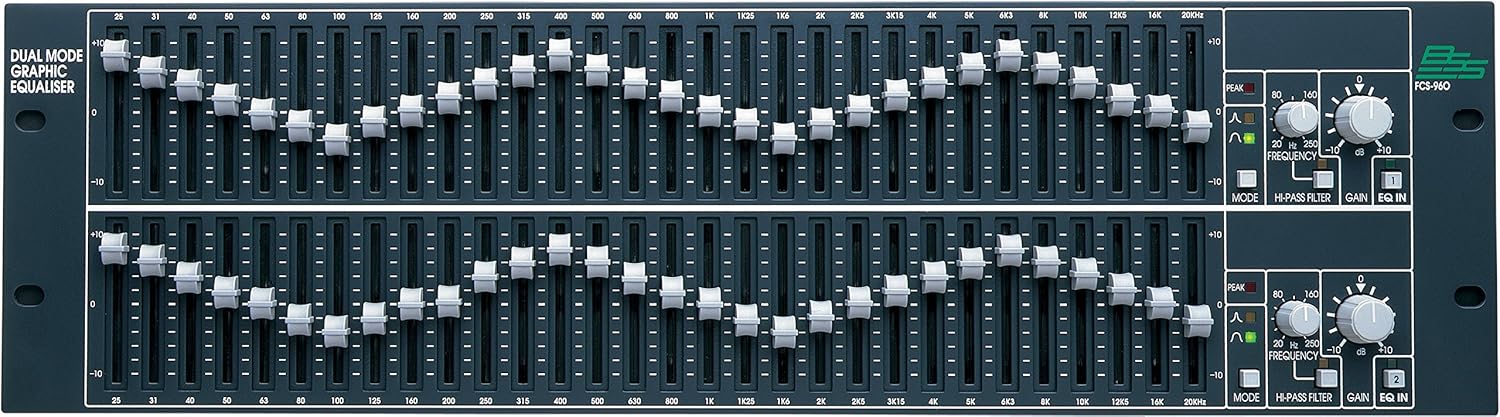
Figure 1: Front panel view of the BSS FCS-960 Dual Mode Graphic Equalizer. This image displays the two channels, each with 30 frequency faders, a Hi-Pass Filter control, a Gain control, and Mode/EQ In buttons. The faders are clearly labeled with frequency values from 25Hz to 20kHz, and gain markings from -10dB to +10dB.
Setup and Installation
Proper installation ensures optimal performance and longevity of your FCS-960 equalizer.
Rack Mounting
The FCS-960 is designed for standard 19-inch rack mounting and occupies 3U of rack space. Ensure adequate ventilation around the unit to prevent overheating. Use appropriate rack screws to secure the unit firmly.
Audio Connections
The unit features electronically balanced inputs and outputs. Use high-quality XLR or TRS cables for all audio connections.
- Inputs: Connect your audio source (e.g., mixing console output) to the balanced inputs on the rear panel.
- Outputs: Connect the balanced outputs to your next audio device in the signal chain (e.g., amplifier, crossover).
Power Connection
Connect the supplied AC power cord to the IEC inlet on the rear panel and then to a suitable AC power outlet. Ensure the power supply voltage matches the unit's requirements.
Operating Instructions
Understanding the controls of the FCS-960 is crucial for effective equalization.
Front Panel Controls
- Frequency Faders: Each channel features 30 constant Q-filters, controlled by 45mm faders. These faders allow for +/- 15dB of adjustable gain at specific frequencies, ranging from 25Hz to 20kHz. Adjust these to boost or cut specific frequency bands.
- Dual Mode Operation:
- Wide Q (Room Contouring): Use this mode for broader adjustments, ideal for shaping the overall frequency response of a room or system.
- Narrow Q (Monitoring/Notching): This mode provides a tighter Q, allowing for precise notching out of specific problematic frequencies, such as feedback.
- Hi-Pass Filter: This sweepable/switchable filter allows you to remove unwanted low-frequency content, such as rumble or stage noise. Adjust the frequency knob to set the cutoff point.
- Gain Control: A master gain control for each channel allows for overall level adjustment, typically ranging from -10dB to +10dB.
- EQ In/Out Button: Engages or bypasses the equalization for the respective channel. This allows for A/B comparison of the processed and unprocessed signal.
- Peak Indicator: An LED indicator that illuminates when the signal level approaches clipping, warning of potential distortion.
Basic Equalization Principles
When equalizing, it is generally recommended to cut frequencies rather than boost them excessively, as boosting can introduce noise and distortion. Make small, incremental adjustments and listen carefully to the results.
Maintenance
Regular maintenance helps preserve the performance and appearance of your FCS-960.
- Cleaning: Use a soft, dry cloth to wipe down the unit's exterior. For stubborn dirt, a slightly damp cloth with mild detergent can be used, followed by a dry cloth. Avoid abrasive cleaners or solvents.
- Ventilation: Ensure that the ventilation slots are clear of dust and debris to maintain proper airflow and prevent overheating.
- Storage: When not in use for extended periods, store the unit in a cool, dry environment, protected from dust and extreme temperatures.
Troubleshooting
This section addresses common issues you might encounter with your FCS-960.
| Problem | Possible Cause | Solution |
|---|---|---|
| No audio output |
|
|
| Distorted audio |
|
|
| Hum or buzz noise |
|
|
Specifications
Technical specifications for the BSS FCS-960 Dual Mode Graphic Equalizer.
| Feature | Detail |
|---|---|
| Channels | 2 |
| Rack Space | 3U |
| Filter Type | Constant Q-filters |
| Fader Length | 45mm |
| Adjustable Gain | +/- 15dB per fader |
| Operation Modes | Wide Q (Room Contouring), Narrow Q (Monitoring/Notching) |
| Hi-Pass Filter | Sweepable/Switchable |
| Gain Control | Electronically balanced inputs and outputs |
| Inputs/Outputs | Electronically balanced |
| Item Weight | 2.99 kg (2 kg 990 g) |
| Model Number | FCS-960 |
| Manufacturer | Harman International Industries, Inc |
| Date First Available | 3 February 2015 |
Warranty and Support
For information regarding warranty coverage, technical support, or service, please refer to the official BSS website or contact your authorized BSS dealer. Keep your purchase receipt as proof of purchase.
Manufacturer: Harman International Industries, Inc
Related documentsFCS-960


Ask a question about this manual
Ask about setup, troubleshooting, compatibility, parts, safety, or missing instructions. Manuals+ will review the question and use this page’s manual context to help answer it.