
Serta 44954
Serta Jackson Big and Tall Executive Office Chair User Manual
Model: 44954 | Brand: Serta
Introduction
This manual provides comprehensive instructions for the assembly, operation, maintenance, and troubleshooting of your Serta Jackson Big and Tall Executive Office Chair. Please read all instructions carefully before assembly and use to ensure proper function and safety.
Important Safety Information:
This chair is designed to support a maximum weight of 350 pounds. Exceeding this weight limit may result in damage to the chair or personal injury. Always ensure all components are securely fastened before use.
Product Features
The Serta Jackson Executive Office Chair is engineered for comfort and support, incorporating several key technologies:
- AIR Ergonomic Support Technology®: The lumbar support system flexes and pivots with your body's movements, providing continuous support to the lower back.
- Smart Layers™ Cushioning: The seat features multiple layers of high-density foam and ComfortCoils™ for enhanced comfort and support during extended periods of sitting.
- Spacious Design: An extra-wide seat and generous high-back accommodate users up to 350 lbs.
- Padded Armrests: Supportive armrests are padded and upholstered for ergonomic arm support.
- 360° Dual-Wheel Casters: Heavy-duty casters allow for smooth movement across various floor surfaces.

Image: Key features of the Serta Jackson Executive Office Chair.

Image: Detailed view of AIR Ergonomic Support Technology and Smart Layers Cushion.
Setup and Assembly Instructions
Assembly typically requires two people. Follow these steps for proper chair assembly:
- Unpack Components: Carefully remove all parts from the packaging and lay them out on a clean, soft surface to prevent scratches. Verify all components are present against the parts list (not provided in this manual, refer to packaging).
- Attach Casters to Base: Insert the dual-wheel casters into the holes at the end of each leg of the chair base. Push firmly until they click into place.
- Insert Gas Lift: Place the gas lift cylinder into the center hole of the assembled chair base.
- Attach Mechanism to Seat: Secure the seat mechanism to the underside of the seat cushion using the provided screws. Ensure the front of the mechanism aligns with the front of the seat.
- Connect Seat to Gas Lift: Carefully place the assembled seat onto the gas lift cylinder, ensuring it is centered and stable.
- Attach Backrest to Seat: Align the backrest with the seat and attach it using the designated screws. It is recommended to leave these screws slightly loose initially to allow for easier alignment of the armrests.
- Install Armrests: Attach the armrests to both the seat and the backrest using the provided screws. Once all armrest screws are in place, tighten all screws for the backrest and armrests securely.
Note:
During armrest installation, ensure all screws are aligned before tightening to prevent stripping. If an armrest bolt repeatedly loosens, applying a thread-locking compound (not included) may help secure it.
Operating Instructions
Your Serta Jackson chair offers several adjustments to customize your seating experience:
Height Adjustment
To adjust the seat height, locate the lever on the right side of the chair (when seated). Lift the lever to raise the seat. To lower the seat, remain seated and lift the lever. Release the lever at your desired height.

Image: Seat height adjustment lever.
Recline and Tilt Tension Adjustment
To unlock the recline mechanism, locate the lever on the left side of the chair (when seated) and lift it. The chair back will then allow you to recline. To lock the recline position, push the lever down.
To adjust the tilt tension, rotate the large knob located underneath the front of the seat. Turning the knob clockwise increases tension, making it harder to recline. Turning it counter-clockwise decreases tension, allowing for easier recline.
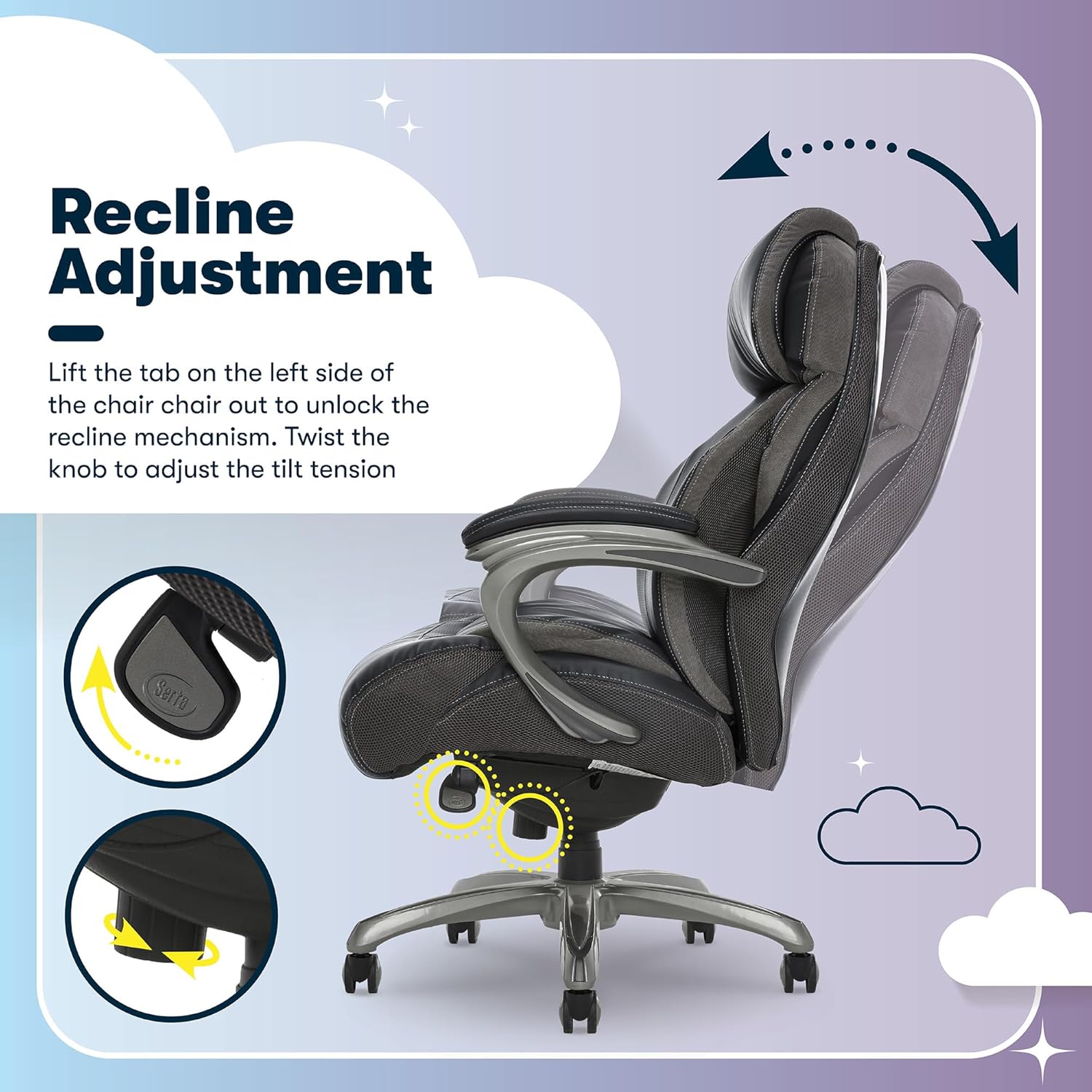
Image: Recline lever and tilt tension knob.
Maintenance and Care
Proper care will extend the life and appearance of your Serta Jackson chair:
- Cleaning: The bonded leather upholstery should be spot cleaned only. Use a damp cloth with mild soap and water for spills or stains. Avoid harsh chemicals or abrasive cleaners, as these can damage the material.
- Regular Inspection: Periodically check all screws and bolts to ensure they are tight. Re-tighten as necessary to maintain stability and prevent wobbling.
- Caster Care: Keep the casters free of debris such as hair or carpet fibers to ensure smooth rolling.
Troubleshooting
If you encounter issues with your chair, refer to the following common problems and solutions:
- Chair Wobbles:
Solution: Check all assembly screws, particularly those connecting the armrests to the seat and backrest, and the mechanism to the seat. Tighten any loose screws. - Gas Lift Not Functioning (Chair stuck at one height):
Solution: Ensure the height adjustment lever is fully engaged or disengaged. If the issue persists, the gas lift cylinder may need replacement. Contact customer support for assistance. - Casters Not Rolling Smoothly:
Solution: Turn the chair over and inspect the casters for accumulated hair, dust, or debris. Remove any obstructions. - Difficulty Reclining or Adjusting Tilt:
Solution: Verify the recline lever is in the unlocked position. Adjust the tilt tension knob (under the seat) to a looser setting if the recline is too stiff. - Armrests Feel Loose:
Solution: Re-tighten the screws securing the armrests. For persistent loosening, a thread-locking compound may be applied to the screw threads (ensure it is safe for plastics if applicable).
Specifications
| Brand | Serta |
| Model Name | Jackson |
| Item Model Number | 44954 |
| Color | Black |
| Product Dimensions (D x W x H) | 33" x 28.25" x 46" |
| Maximum Weight Recommendation | 350 Pounds |
| Seat Height (Min-Max) | 19.5" - 22.5" |
| Seat Depth | 19.5" |
| Seat Back Interior Height | 27" |
| Inner Seat Width | 22.25" |
| Material | Bonded Leather (Faux Leather), Foam Fill |
| Item Weight | 57.6 pounds |
| Assembly Required | Yes |
| UPC | 887909021813 |

Image: Product Dimensions Overview.
Warranty Information
The Serta Jackson Big and Tall Executive Office Chair comes with a 1-year limited warranty. This warranty covers manufacturing defects in materials and workmanship under normal use. For specific terms and conditions, or to make a warranty claim, please contact customer support.
Customer Support
For further assistance with assembly, parts, or any other inquiries regarding your Serta Jackson Executive Office Chair, please contact our dedicated U.S.-based customer support team.
Visit True Innovations Customer Support

Image: QR Code for Customer Support.
Related documents44954


Ask a question about this manual
Ask about setup, troubleshooting, compatibility, parts, safety, or missing instructions. Manuals+ will review the question and use this page’s manual context to help answer it.