
Microlife BPA2-B
Microlife Blood Pressure Monitor BP A2 BASIC User Manual
Model: BPA2-B / A2 BASIC+A
Brand: Microlife
Introduction
This manual provides essential information for the safe and effective use of your Microlife BP A2 BASIC Blood Pressure Monitor. Please read it thoroughly before first use and keep it for future reference.
The Microlife BP A2 BASIC is a fully-automatic upper arm blood pressure monitor designed for accurate and comfortable blood pressure measurement at home. It features PAD technology for early recognition of heart arrhythmias.
Key Features:
- Gentle+ Technology: Ensures gentle inflation and deflation for comfortable measurements.
- PAD Technology: Detects pulse arrhythmia for early recognition of irregular heartbeats.
- Wide Range Cuff: Fan-shaped cuff (22-42 cm) designed for better fitting and accuracy.
- Automatic Operation: Fully automatic measurement process.
- 5-Year International Manufacturer Warranty: Provides long-term assurance for your device.


Setup
Unboxing and Components:
Your Microlife BP A2 BASIC package should contain the following items:
- 1x Microlife BP A2 BASIC Blood Pressure Monitor unit
- 1x Upper Arm Cuff (22-42 cm)
- 4x AA batteries
- 1x AC Adapter
- 1x Instruction Manual (this document)
- 1x Storage Bag
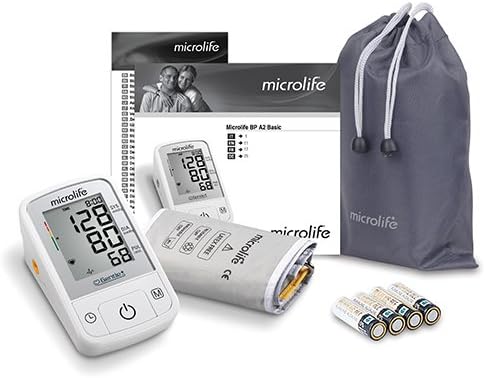
Powering the Device:
The monitor can be powered by batteries or the included AC adapter.
Battery Installation:
- Open the battery compartment cover on the back of the device.
- Insert four new AA batteries, ensuring correct polarity (+ and -).
- Close the battery compartment cover securely.
AC Adapter Connection:
- Insert the adapter plug into the DC port on the side of the monitor.
- Plug the AC adapter into a standard electrical outlet.
- When using the AC adapter, batteries are not required but can remain in the device.
Cuff Connection:
- Insert the air tube connector firmly into the air socket on the left side of the monitor.
- Ensure the cuff is properly connected before taking a measurement.
Operating Instructions
Before Measurement:
- Avoid eating, smoking, or exercising for at least 30 minutes before measurement.
- Rest for 5-10 minutes in a quiet environment before taking a reading.
- Sit comfortably with your back supported and feet flat on the floor.
- Place your arm on a flat surface so the cuff is at heart level.
- Ensure the cuff is applied directly to the bare skin of your upper arm, not over clothing.

Applying the Cuff:
- Slide the open end of the cuff through the metal ring to form a loop. The smooth cloth should be on the inside of the cuff loop.
- Place the cuff on your left upper arm so the air tube points towards your forearm.
- The bottom edge of the cuff should be approximately 2-3 cm above your elbow.
- Tighten the cuff evenly around your arm using the hook-and-loop fastener. It should be snug but not too tight (you should be able to fit two fingers under the cuff).
- Ensure the artery mark on the cuff (if present) is aligned with your brachial artery.

Taking a Measurement:
- Press the ON/OFF button to start the measurement.
- The monitor will automatically inflate the cuff. The Gentle+ technology ensures a comfortable inflation.
- Remain still and silent during the measurement.
- Once the measurement is complete, the systolic, diastolic, and pulse readings will be displayed on the screen.
- If PAD technology detects an irregular heartbeat, a corresponding symbol will appear on the display.
- Press the ON/OFF button again to turn off the monitor, or it will automatically shut off after approximately 1 minute.

Understanding Your Readings:
- SYS (Systolic Pressure): The top number, indicating the pressure in your arteries when your heart beats.
- DIA (Diastolic Pressure): The bottom number, indicating the pressure in your arteries between beats.
- PUL (Pulse Rate): Your heart rate, measured in beats per minute.
- PAD Symbol: Indicates the detection of an irregular heartbeat. Consult your doctor if this symbol appears frequently.
Memory Function:
The Microlife BP A2 BASIC stores previous measurements. Press the 'M' button to recall stored readings. Refer to the on-screen indicators for navigation.
Maintenance
Cleaning:
- Clean the monitor unit and cuff with a soft, dry cloth.
- For stubborn stains, use a cloth lightly dampened with water or a mild detergent.
- Do not use abrasive cleaning agents, alcohol, or solvents.
- Do not immerse the monitor or cuff in water.
Storage:
- Store the device in its original storage bag in a cool, dry place, away from direct sunlight and extreme temperatures.
- If the device will not be used for an extended period, remove the batteries to prevent leakage.
Troubleshooting
Common Issues and Solutions:
| Problem | Possible Cause | Solution |
|---|---|---|
| No display when powered on. | Batteries are dead or incorrectly inserted. | Replace batteries or check polarity. Ensure AC adapter is properly connected if used. |
| Error message (e.g., "ERR"). | Cuff not applied correctly, movement during measurement, or air leakage. | Re-apply cuff, remain still, check cuff and tube connections for leaks. |
| Inconsistent readings. | Improper measurement technique, stress, or recent activity. | Ensure proper preparation and technique. Take multiple readings over time. Consult a healthcare professional if concerns persist. |
If problems persist, please contact Microlife customer support or your local distributor.
Specifications
- Model: BPA2-B / A2 BASIC+A
- Dimensions: Approximately 14 x 6 x 8 cm
- Weight: Approximately 340 grams (including batteries)
- Measurement Method: Oscillometric
- Measurement Range: Blood Pressure: 20-280 mmHg; Pulse: 40-200 beats/minute
- Cuff Size: 22-42 cm (Fan Shape Wide Range Cuff)
- Power Source: 4 x 1.5 V AA batteries or DC 6V, 600 mA AC adapter
- Operating Conditions: 10-40 °C (50-104 °F) / 15-95 % relative humidity non-condensing
- Storage Conditions: -20-+55 °C (-4-+131 °F) / 15-95 % relative humidity non-condensing
- Memory: 30 Data memory
- Technology: Gentle+, PAD (Pulse Arrhythmia Detection)
Warranty and Support
Your Microlife BP A2 BASIC Blood Pressure Monitor comes with a 5-Year International Manufacturer Warranty from the date of purchase. Please retain your purchase receipt as proof of purchase.
This warranty covers defects in materials and workmanship under normal use. It does not cover damage caused by misuse, accidents, unauthorized repairs, or failure to follow the instructions in this manual.
For warranty claims, technical support, or service inquiries, please contact your local Microlife distributor or visit the official Microlife website for contact information.
Important: Self-treatment based on blood pressure measurements is dangerous. Always consult your doctor for diagnosis and treatment.
Related documentsBPA2-B


Ask a question about this manual
Ask about setup, troubleshooting, compatibility, parts, safety, or missing instructions. Manuals+ will review the question and use this page’s manual context to help answer it.