
1. Introduction
The Pentax K-S2 is a 20-megapixel DSLR camera designed for both enthusiasts and advanced users. It features an AA filter-less CMOS sensor for sharp image capture and includes built-in Wi-Fi for seamless sharing. This camera is built with a durable, weather-sealed construction, making it suitable for various outdoor shooting conditions. The kit typically includes an 18-50mm WR and a 50-200mm WR lens, providing versatility for different photographic needs.
Key Features:
- 20 MP AA filter-less APS-C CMOS Sensor with ISO Speeds up to 51200.
- In-camera Wi-Fi with a dedicated Wi-Fi connect button and a dedicated "selfie" mode.
- Large, high-resolution 3-inch variable-angle swing-out LCD Monitor (921K Dots).
- Fully weather-sealed, dustproof, and cold-proof design with in-body shake reduction.
- 4K interval movie capture and 1080P h.264 HD video recording.

Figure 1: Front view of the Pentax K-S2 DSLR camera with the 18-50mm lens.

Figure 2: Angled front view of the Pentax K-S2 DSLR camera.
2. Setup
2.1. Attaching the Lens
- Remove the body cap from the camera and the rear lens cap from the lens.
- Align the red dot on the lens barrel with the red dot on the camera body's lens mount.
- Rotate the lens clockwise until it clicks into place.
- For the retractable 18-50mm WR lens, extend it by rotating the zoom ring past the "L" (Lock) position to the desired focal length.

Figure 3: Top view of the camera with the 18-50mm lens in its retracted position.
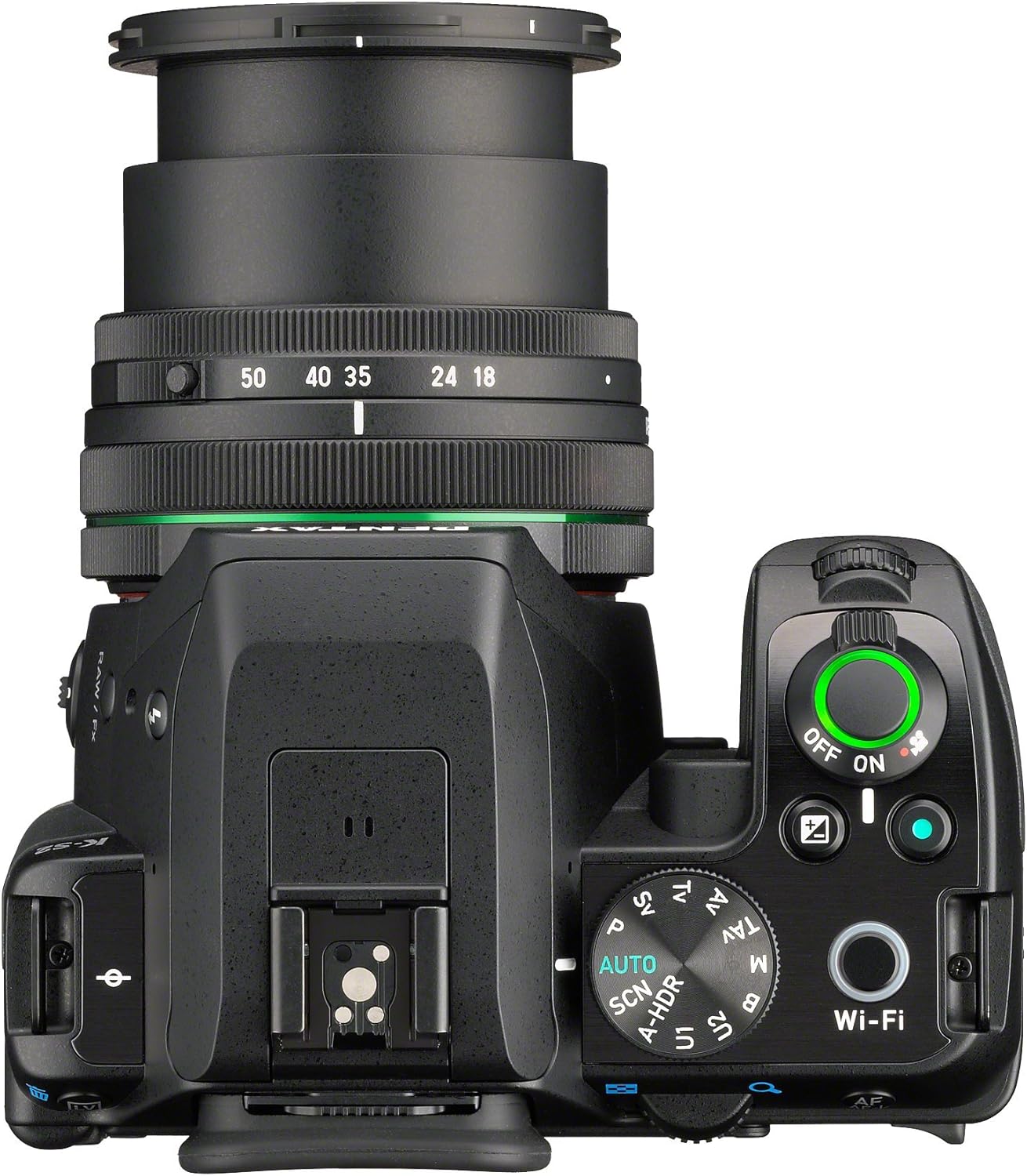
Figure 4: Top view of the camera with the 18-50mm lens extended for use.
2.2. Inserting the Battery and Memory Card
- Open the battery compartment cover located at the bottom of the camera.
- Insert the battery with the correct orientation, ensuring it locks into place.
- Open the memory card slot cover (typically on the side).
- Insert an SD/SDHC/SDXC memory card until it clicks. Ensure the card is facing the correct direction.
- Close both covers securely.
3. Operating the Camera
3.1. Power On/Off and Basic Shooting
- To power on the camera, rotate the power switch around the shutter button to the "ON" position.
- Look through the optical viewfinder or use the vari-angle LCD monitor to compose your shot.
- Press the shutter button halfway to focus, then press fully to take a picture.

Figure 5: Rear view of the Pentax K-S2, highlighting the LCD and control layout.

Figure 6: The LCD screen displaying shooting parameters and settings.

Figure 7: The vari-angle LCD monitor extended for flexible viewing angles.
3.2. Shooting Modes
The mode dial on the top of the camera allows you to select various shooting modes:
- AUTO: Fully automatic mode for simple point-and-shoot operation.
- P (Program AE): Camera sets aperture and shutter speed, but allows for program shift.
- Av (Aperture-Priority AE): You set the aperture, camera sets shutter speed.
- Tv (Shutter-Priority AE): You set the shutter speed, camera sets aperture.
- M (Manual): You set both aperture and shutter speed.
- B (Bulb): Shutter remains open as long as the shutter button is pressed.
- Sv (Sensitivity-Priority AE): You set the ISO sensitivity, camera sets aperture and shutter speed.
- TAv (Shutter & Aperture-Priority AE): You set shutter speed and aperture, camera sets ISO.
- SCN (Scene Modes): Pre-set modes for specific situations (e.g., Portrait, Landscape).
- A-HDR (Auto High Dynamic Range): Captures multiple exposures and combines them for extended dynamic range.
- U1/U2 (User Modes): Customizable settings for quick recall.
3.3. Focusing
The K-S2 offers both autofocus and manual focus capabilities:
- Autofocus (AF): The camera uses SAFOX X phase detection with 11 autofocus points. Available modes include Single AF, Continuous AF, Auto AF, Face Detection, Live View, Multi-area, Phase Detection, Selective single-point, and Tracking.
- Manual Focus (MF): Rotate the focusing ring on the lens to adjust focus manually.
3.4. Exposure and White Balance
- Metering: Choose from Multi-segment, Center-weighted, or Spot metering modes to determine exposure.
- White Balance: Set to Auto White Balance (AWB) for most situations, or select specific presets for accurate color reproduction under different lighting conditions.
3.5. Video Recording
The K-S2 supports Full HD (1080p) video recording at various frame rates. It also features 4K interval movie capture, allowing you to create time-lapse videos with high resolution.
3.6. Wi-Fi Connectivity
Utilize the built-in Wi-Fi to connect your camera to a smartphone or tablet. This allows for remote control of shooting functions, browsing images, and transferring photos for instant sharing.
4. Maintenance
4.1. Cleaning
- Camera Body: Wipe with a soft, dry cloth. For stubborn dirt, use a slightly damp cloth and then dry thoroughly.
- Lenses: Use a lens brush or blower to remove dust, then gently clean with a microfiber lens cloth and lens cleaning solution if necessary. Avoid touching the glass elements directly.
- Sensor: For sensor cleaning, it is recommended to use the camera's built-in sensor cleaning function or consult a professional service.
- LCD Screen: Use a soft, dry cloth. Avoid harsh chemicals.
4.2. Storage
- Store the camera in a cool, dry place away from direct sunlight and extreme temperatures.
- If storing for an extended period, remove the battery.
- Use a desiccant pack in the storage container to prevent mold and mildew, especially in humid environments.
4.3. Weather Resistance
The Pentax K-S2 features a weather-sealed, dustproof, and cold-proof design. While this provides enhanced durability in challenging conditions, it is not waterproof. Avoid submerging the camera in water. Ensure all port covers and battery/card doors are securely closed when operating in wet or dusty environments.

Figure 8: Internal diagram illustrating the weather-sealing points of the Pentax K-S2.
5. Troubleshooting
Common Issues and Solutions:
- Camera does not power on:
- Ensure the battery is fully charged and correctly inserted.
- Check if the battery contacts are clean.
- Shutter does not release:
- Check if the lens is properly attached and extended (if retractable).
- Ensure a memory card is inserted and has free space.
- Verify that the focus is achieved (green focus indicator). If not, try manual focus or adjust lighting.
- Check if any error messages are displayed on the LCD.
- Images are blurry:
- Check focus settings (AF/MF).
- Ensure shutter speed is fast enough to prevent camera shake, especially with longer lenses. Utilize the in-body shake reduction.
- Clean the lens and sensor if dust or smudges are present.
- Wi-Fi connection issues:
- Ensure Wi-Fi is enabled on the camera and your smart device.
- Check network settings and password.
- Move closer to the camera to improve signal strength.
If problems persist, refer to the full user manual or contact Pentax customer support.
6. Specifications
| Feature | Specification |
|---|---|
| Model Name | Pentax K-S2 |
| Effective Still Resolution | 20 MP |
| Photo Sensor Size | APS-C |
| Image Stabilization | Sensor-shift |
| ISO Range | Auto, 100-51200 |
| Video Resolution | FHD 1080p |
| Connectivity Technology | Wi-Fi, NFC |
| Screen Size | 3 Inches |
| Display Type | Articulating LCD (921,000 dots) |
| Viewfinder | Optical |
| Compatible Mountings | Pentax KAF2, Pentax KAF3 |
| Included Lenses | DA 18-50mm f4.5-5.6 DC WR & DA L 50-200mm WR |
| Maximum Shutter Speed | 1/6000 Seconds |
| Minimum Shutter Speed | 30 seconds |
| Item Weight | 1.49 Pounds |
| Color | Black |
7. Warranty and Support
7.1. Warranty Information
The Pentax K-S2 comes with a 1-year parts and labor warranty from the manufacturer. Please retain your proof of purchase for warranty claims.
7.2. Customer Support
For further assistance, technical support, or service inquiries, please visit the official Pentax website or contact their customer service department. Contact information can typically be found on the manufacturer's website or in the packaging materials.