
1. Introduction
This manual provides detailed instructions for the safe and efficient operation of your BAOFENG UV-5RTP 8/4/1W Two-Way Radio. The UV-5RTP is a high-power, dual-band handheld ham radio designed for reliable communication. Please read this manual thoroughly before using the device to ensure proper functionality and to prevent damage.
The BAOFENG UV-5RTP features tri-power settings (8W/4W/1W), dual-band frequency range (VHF: 144-148MHz RX only, UHF: 420-450MHz RX/TX), and a rugged design suitable for outdoor use. It is FCC Part 15 & Part 97 Certified.
2. Package Contents
Verify that all items are present in your package:
- 2 x BAOFENG UV-5RTP Tri-Power 8/4/1W Two-Way Radio
- 2 x Earpieces
- 2 x Speaker Microphones
- 2 x 1800mAh Li-ion Batteries
- 2 x High Gain Antennas
- 2 x Wrist Straps
- 2 x Desktop Chargers
- 1 x Programming Cable

Figure 2.1: Complete package contents of the BAOFENG UV-5RTP radio kit.
3. Product Overview
The BAOFENG UV-5RTP is a compact and robust two-way radio. Key features include a metallic frame for durability, an exquisite LED screen for clear visibility in various lighting conditions, and multiple power levels for versatile use.

Figure 3.1: Front view of the BAOFENG UV-5RTP radio.

Figure 3.2: Display showing transmit power settings (High, Medium, Low).
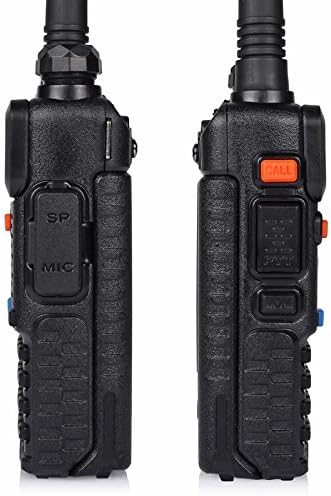
Figure 3.3: Side view of the radio with speaker/mic port.

Figure 3.4: Top view of the radio with antenna and controls.
4. Setup
4.1 Battery Installation and Charging
- Align the battery pack with the grooves on the back of the radio.
- Slide the battery upwards until it clicks into place.
- To charge, place the radio (with battery installed) into the desktop charger. Ensure the charging contacts align.
- Connect the desktop charger to a power outlet. The indicator light will show charging status.
4.2 Antenna Attachment
Screw the antenna clockwise onto the connector at the top of the radio until it is finger-tight. Do not overtighten.
4.3 Speaker Mic / Earpiece Connection
Insert the 2-pin plug of the speaker microphone or earpiece into the accessory jack on the side of the radio. Ensure a secure connection.
5. Operating Instructions
5.1 Power On/Off and Volume Control
Rotate the top knob clockwise to power on the radio and increase volume. Rotate counter-clockwise to decrease volume and power off.
5.2 Frequency and Channel Mode
Press the VFO/MR button to switch between Frequency (VFO) mode and Channel (MR) mode. In VFO mode, you can manually input frequencies. In MR mode, you can select pre-programmed channels.
5.3 Programming Channels Manually
Manual programming involves setting frequencies, CTCSS/DCS tones, and other parameters directly on the radio. This process is similar to the UV-5R series.
Video 5.1: A brief demonstration of manual programming on a similar Baofeng radio, showing menu navigation and channel saving. This video is a preview and provides a quick overview of the process.
- Switch to VFO mode using the VFO/MR button.
- Enter the desired frequency using the keypad.
- Press MENU, then navigate to the appropriate settings for CTCSS/DCS tones (e.g., T-CTCS, R-CTCS) and set them as required for your repeater or direct communication.
- Navigate to the SAVE menu option (usually 27 or 28) to save the frequency and settings to a channel.
- Select an empty channel number and press MENU to confirm.
5.4 Programming with Software (CHIRP)
For advanced programming, including adding channel names, it is recommended to use programming software like CHIRP with the provided programming cable. The official Baofeng software may have compatibility issues with Windows 10.
5.5 Transmit Power Adjustment
The UV-5RTP offers three power levels: High (8W), Medium (4W), and Low (1W). You can cycle through these power levels by pressing the # key on the keypad. The display will indicate the current power setting (H, M, L).
5.6 Scanning Channels
To initiate scanning, long-press the SCAN button (key 5). The radio will scan through programmed channels or frequencies depending on the current mode. Press EXIT to stop scanning.
6. Maintenance
6.1 Cleaning
Wipe the radio with a soft, damp cloth. Do not use harsh chemicals or solvents. Ensure the radio is dry before use.
6.2 Battery Care
Charge the battery fully before first use (approximately 5 hours). Avoid overcharging or completely draining the battery to prolong its lifespan. Store batteries in a cool, dry place.
7. Troubleshooting
| Problem | Possible Cause | Solution |
|---|---|---|
| Radio not powering on | Low or dead battery; improperly installed battery. | Charge battery; ensure battery is correctly installed. |
| Cannot transmit or receive | Incorrect frequency/channel; antenna not connected; low power setting. | Verify frequency/channel; check antenna connection; increase transmit power. |
| Programming software not working | Driver issues; incompatible software version (e.g., official Baofeng software on Windows 10). | Install correct drivers for programming cable; try CHIRP software. |
| Poor audio quality with external mic | Faulty mic; improper connection. | Test with another mic; ensure secure connection. |
7.1 Factory Reset
If experiencing persistent issues, a factory reset may resolve them. Navigate to the RESET ALL option in the menu. Warning: This will erase all programmed channels and settings.
8. Specifications
- Model: UV-5RTP
- Frequency Range: VHF: 144-148MHz (RX only), UHF: 420-450MHz (RX/TX)
- Transmit Power: 8W / 4W / 1W (Tri-Power)
- Number of Channels: 128
- Battery: 2 x 1800mAh Lithium Ion (included)
- Item Weight: 15.2 ounces
- Product Dimensions: 2.05 x 1.26 x 3.94 inches
- Display Type: LED
- Special Features: Call Alert, Dual Band, Keypad Lock, Long Range, Voice Operated Transmission
- Water Resistance Level: Not Water Resistant
- Voltage: 7.4 Volts
9. Warranty and Support
For warranty information and technical support, please refer to the documentation provided with your purchase or contact BAOFENG customer service. Protection plans are available for extended coverage.
- 2-Year Protection Plan: Available for purchase.
- 3-Year Protection Plan: Available for purchase.


