
Introduction
This manual provides detailed instructions for the safe and effective use of your Proster Digital LCD Anemometer Thermometer. This device is designed for measuring wind speed and temperature, suitable for various outdoor activities and professional applications. Please read this manual thoroughly before operating the device and keep it for future reference.
Product Features
- Measures wind speed and temperature.
- LCD display with backlight for clear readings in various lighting conditions.
- Data hold function to freeze current readings.
- Automatic and manual power off options.
- High-precision pressure sensor for quick response.
- External thermistor for accurate temperature measurement.
- Multiple wind speed units: m/s, km/h, ft/min, knots, mph.
- Temperature units: Celsius (°C) and Fahrenheit (°F).
- Beaufort scale indicator.
- Battery status indicator.
Package Contents
Upon unpacking, please verify that all items listed below are present and in good condition:
- 1 x Proster Digital Anemometer
- 1 x CR2032 3V Battery
- 1 x Lanyard
- 1 x User Manual
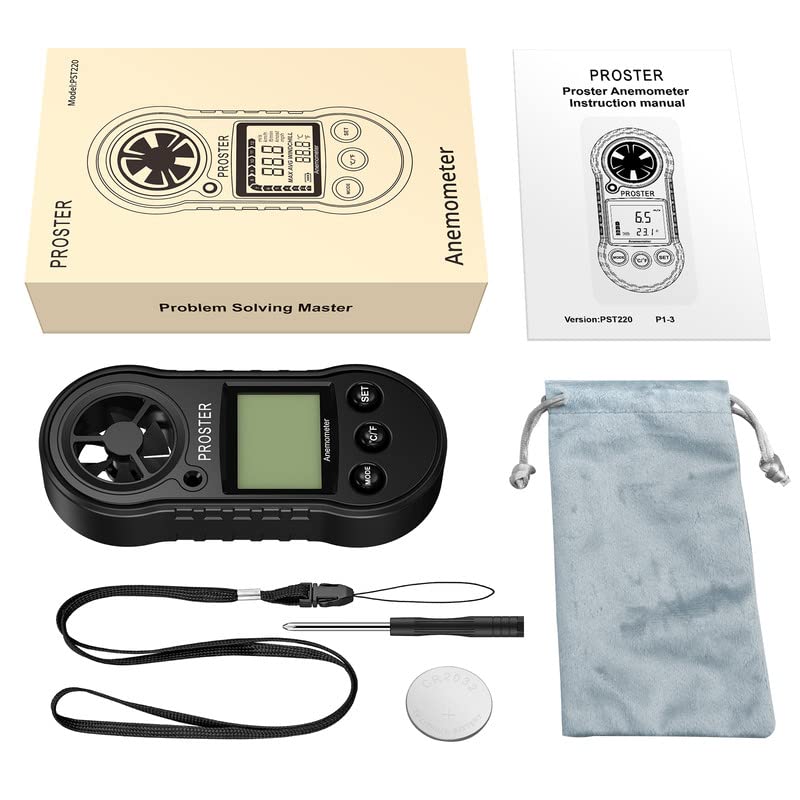
Image: Contents of the Proster Digital Anemometer package, showing the device, a CR2032 battery, a lanyard, and the instruction manual.
Device Overview
Familiarize yourself with the components of your anemometer:
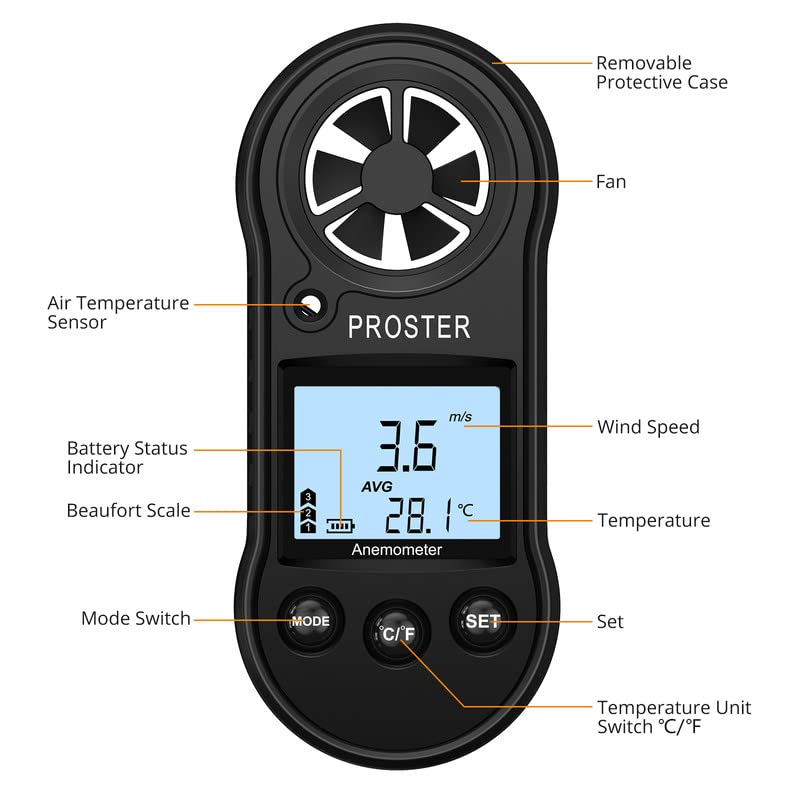
Image: Detailed diagram of the Proster Digital Anemometer, labeling its key parts including the fan, air temperature sensor, LCD display, control buttons (Mode, C/F, Set), battery status indicator, and removable protective case.
- Removable Protective Case: Protects the device when not in use.
- Fan: Measures wind speed. Ensure it is unobstructed.
- Air Temperature Sensor: Detects ambient air temperature.
- Battery Status Indicator: Shows remaining battery life on the LCD.
- Beaufort Scale: Visual indicator of wind force.
- Wind Speed Display: Shows current, average, or maximum wind speed.
- Temperature Display: Shows current air temperature.
- MODE Switch: Cycles through measurement modes (Current, Max, Average).
- °C/°F Button: Toggles between Celsius and Fahrenheit temperature units.
- SET Button: Used for various settings and data hold function.
Setup
1. Battery Installation
- Locate the battery compartment on the back of the device.
- Use a small screwdriver or coin to open the battery cover by turning it counter-clockwise to the "OPEN" position.
- Insert the CR2032 3V lithium battery with the positive (+) side facing up.
- Replace the battery cover and turn it clockwise to the "CLOSE" position to secure it.
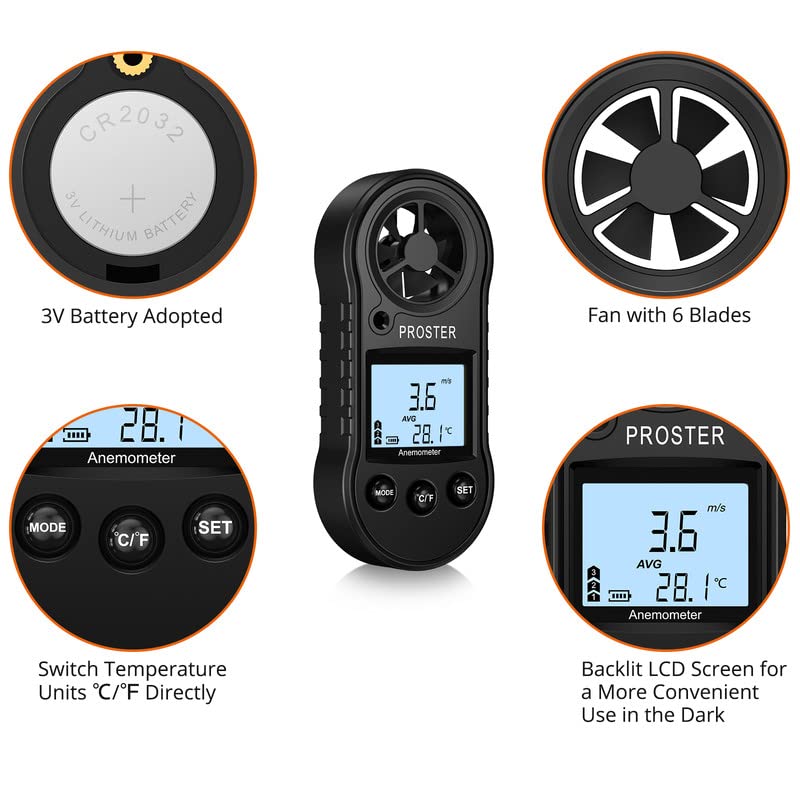
Image: Illustration showing the CR2032 battery being inserted into the compartment and a close-up of the device's fan and LCD display.
2. Attaching the Lanyard
Thread the provided lanyard through the designated loop on the device to prevent accidental drops during use.
Operating Instructions
1. Power On/Off
- To Power On: Press the MODE button briefly. The LCD will light up.
- To Power Off Manually: Press and hold the MODE button for approximately 3 seconds.
- Automatic Power Off: The device will automatically power off after 14 minutes of inactivity to conserve battery life.
2. Changing Wind Speed Units
With the device powered on, press the SET button briefly to cycle through the available wind speed units: m/s, km/h, ft/min, knots, mph.
3. Changing Temperature Units
Press the °C/°F button briefly to switch between Celsius (°C) and Fahrenheit (°F).
4. Measurement Modes
Press the MODE button (after initial power-on) to cycle through the following wind speed measurement display modes:
- Current Wind Speed: Displays the instantaneous wind speed.
- Maximum Wind Speed (MAX): Displays the highest wind speed recorded since the device was powered on or reset.
- Average Wind Speed (AVG): Displays the average wind speed over the measurement period.
To reset the MAX/AVG readings, press and hold the SET button while in MAX or AVG mode until the display clears or resets.
5. Backlight Control
The backlight automatically activates when the device is powered on. It will turn off after a short period of inactivity to save battery. There is no manual control for the backlight.
6. Taking Measurements
Hold the anemometer upright, ensuring the fan is exposed to the wind flow. The wind speed and temperature will be displayed on the LCD. For accurate temperature readings, allow the device to stabilize in the environment for a few minutes.
Maintenance
- Cleaning: Wipe the device with a soft, dry cloth. Do not use abrasive cleaners or solvents. Ensure the fan blades are free from dust and debris.
- Storage: When not in use for extended periods, remove the battery to prevent leakage. Store the device in a cool, dry place, away from direct sunlight and extreme temperatures.
- Fan Care: Avoid touching the fan blades directly. If the fan becomes stiff or dirty, gently clean it with a soft brush or compressed air. Do not apply lubricants.
- Battery Replacement: Replace the CR2032 battery when the low battery indicator appears on the display. Dispose of old batteries responsibly.
Troubleshooting
| Problem | Possible Cause | Solution |
|---|---|---|
| Device does not power on. | Battery is dead or incorrectly installed. | Check battery orientation. Replace with a new CR2032 battery. |
| Inaccurate wind speed readings. | Fan obstructed or damaged. Device not held correctly. | Ensure fan is clean and rotates freely. Hold the device upright and directly into the wind. |
| Inaccurate temperature readings. | Device not stabilized to ambient temperature. Sensor obstructed. | Allow device to acclimate to the environment for several minutes. Ensure temperature sensor is clear. |
| Display is dim or flickering. | Low battery. | Replace the CR2032 battery. |
Specifications
| Model Number | TL0090 |
| Wind Speed Measurement Range | 0 - 30 m/s, 0 - 90 km/h, 0 - 65 mph, 0 - 55 knots |
| Wind Speed Resolution | 0.1 m/s, 0.3 km/h, 0.2 mph, 0.2 knots |
| Air Temperature Range | -10 °C to 45 °C (14 °F to 113 °F) |
| Temperature Resolution | 0.2 °C |
| Temperature Accuracy | ± 2 °C |
| Operating Humidity | Less than or equal to 90% RH |
| Storage Temperature | -40 °C to 60 °C (-40 °F to 140 °F) |
| Power Source | 1 x CR2032 3V Lithium Battery |
| Dimensions (LxWxH) | 4.13 x 1.57 x 0.71 cm (112 x 49 x 21 mm) |
| Weight | 49.9 grams |
| Material | Polypropylene (PP) |
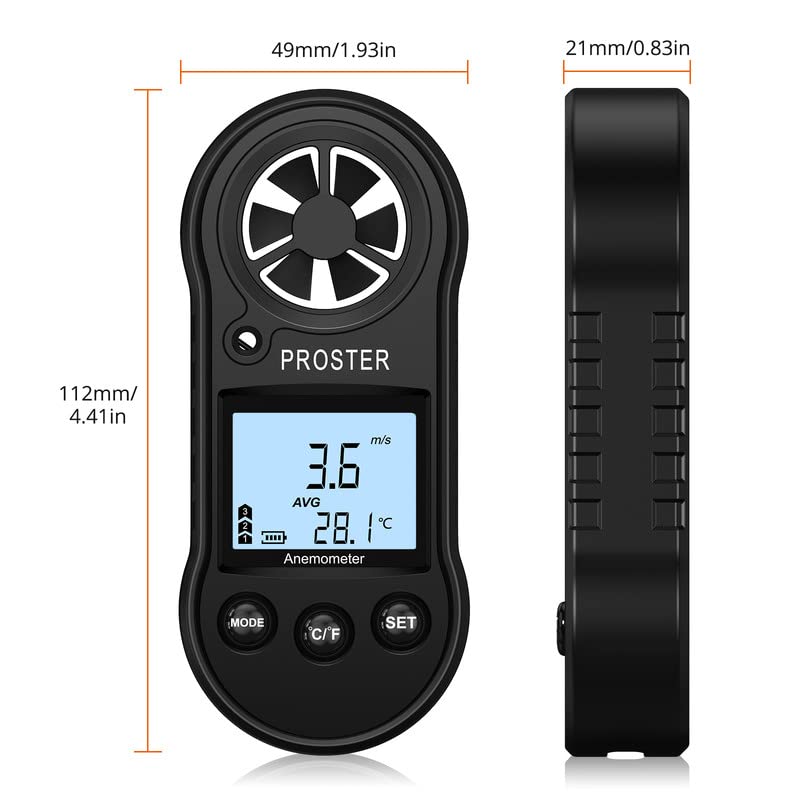
Image: Diagram illustrating the physical dimensions of the Proster Digital Anemometer.
Warranty and Support
Warranty Information
Proster products are designed and manufactured to high-quality standards. For specific warranty details, please refer to the warranty card included with your purchase or visit the official Proster website. Keep your purchase receipt as proof of purchase for warranty claims.
Customer Support
If you encounter any issues or have questions regarding your Proster Digital LCD Anemometer Thermometer, please contact Proster customer support. Contact information can typically be found on the product packaging, the official Proster website, or through your retailer.
For more information, visit the Proster Store.