
1. Introduction
Thank you for purchasing the Intex IT-11500 SUF Multimedia Speaker system. This 2.0 channel speaker system is designed to provide high-quality audio for your entertainment needs. It features multiple connectivity options including AUX, USB, SD/MMC card playback, and a digital FM radio. The system also includes a cordless microphone for added versatility and a fully functional remote control for convenient operation. Please read this manual carefully before using the product to ensure proper setup and optimal performance.
2. Package Contents
Please check the package contents upon unboxing. If any items are missing or damaged, contact your retailer immediately.
- Main Speaker Unit (Subwoofer)
- Satellite Speakers (2 units)
- Cordless Microphone
- Remote Control
- Audio Input Cable (AUX)
- Power Cord
- User Manual
3. Product Features
- 2.0 Channel multimedia speaker with Cordless MIC
- AUX audio input compatible with DVD/PC/LCD TV
- MP3 playability with USB/SD/MMC
- Digital FM playability
- Fully function smart remote control
- LED display
- Frequency Response : 50Hz - 20KHz
- S/N Ratio : ≥ 60dB
- Separation : ≥ 40dB
- Bass Up/down : ±15dB
4. Setup
4.1 Unpacking and Placement
Carefully remove all components from the packaging. Place the main speaker unit on a stable, flat surface. Position the satellite speakers to the left and right of your listening area for optimal stereo separation. Ensure adequate ventilation around the units.
4.2 Connecting Speakers
Connect the satellite speakers to the corresponding output jacks on the rear panel of the main speaker unit. Ensure the connections are secure.
4.3 Connecting Audio Source (AUX)
To connect an external audio device (e.g., DVD player, PC, TV), use the provided audio input cable. Insert one end into the AUX input jack on the main speaker unit and the other end into the audio output jack of your external device.
4.4 Power Connection
Connect the power cord to the AC power input on the rear of the main speaker unit, then plug the other end into a standard AC 200V ~ 240V / 50Hz power outlet.
4.5 Initial Power On
After all connections are made, switch on the power button located on the main speaker unit. The LED display will illuminate.
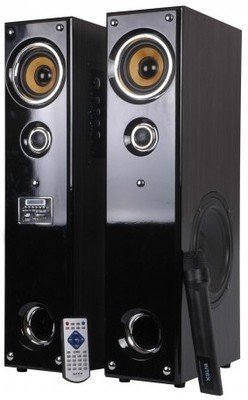
Image: Front view of the Intex IT-11500 SUF Multimedia Speaker, showing the main unit with control panel and LED display, and two satellite speakers.
5. Operating Instructions
5.1 Power On/Off
Press the POWER button on the main unit or the remote control to turn the system on or off.
5.2 Mode Selection
Press the MODE button on the main unit or remote control to cycle through available input modes: AUX, USB, SD/MMC, and FM.
5.3 Volume Control
Adjust the master volume using the VOLUME +/- buttons on the main unit or remote control. Bass levels can be adjusted using the BASS +/- controls on the remote.
5.4 USB/SD/MMC Playback
Insert a USB drive or an SD/MMC card into the respective slot on the main unit. The system will automatically switch to USB/SD/MMC mode and begin playing compatible MP3 audio files. Use the PLAY/PAUSE, PREV, and NEXT buttons to control playback.
5.5 FM Radio Operation
In FM mode, press the SCAN button on the remote control to automatically scan and save available FM stations. Use the PREV and NEXT buttons to navigate through saved stations.
5.6 Using the Cordless Microphone
Ensure the cordless microphone has fresh batteries. Turn on the microphone. The microphone's audio will be mixed with the main audio source. Adjust microphone volume if available on the main unit or remote.
5.7 Remote Control Functions
The remote control provides full functionality for the speaker system. Refer to the diagram on the remote for specific button functions, including power, mode, volume, track control, FM scan, and bass adjustment.
6. Maintenance
6.1 Cleaning
Wipe the speaker surfaces with a soft, dry cloth. Do not use abrasive cleaners, waxes, or solvents as they may damage the finish. Ensure the unit is powered off and unplugged before cleaning.
6.2 Storage
If storing the unit for an extended period, unplug it from the power outlet and store it in a cool, dry place away from direct sunlight and extreme temperatures.
6.3 Safety Precautions
- Do not expose the unit to water or excessive moisture.
- Do not open the speaker casing; there are no user-serviceable parts inside.
- Keep away from heat sources and direct sunlight.
- Ensure proper ventilation to prevent overheating.
7. Troubleshooting
| Problem | Possible Cause | Solution |
|---|---|---|
| No power | Power cord not connected; Power outlet faulty; Power switch off. | Check power cord connection; Try a different outlet; Ensure power switch is ON. |
| No sound | Volume too low; Incorrect input mode; Audio cable loose/faulty; Mute activated. | Increase volume; Select correct input mode (AUX, USB, FM); Reconnect audio cable; Deactivate mute. |
| Distorted sound | Volume too high; Source audio quality poor; Speaker placement. | Reduce volume; Check audio source; Adjust speaker position. |
| Remote control not working | Batteries depleted; Obstruction between remote and unit; Remote sensor blocked. | Replace batteries; Remove obstructions; Ensure clear line of sight to sensor. |
| FM reception poor | Weak signal; Antenna not extended. | Adjust antenna position; Rescan for stations. |
8. Specifications
| Speaker Type | Multimedia |
| Channel Configuration | 2.0 |
| Frequency Response | 50Hz - 20KHz |
| S/N Ratio | ≥ 60dB |
| Separation | ≥ 40dB |
| Bass Up/Down | ±15dB |
| Sensitivity | < 500mV |
| FM Frequency Receiver | 88MHz to 108MHz |
| Power Supply | AC 200V ~ 240V / 50Hz |
| Connectivity Technology | USB |
| Control Method | Remote |
| Item Weight | 17 kg |
| Model Number | 1112-1150-0 |
9. Warranty and Support
For warranty information, please refer to the warranty card included with your product or contact your local Intex customer service. Keep your purchase receipt as proof of purchase. For technical support or service inquiries, please visit the official Intex website or contact their customer support helpline.
Note: Specifications are subject to change without prior notice for product improvement.