
1. Introduction
Thank you for purchasing the Intex IT-1875 SUF 2.1 Multimedia Speaker system. This manual provides essential information for the safe and efficient operation of your new speaker system. Please read this manual thoroughly before use and retain it for future reference.
The Intex IT-1875 SUF is a 2.1 channel multimedia speaker system designed to deliver a rich audio experience. It features a main unit (subwoofer) and two satellite speakers, offering versatile connectivity options including USB, SD card, and FM radio functionality, controllable via a remote.
2. Safety Information
- Power Supply: Ensure the power supply matches the requirements specified on the speaker unit (AC 220V to 240V at 50Hz/60Hz).
- Ventilation: Do not block any ventilation openings. Maintain adequate space around the unit for proper airflow.
- Water and Moisture: Do not expose the speaker system to rain, moisture, or dripping/splashing liquids. Do not place objects filled with liquids, such as vases, on the apparatus.
- Heat Sources: Keep the unit away from heat sources such as radiators, heat registers, stoves, or other apparatus (including amplifiers) that produce heat.
- Cleaning: Unplug the unit from the power outlet before cleaning. Use a dry cloth for cleaning.
- Servicing: Do not attempt to service this product yourself. Refer all servicing to qualified service personnel.
- Placement: Place the speakers on a stable, flat surface to prevent them from falling.
3. Package Contents
Verify that all items are present in the package:
- 1 x Main Unit (Subwoofer)
- 2 x Satellite Speakers
- 1 x Remote Control
- 1 x Audio Cable (if included)
- 1 x User Manual (this document)
4. Setup
4.1 Speaker Placement
For optimal sound quality, place the main unit (subwoofer) on the floor, preferably in a corner or near a wall to enhance bass response. Position the two satellite speakers equidistant from your listening position, facing towards you. Ensure they are placed on a stable surface.
4.2 Connecting the Speakers
- Connect the satellite speakers to the corresponding output ports on the rear panel of the main unit. Ensure the left and right speakers are connected correctly.
- Connect the audio input cable from your source device (e.g., TV, laptop, smartphone) to the audio input port on the main unit. The system supports USB connectivity.
- Plug the power cord of the main unit into a suitable AC power outlet (220V-240V, 50/60Hz).
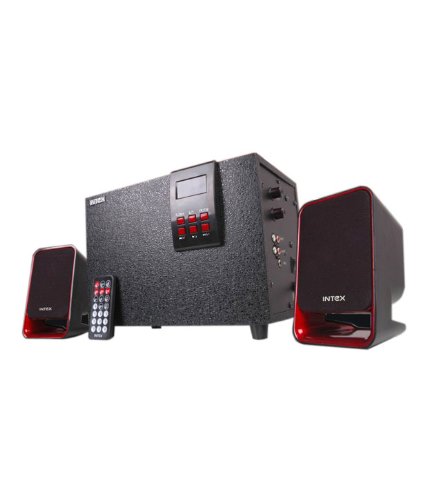
Image 1: Intex IT-1875 SUF Multimedia Speaker system, showing the main unit and two satellite speakers. The main unit is typically larger and houses the subwoofer, while the satellite speakers are smaller and designed for mid-range and treble audio output.
5. Operating Instructions
5.1 Power On/Off
Press the Power button on the front panel of the main unit or on the remote control to turn the speaker system on or off.
5.2 Volume Control
Adjust the master volume using the rotary knob on the front panel of the main unit or the Volume +/- buttons on the remote control.
5.3 Input Mode Selection
Press the 'Mode' button on the front panel or the remote control to cycle through available input sources: USB, SD Card, FM Radio, and AUX (if connected via audio cable).
- USB/SD Card Mode: Insert a USB drive or SD card into the respective slot. The system will automatically detect and play compatible audio files. Use the remote control for playback functions (Play/Pause, Next/Previous Track).
- FM Radio Mode: In FM mode, press the 'Scan' button on the remote to automatically scan and save available radio stations. Use the Next/Previous buttons to navigate through saved stations.
5.4 Remote Control Functions
The remote control provides convenient access to various functions:
- Power: Turn the unit on/off.
- Mode: Switch between input sources (USB, SD, FM, AUX).
- Volume +/-: Adjust the master volume level.
- Mute: Mute or unmute the audio output.
- Play/Pause: Play or pause audio playback in USB/SD mode.
- Previous/Next: Skip to the previous or next track/station.
- Scan: Auto-scan for FM radio stations.
- Bass +/-: Adjust bass level (if available on remote).
6. Maintenance
- Cleaning: Use a soft, dry cloth to clean the surfaces of the speakers. Do not use liquid cleaners or aerosol sprays.
- Dust: Regularly dust the speaker grilles and vents to prevent accumulation, which can affect sound quality and ventilation.
- Storage: If storing the unit for an extended period, unplug it from the power outlet and store it in a cool, dry place, away from direct sunlight and extreme temperatures.
7. Troubleshooting
If you encounter issues with your speaker system, refer to the following common problems and solutions:
- No Power:
- Ensure the power cord is securely plugged into both the speaker unit and the wall outlet.
- Check if the power outlet is functional by plugging in another device.
- Press the Power button on the unit or remote control.
- No Sound:
- Check if the volume is turned up on both the speaker system and the connected audio source.
- Ensure the correct input mode (USB, SD, FM, AUX) is selected.
- Verify that the audio input cable is securely connected to both the speaker unit and the source device.
- If using USB/SD, ensure the audio files are in a compatible format.
- Remote Control Not Working:
- Check and replace the batteries in the remote control if necessary.
- Ensure there are no obstructions between the remote control and the speaker's IR receiver.
- Point the remote directly at the main unit.
- Distorted Sound:
- Reduce the volume level on both the speaker system and the audio source.
- Check the audio cable for damage or loose connections.
- Ensure the audio source is not sending an overdriven signal.
8. Specifications
| Feature | Specification |
|---|---|
| Speaker Type | 2.1 Channel Multimedia Speaker |
| Total Output Power (RMS) | 12W + 3W x 2 (18W Total) |
| Subwoofer Driver | 10.2 cm (4 inches) |
| Satellite Speaker Power | 3W x 2 |
| Subwoofer Frequency Response | 40Hz - 200Hz |
| Satellite Frequency Response | 160Hz - 20KHz |
| Signal to Noise Ratio (SNR) | ≥ 60dB |
| Separation | ≥ 40dB |
| Power Supply | AC 220V - 240V, 50Hz/60Hz |
| Connectivity Technology | USB |
| Product Features | Radio, Remote Control, SD Card, Subwoofer |
| Net Weight | 3.1 kg |
9. Warranty and Support
For warranty information, please refer to the warranty card included with your product or visit the official Intex website. Keep your purchase receipt as proof of purchase for warranty claims.
For technical support or service inquiries, please contact Intex customer service through their official channels. Contact details can typically be found on the Intex website or in the product packaging.
