
1. Introduction
This manual provides comprehensive instructions for the HOBBYWING A2 Combo, which includes the EZRUN-18A-SL ESC, EZRUN Series 18T/2030 (5200Kv) Motor, and the Digital LED Program Card. The Digital LED Program Card is a versatile tool compatible with various Hobbywing ESCs, including the QuickRun Fusion BL SYS for Crawler-540spec, QuickRun WP 1080 G2, QuickRun Fusion SE, and QuickRun Fusion Pro. It allows users to easily adjust and customize the settings of their Electronic Speed Controllers (ESCs).
Key Features:
- Compatible with sensorless brushless motors.
- Top-quality components ensure high current endurance.
- Excellent start-up, acceleration, and linearity features.
- Numerous programmable items for various chassis, tires, and race tracks.
- Multiple protection features: Low voltage cut-off protection, Over-heating protection, and Throttle signal loss protection.
2. What's in the Box
The HOBBYWING A2 Combo package includes the following components:
- 1x EZRUN-18A Electronic Speed Controller (ESC)
- 1x EZRUN-2030 Brushless Motor
- 1x Digital LED Program Card
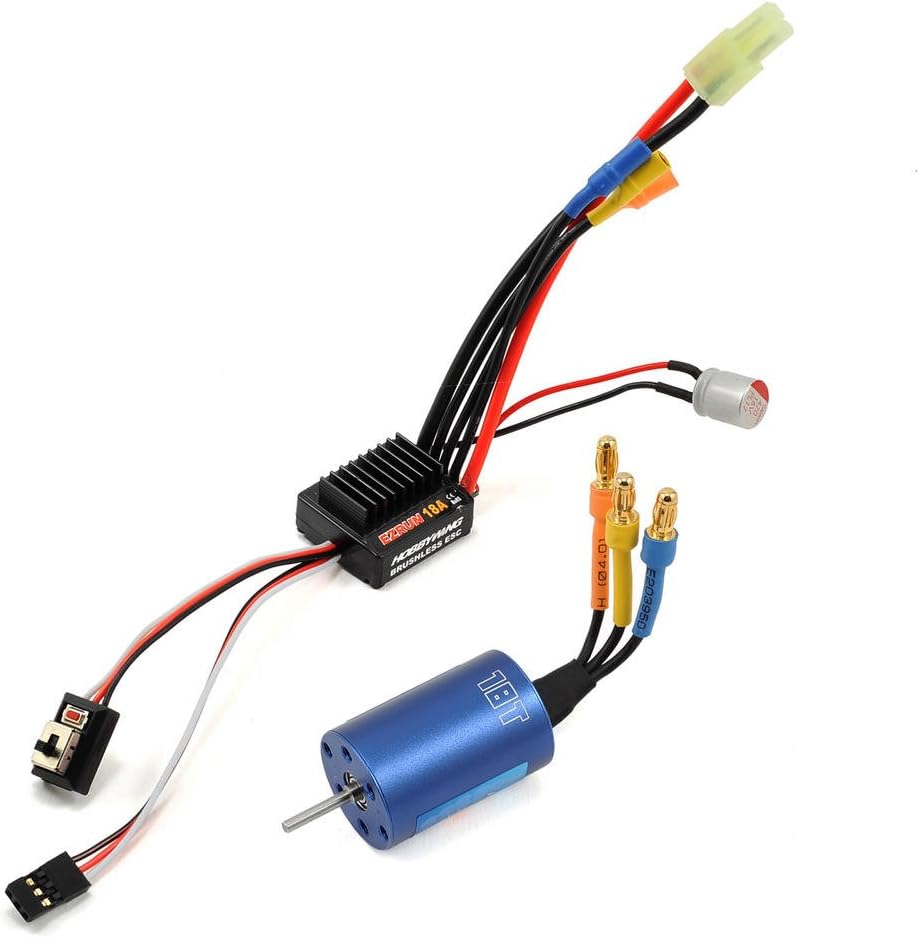
Image: The HOBBYWING A2 Combo components, including the Electronic Speed Controller (ESC), the brushless motor, and the LED Program Card.

Image: Additional accessories included in the combo, such as zip ties and heat shrink tubing for secure installation.

Image: The retail packaging for the HOBBYWING A2 Combo, showcasing the included ESC, motor, and program card.
3. Setup
Follow these steps to set up your HOBBYWING A2 Combo:
- Connect the Motor and ESC: Connect the EZRUN-2030 motor to the EZRUN-18A-SL ESC according to the manufacturer's guidelines. Ensure all connections are secure.
- Program the LED Card: Connect the Digital LED Program Card to the ESC. The program card is used to adjust various settings for optimal performance.
- Utilize Protection Features: Familiarize yourself with the multiple protection features (low voltage cut-off, over-heating, throttle signal loss) to ensure safe operation and longevity of your components.
Video Guide: HOBBYWING LED Program Card Setup
Video: This official HOBBYWING North America video demonstrates how to set up and use the HOBBYWING LED Program Card to adjust ESC settings. It covers connecting the card, navigating the menu, and understanding various programmable parameters.
4. Operating the Digital LED Program Card
The Digital LED Program Card allows you to customize the performance of your Hobbywing ESC. The card displays 'ITEM' and 'VALUE' to show the current setting and its selected option. Use the 'ITEM' button to cycle through settings, and the 'VALUE' button to change the option for the selected setting. Press 'OK' to save changes.

Image: A detailed view of the HOBBYWING LED Program Card, highlighting the 'ITEM' and 'VALUE' displays, along with the control buttons for programming.
Programmable Parameters:
The following settings can be adjusted using the program card:
| Item No. | Setting | Description & Values |
|---|---|---|
| 1 | RPM/Throttle Matching | Controls the 1:1 ratio to prevent motor stalling on inclines. Options: (1) Enabled, (2) Disabled. |
| 2 | LiPo Cells | Sets the number of LiPo cells. Options: (1) Auto, (2) 2S, (3) 3S. Auto-detection is the default. |
| 3 | Cutoff Voltage | Determines the voltage level at which the ESC cuts power to protect the battery. Options: (1) Disabled (for NiMH batteries), (2) Low (approx. 3.3V/cell), (3) Intermediate (approx. 3.5-3.6V/cell), (4) High (approx. 3.7V/cell). |
| 4 | ESC Thermal Protection | Activates thermal protection for the ESC. Options: (1) 105°C/221°F, (2) 125°C/257°F, (3) Disabled. It is recommended to keep this enabled. |
| 5 | Motor Rotation | Adjusts the motor's forward rotation direction. Options: (1) CCW (Counter-Clockwise), (2) CW (Clockwise). This is crucial for correct vehicle movement, especially with different transmission setups. |
| 6 | BEC Voltage | Sets the output voltage of the Built-in Electronic Circuit (BEC). Options: (1) 6.0V, (2) 7.4V. |
| 7 | Drag Brake Force | Controls the strength of the drag brake when the throttle is released. Options: (1) Disabled, (2) Level 1, ..., (8) Level 7. |
| 8 | Drag Brake Rate | Adjusts how quickly the drag brake is applied. Options: (1) Level 1, ..., (8) Level 7. A lower level provides a smoother brake application. |
| 9 | Max. Reverse Force | Sets the maximum power available for reverse. Options: (1) 25%, (2) 50%, (3) 75%, (4) 100%. Lowering this can provide smoother control for fine movements in reverse. |
5. Maintenance
To ensure the longevity and optimal performance of your HOBBYWING A2 Combo components, regular maintenance is recommended:
- Cleaning: Periodically clean the ESC, motor, and program card to remove dust, dirt, and debris. Use a soft brush or compressed air. Avoid using liquids directly on electronic components.
- Connections: Regularly inspect all electrical connections (motor to ESC, ESC to battery, program card port) for any signs of wear, corrosion, or looseness. Ensure secure connections to prevent power loss or damage.
- Motor Inspection: Check the motor for any obstructions or excessive wear on the bearings. Ensure the motor is free to rotate without resistance.
- Program Card Port: After using the program card, ensure the protective rubber cover (if applicable) is re-inserted into the program port on the ESC to prevent moisture or debris from entering.
- Storage: Store components in a dry, cool environment away from direct sunlight and extreme temperatures.
6. Troubleshooting
If you encounter issues with your HOBBYWING A2 Combo, consider the following common troubleshooting steps:
- No Power/Intermittent Power:
- Check battery charge level.
- Inspect all power connections for looseness or damage.
- Ensure the ESC switch is in the 'ON' position.
- Motor Not Responding/Incorrect Rotation:
- Verify motor and ESC connections are correct.
- Check the 'Motor Rotation' setting (Item 5) on the program card and adjust if necessary.
- Ensure the throttle trim on your transmitter is centered.
- Overheating:
- Check for proper ventilation around the ESC and motor.
- Ensure the 'ESC Thermal Protection' setting (Item 4) is enabled.
- Consider reducing the load on the motor or adjusting gearing.
- Program Card Not Connecting/Displaying:
- Ensure the program card is correctly plugged into the ESC's program port.
- Verify the ESC is powered on.
- Check for any damage to the program card cable or port.
7. Specifications
| Feature | Detail |
|---|---|
| Product Dimensions | 6.1 x 1.8 x 5.7 inches |
| Item Weight | 7 ounces |
| ASIN | B00SU4RJB6 |
| Item Model Number | HWI81030010 |
| Manufacturer Recommended Age | 16 years and up |
| Manufacturer | Hobbywing Technology |
| Date First Available | January 6, 2015 |
8. Warranty and Support
For warranty information, technical support, or service inquiries, please contact Hobbywing Technology directly. Refer to the official Hobbywing website or product packaging for the most up-to-date contact details and warranty policies.


