1. Introduction and Safety Information
This manual provides essential information for the safe and efficient operation of your CEVIK PRO CA-PRO25VX V-head air compressor. Please read all instructions carefully before use to ensure proper function and prevent injury or damage.
The CEVIK PRO CA-PRO25VX is a powerful 3HP, 24-liter air compressor designed for demanding tasks. Featuring a V-head cylinder configuration for improved cooling and efficiency, it delivers up to 8 Bar pressure and a flow rate of 340 l/min. Its oil-lubricated system ensures durability and smooth operation, making it suitable for pneumatic tools, painting, and other applications requiring a reliable air supply. The compact and portable design, including an ergonomic handle and transport wheels, enhances its versatility.
General Safety Warnings
- Always wear appropriate personal protective equipment (PPE), including eye protection, hearing protection, and gloves.
- Ensure the compressor is placed on a stable, level surface in a well-ventilated area.
- Do not operate the compressor in wet conditions or near flammable materials.
- Before performing any maintenance, disconnect the compressor from the power supply and ensure the tank is fully depressurized.
- Never direct compressed air at people or animals.
- Regularly inspect the compressor for any signs of damage or wear.
2. Product Overview
The CEVIK PRO CA-PRO25VX air compressor is engineered for performance and portability. Key features include:
- 3HP Motor: Provides high power for various pneumatic applications.
- 24-Liter Tank: Offers a good air reserve for continuous operation.
- V-Head Cylinder: Designed for enhanced cooling and extended lifespan under intensive use.
- Oil-Lubricated: Ensures smooth operation and increased motor durability.
- Dual Air Outlets: Allows simultaneous connection of two pneumatic tools.
- Portable Design: Equipped with an ergonomic handle and wheels for easy transport.
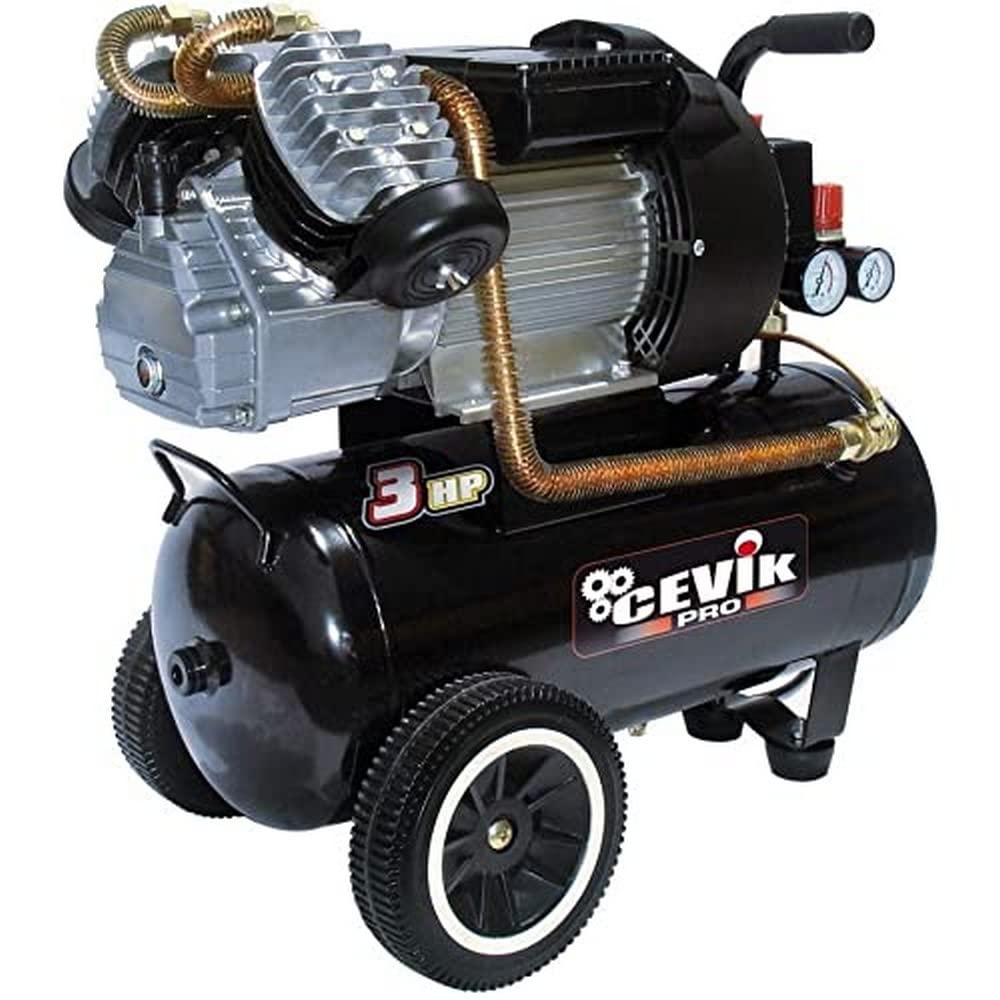
Figure 1: CEVIK PRO CA-PRO25VX V-Head Air Compressor.

Figure 2: Close-up of the V-head cylinder design, optimizing cooling and performance.
3. Setup Instructions
- Unpacking: Carefully remove the compressor and all accessories from the packaging. Retain the packaging for future transport or storage.
- Attach Wheels and Feet:
Locate the transport wheels and rubber feet included in the package. Attach the wheels to the designated axle points on one side of the tank and secure them. Install the rubber feet on the opposite side to provide stability.
Note: No specific setup video for the CEVIK PRO CA-PRO25VX was available from the seller. Always refer to the included paper manual for detailed, model-specific assembly instructions.
- Check Oil Level: Before first use, ensure the oil level is correct. Refer to the oil sight glass or dipstick (if present) and top up with appropriate compressor oil if necessary.
- Positioning: Place the compressor on a firm, level surface in a clean, dry, and well-ventilated area. Ensure there is adequate space around the unit for air circulation.
- Electrical Connection: Connect the power cable to a suitable grounded electrical outlet (230 Volts). Ensure the power supply matches the compressor's requirements.
- Connect Air Hose: Attach your air hose to one of the quick-connect air outlets.
4. Operating Instructions
- Power On: Press the ON/OFF switch to start the compressor. The motor will run until the tank reaches its maximum pressure (8 Bar), then it will automatically shut off.
- Adjust Output Pressure: Use the pressure regulator knob (usually red) to set the desired output pressure for your pneumatic tool. The output pressure gauge will display the adjusted pressure.
- Connect Tool: Connect your pneumatic tool to the air hose.
- Operation: Begin using your pneumatic tool. The compressor will automatically restart when the tank pressure drops below a preset minimum, maintaining a consistent air supply.
- Power Off: When finished, turn off the compressor by pressing the OFF switch.
- Depressurize Tank: Before disconnecting any tools or storing the compressor, always drain the air from the tank. This is typically done by opening the drain valve located at the bottom of the tank.
5. Maintenance
Regular maintenance is crucial for the longevity and optimal performance of your compressor.
- Daily:
- Drain condensation from the air tank. This prevents rust and maintains tank capacity.
- Check the oil level and top up if necessary.
- Weekly/After 10-20 Hours of Use:
- Clean the air filter. A clogged filter reduces efficiency and can damage the motor.
- Inspect all hoses and connections for leaks or damage.
- Monthly/After 50 Hours of Use:
- Change the compressor oil. Use only recommended compressor oil.
- Inspect the safety valve to ensure it operates freely.
- Annually:
- Have the pressure relief valve and pressure switch checked by a qualified technician.
Warning: Always disconnect the power supply and depressurize the tank before performing any maintenance.
6. Troubleshooting
| Problem | Possible Cause | Solution |
|---|---|---|
| Compressor does not start. | No power, faulty switch, motor overload. | Check power connection, reset circuit breaker, allow motor to cool. |
| Low air pressure or slow recovery. | Air leaks, clogged air filter, worn piston rings. | Check connections for leaks, clean/replace air filter, contact service for repair. |
| Excessive noise or vibration. | Loose components, worn bearings, insufficient oil. | Tighten loose parts, check oil level, contact service for inspection. |
| Oil leakage. | Loose fittings, damaged seals. | Tighten fittings, contact service for seal replacement. |
7. Specifications
| Feature | Detail |
|---|---|
| Brand | CEVIK PRO |
| Model Number | CA-PRO25VX |
| Voltage | 230 Volts |
| Motor Power | 3 HP (2237.1 Watts) |
| Tank Capacity | 25 Liters |
| Max Pressure | 8 Bar |
| Air Flow Capacity | 340 l/min (357 Liters per minute) |
| Noise Level | 72 Decibels |
| Special Feature | Portable, V-Head Cylinder |
| Lubrication Type | Oil-lubricated |
| Recommended Uses | Screwing, drilling, sanding, nailing, cutting (with appropriate pneumatic tools) |
| Included Components | Ergonomic handle, User manual, Transport wheels |
| Product Weight | 32 Kilograms |
| Material | Metallic casing, Electromechanical components, Electronic components |
8. Warranty and Support
For warranty information, technical support, or service inquiries, please refer to the warranty card included with your product or contact CEVIK PRO customer service directly. Keep your purchase receipt as proof of purchase.
Contact Information: Please refer to the official CEVIK PRO website or your retailer for the most up-to-date contact details.


