
1. Introduction
This manual provides detailed instructions for the installation, operation, and maintenance of your ELP 960P Low Illumination USB Camera Module with a 2.8-12mm varifocal lens. This camera is designed for various applications requiring high-resolution imaging and flexible focal length adjustments, such as video conferencing, industrial inspection, and embedded systems. Please read this manual thoroughly before using the product to ensure optimal performance and longevity.
2. What's in the Box
- 1x ELP 960P Low Illumination USB Camera Module
- 1x 1-meter USB Cable
- 1x User Manual
3. Product Features
- Sensor: AR0130 1/3 CMOS Sensor
- Resolution: 1.3 Megapixel (960P)
- Lens: 2.8-12mm Varifocal Lens for manual zoom and focus adjustment
- Low Illumination: 0.01 lux capability for clear images in dim lighting
- USB Protocol: USB 2.0 HS/FS
- Compression Format: MJPEG and YUY2 (optional)
- UVC Compatibility: Driver-free operation with Windows, Linux, Mac OS X, Wince, and Android 4.0+
- Adjustable Parameters: Brightness, Contrast, Color saturation, Definition, Gamma, White Balance, Backlight Contrast, Gain, Frequency, Exposure
- Dimensions: 32x32mm board size
4. Setup
4.1 Connecting the Camera
- Unpack the camera module and the provided USB cable.
- Connect one end of the USB cable to the 4-pin 2.0mm connector on the camera module.
- Connect the other end of the USB cable to an available USB 2.0 port on your computer or compatible device.
- The camera is UVC compliant, meaning it is plug-and-play and does not require additional driver installation on most operating systems.
4.2 Initial Software Setup
Once connected, the camera should be recognized by your operating system. You can use standard webcam software or third-party applications to view the camera feed and adjust settings. For Windows, applications like AMCAP are commonly used.
Video: ELP USB Camera High Definition Webcam Board Module. This video demonstrates the unboxing, connection, and initial software setup using AMCAP, showing how to select the camera and adjust basic parameters.
5. Operating Instructions
5.1 Adjusting the Varifocal Lens
The 2.8-12mm varifocal lens allows for manual adjustment of both zoom and focus. This is crucial for achieving the desired field of view and image sharpness for your specific application.
- Zoom Adjustment: Gently rotate the zoom ring on the lens to adjust the magnification. Turning it one way will zoom in, and the other way will zoom out.
- Focus Adjustment: After adjusting the zoom, rotate the focus ring to achieve a clear and sharp image. Zoom and focus are interdependent, so you may need to fine-tune the focus after each zoom adjustment.
- Securing the Lens: The lens features small tension screws/knobs that can be tightened to secure your chosen zoom and focus settings, preventing accidental changes.
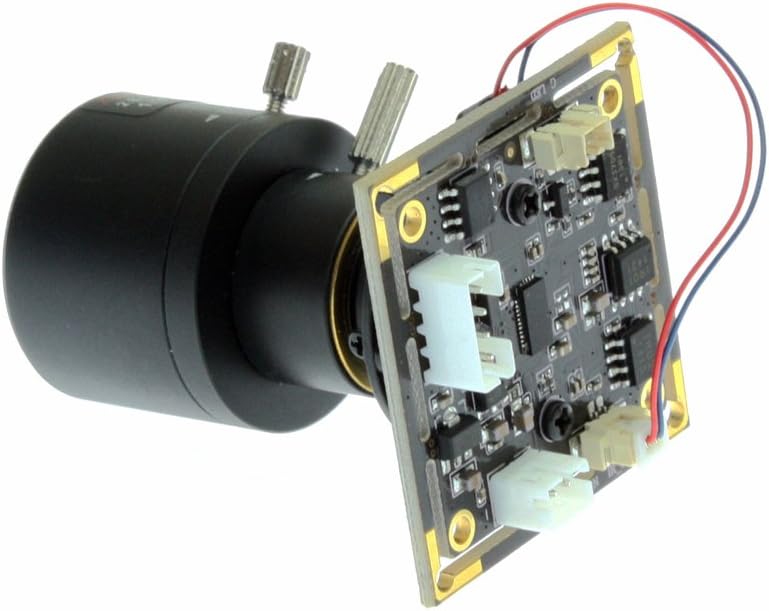
Image: ELP 960P USB Camera Module with Varifocal Lens. This image displays the camera module with its 2.8-12mm varifocal lens, highlighting the adjustable components.
Video: ELP Manual Zoom Camera for Computer. This video demonstrates the manual zoom and focus adjustment of a varifocal lens, showing how to achieve clear images at different magnifications.
5.2 Adjusting Image Parameters
Most UVC-compatible software allows you to adjust various image parameters to optimize the video feed for your environment. Common adjustable parameters include:
- Brightness
- Contrast
- Color saturation
- Definition (Sharpness)
- Gamma
- White Balance (WB)
- Backlight Contrast
- Gain
- Frequency
- Exposure
Refer to your chosen software's documentation for specific instructions on accessing and modifying these settings.
6. Specifications
| Feature | Specification |
|---|---|
| Sensor | AR0130 1/3 CMOS |
| Effective Pixels | 1280(H)x960(V) |
| Lens | 2.8-12mm Varifocal Lens |
| Low Illumination | 0.01 lux |
| USB Protocol | USB2.0 HS/FS |
| Compression | MJPEG, YUY2 |
| Frame Rate (MJPEG) | 1280x960 @ 15fps, 1280x720 @ 30fps, 960x720 @ 30fps, 800x600 @ 30fps, 640x480 @ 30fps |
| Frame Rate (YUY2) | 1280x960 @ 8fps, 1280x720 @ 10fps, 960x720 @ 15fps, 800x600 @ 20fps, 640x480 @ 30fps |
| Voltage/Current | DC 5V / 150mA |
| Operating Temperature | -20°C to 70°C |
| Board Size | 32x32mm |
| OS Support | WinXP/Vista/WIN7/WIN8/Linux with UVC/Mac-OS X 10.4.8 or later/Wince with UVC/Android 4.0 or above |
7. Troubleshooting
7.1 Camera Not Detected
- Ensure the USB cable is securely connected to both the camera and the computer.
- Try connecting the camera to a different USB port on your computer.
- Test the camera on another computer to rule out a computer-specific issue.
- Verify that your operating system's device manager recognizes the camera (it should appear as a UVC-compatible device).
7.2 Image is Blurry or Out of Focus
- Manually adjust the focus ring on the lens until the image appears sharp.
- If you have adjusted the zoom, refocus the lens as zoom and focus are interdependent.
- Ensure the lens is clean and free from dust or smudges.
7.3 Poor Image Quality in Low Light
- While the camera has low illumination capabilities, extreme darkness may still result in a grainy image. Consider adding external lighting if possible.
- Adjust the exposure and gain settings in your camera software to optimize for low light conditions.
8. Maintenance
- Cleaning: Use a soft, dry cloth to clean the camera body. For the lens, use a specialized lens cleaning cloth and solution to avoid scratches.
- Storage: Store the camera in a cool, dry place away from direct sunlight and extreme temperatures.
- Handling: Avoid dropping the camera or subjecting it to strong impacts, as this can damage internal components or the lens.
9. Warranty and Support
For warranty information and technical support, please refer to the ELP official website or contact your retailer. Keep your purchase receipt as proof of purchase for any warranty claims.
For additional resources and product updates, visit the ELP Store on Amazon.


