
1. Introduction and Overview
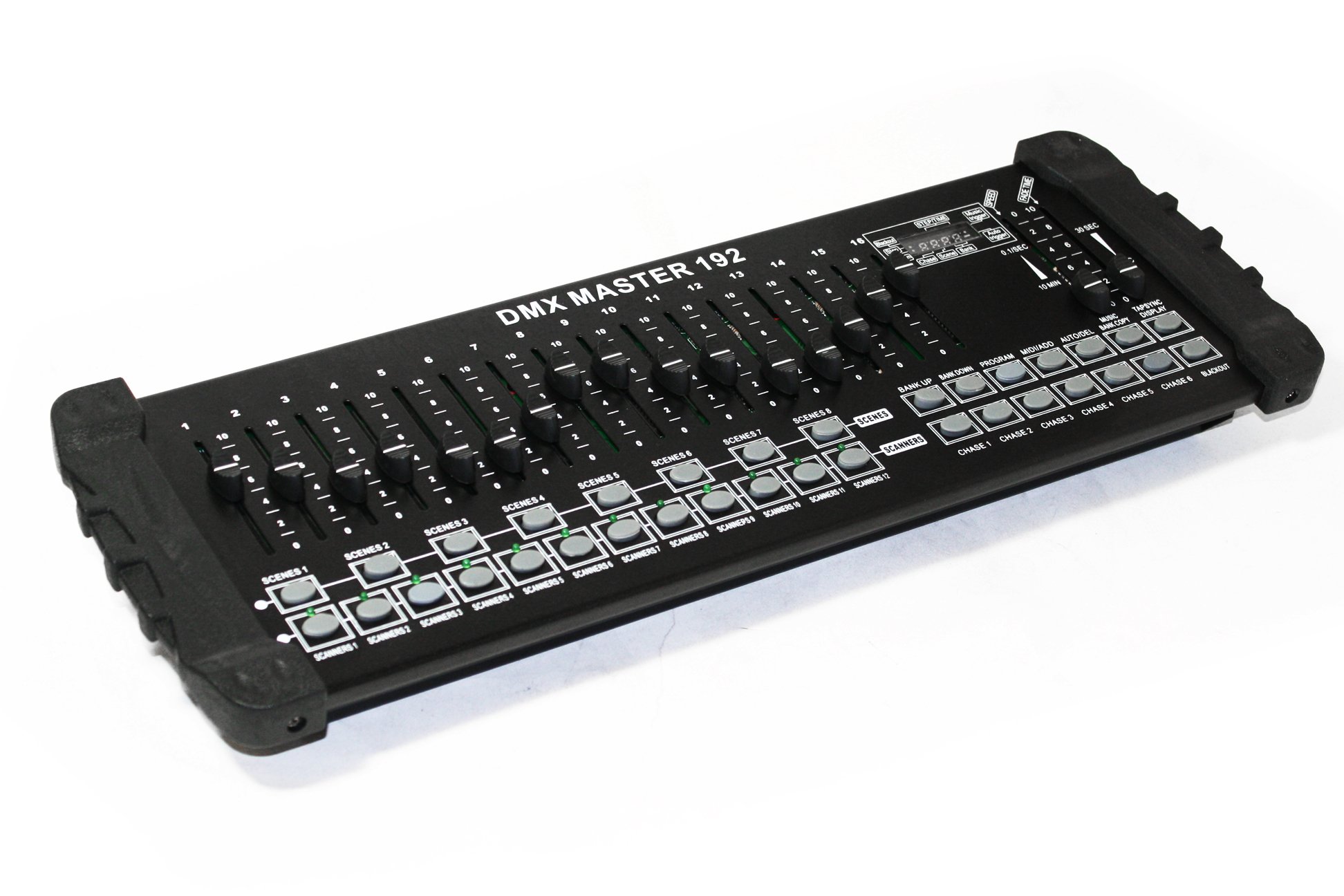
The EMB EBDMX2 is a universal intelligent lighting controller designed for managing DMX-compatible lighting fixtures. This controller allows for the management of up to 12 fixtures, each capable of utilizing up to 16 DMX channels, totaling 192 control channels. Users can program and store up to 240 scenes across 30 banks, with each bank containing 8 scenes. Additionally, the unit supports 6 chase banks, each capable of holding up to 240 steps, which can be composed of saved scenes in any desired order.
Programs can be activated through various methods including music synchronization, MIDI input, automatic playback, or manual triggering. All programmed chases can be executed simultaneously. The control surface features 16 universal channel sliders for direct parameter adjustment, quick access buttons for scanners and scenes, and an LED display for simplified navigation and function monitoring.
2. Key Features
- DMX512/1990 Standard: Fully compliant with DMX512/1990 protocol for broad compatibility.
- Channel Control: Controls 12 intelligent lights, each with up to 16 channels, for a total of 192 DMX channels.
- Scene Storage: 30 banks, each capable of storing 8 scenes.
- Chase Programming: 6 chases, each supporting up to 240 steps.
- Chase Recording: Ability to record chases with adjustable fade times and speeds.
- Direct Channel Control: 16 sliders for immediate control over individual DMX channels.
- MIDI Control: Supports MIDI control for banks, chases, and blackout functions.
- Music Mode: Integrated microphone for sound-activated operation.
- Auto Mode: Programs can be controlled by fade time sliders in automatic mode.
- Connectivity: 3-pin XLR DMX input/output.
- Illumination: Includes an LED gooseneck lamp port for workspace lighting.
3. Setup
3.1 Unpacking and Inspection
Carefully remove the EBDMX2 controller from its packaging. Inspect the unit for any signs of damage that may have occurred during transit. Ensure all components, including the power adapter and any included accessories, are present.
3.2 Power Connection
Connect the provided power adapter to the DC input port on the rear of the controller. Plug the adapter into a suitable power outlet. The power switch is located on the rear panel.
3.3 DMX Connections
Connect your DMX-compatible lighting fixtures to the DMX OUT port on the rear of the EBDMX2 using standard 3-pin XLR DMX cables. For multiple fixtures, daisy-chain them from the DMX OUT of one fixture to the DMX IN of the next. Ensure the last fixture in the chain has a DMX terminator installed if recommended by the fixture manufacturer.

Image: Rear panel of the EMB EBDMX2 DMX Light Effects Controller, showing DMX IN/OUT, power input, and MIDI ports.
3.4 MIDI Connection (Optional)
If using MIDI control, connect a MIDI cable from your MIDI device to the MIDI IN port on the rear of the EBDMX2.
3.5 Gooseneck Lamp (Optional)
Insert an LED gooseneck lamp (if desired) into the dedicated lamp port on the rear panel for illuminated control surface visibility in low-light environments.
4. Operating Instructions
4.1 DMX Addressing
Before programming, ensure all DMX fixtures are correctly addressed. Each fixture requires a unique starting DMX address. Refer to your fixture's manual for instructions on setting its DMX address. The EBDMX2 controls 12 fixtures, each assigned to a 'Scanner' button (SCANNERS 1-12).

Image: Close-up view of the EMB EBDMX2 DMX Light Effects Controller, highlighting the 16 channel sliders and the digital display.
4.2 Programming Scenes
- Press the PROGRAM button to enter programming mode. The LED display will indicate 'PROG'.
- Select the desired scanner(s) (fixtures) by pressing the corresponding SCANNERS buttons (1-12).
- Adjust the 16 channel sliders to achieve the desired light effect for the selected scanner(s).
- Select a bank using the BANK UP/DOWN buttons (30 banks available).
- Press the MIDI/ADD button.
- Press one of the SCENES buttons (1-8) to save the current light state as a scene within the selected bank. The display will flash to confirm.
- Repeat steps 2-6 to create additional scenes.
- Press the PROGRAM button again to exit programming mode.

Image: Close-up view of the scene selection buttons (SCENES 1-8) on the EMB EBDMX2 DMX Light Effects Controller.
4.3 Programming Chases
- Press the PROGRAM button to enter programming mode.
- Select the desired chase by pressing one of the CHASE buttons (1-6).
- Select a bank using the BANK UP/DOWN buttons.
- Press the MIDI/ADD button.
- Press the desired SCENES button (1-8) to add it as a step in the chase. The display will confirm the step number.
- Repeat steps 3-5 to add more scenes to the chase.
- To set fade time and speed for the chase, use the dedicated FADE TIME and SPEED sliders.
- Press the PROGRAM button again to exit programming mode.

Image: Close-up view of the chase selection buttons (CHASE 1-6) and program control buttons on the EMB EBDMX2 DMX Light Effects Controller.
4.4 Playback Modes
- Manual Scene Playback: Select a bank using BANK UP/DOWN, then press a SCENES button (1-8) to activate a scene.
- Chase Playback: Press a CHASE button (1-6) to activate a programmed chase. Adjust speed and fade time using the respective sliders.
- Auto Mode: Press the AUTO/DEL button to activate automatic playback of chases. The speed and fade time sliders will control the auto mode.
- Music Mode: Press the MUSIC button to activate sound-activated playback. The built-in microphone will detect audio, triggering scenes or chases.
- Blackout: Press the BLACKOUT button to instantly turn off all DMX output. Press again to restore output.
5. Maintenance
5.1 Cleaning
Regularly clean the exterior of the controller with a soft, dry cloth. Avoid using abrasive cleaners or solvents, as these can damage the finish and internal components. Keep the sliders and buttons free from dust and debris.
5.2 Storage
When not in use, store the EBDMX2 in a cool, dry environment, away from direct sunlight, extreme temperatures, and excessive moisture. Protect the unit from physical impact.
6. Troubleshooting
- No Power: Ensure the power adapter is securely connected to both the controller and a working power outlet. Check the power switch on the rear panel.
- Lights Not Responding:
- Verify DMX cables are correctly connected and not damaged.
- Confirm DMX addresses on fixtures match the controller's settings.
- Ensure the DMX output is not in Blackout mode.
- Check if fixtures are powered on and in DMX mode.
- Erratic Light Behavior:
- Check for proper DMX termination at the end of the DMX chain.
- Inspect DMX cables for damage or loose connections.
- Ensure no two fixtures share the same DMX starting address.
- Music Mode Not Working: The built-in microphone's sensitivity is fixed. In environments with loud, bass-heavy music, the sound activation may be overly sensitive, leading to rapid, uncontrolled scene changes. Consider using manual or auto modes in such situations.
- Program Loss: While rare, power fluctuations or improper shutdown can sometimes lead to program loss. It is recommended to periodically back up complex programming if possible, or re-program as needed.
7. Specifications
| Model Number | EBDMX2 |
| DMX Standard | DMX512/1990 |
| Control Channels | 192 (12 fixtures x 16 channels) |
| Scene Banks | 30 banks, 8 scenes per bank |
| Chase Banks | 6 chases, up to 240 steps per chase |
| Connectivity | 3-pin XLR DMX IN/OUT, MIDI IN |
| Item Weight | 6.5 pounds (approx. 2.95 kg) |
| Product Dimensions | 24 x 9 x 6 inches (approx. 61 x 23 x 15 cm) |
| Material Type | Plastic |
| Date First Available | January 24, 2015 |