
1. Introduction
The HealthmateForever CT15AB TENS Machine is a Transcutaneous Electrical Nerve Stimulation (TENS) device designed for temporary relief of pain associated with sore and aching muscles in the shoulder, waist, back, neck, upper extremities (arm), and lower extremities (leg) due to strain from exercise or normal household work activities. This manual provides essential information for the safe and effective use of your device.
2. Safety Information
Important Safety Precautions: Read all instructions before use.
- Do not use this device if you have a pacemaker, implanted defibrillator, or other implanted metallic or electronic device.
- Consult your physician before using this device if you have any medical conditions, including but not limited to, epilepsy, heart disease, recent surgery, or pregnancy.
- Do not apply electrode pads over open wounds, rashes, swollen, red, infected, or inflamed skin areas.
- Do not apply electrode pads over the carotid sinus nerves (front of the neck), on your head, or directly over your heart.
- Keep out of reach of children.
- Do not use while driving, operating machinery, or during any activity where involuntary muscle contractions could put the user at undue risk.
- Discontinue use if you experience any adverse reactions such as skin irritation, discomfort, or dizziness, and consult a healthcare professional.
3. Package Contents
Verify that all items are present in your package:
- HealthmateForever CT15AB TENS Machine
- Electrode pads (various sizes)
- Lead wires
- AAA batteries
- Ear clip (for specific modes)
- User Manual

4. Product Overview
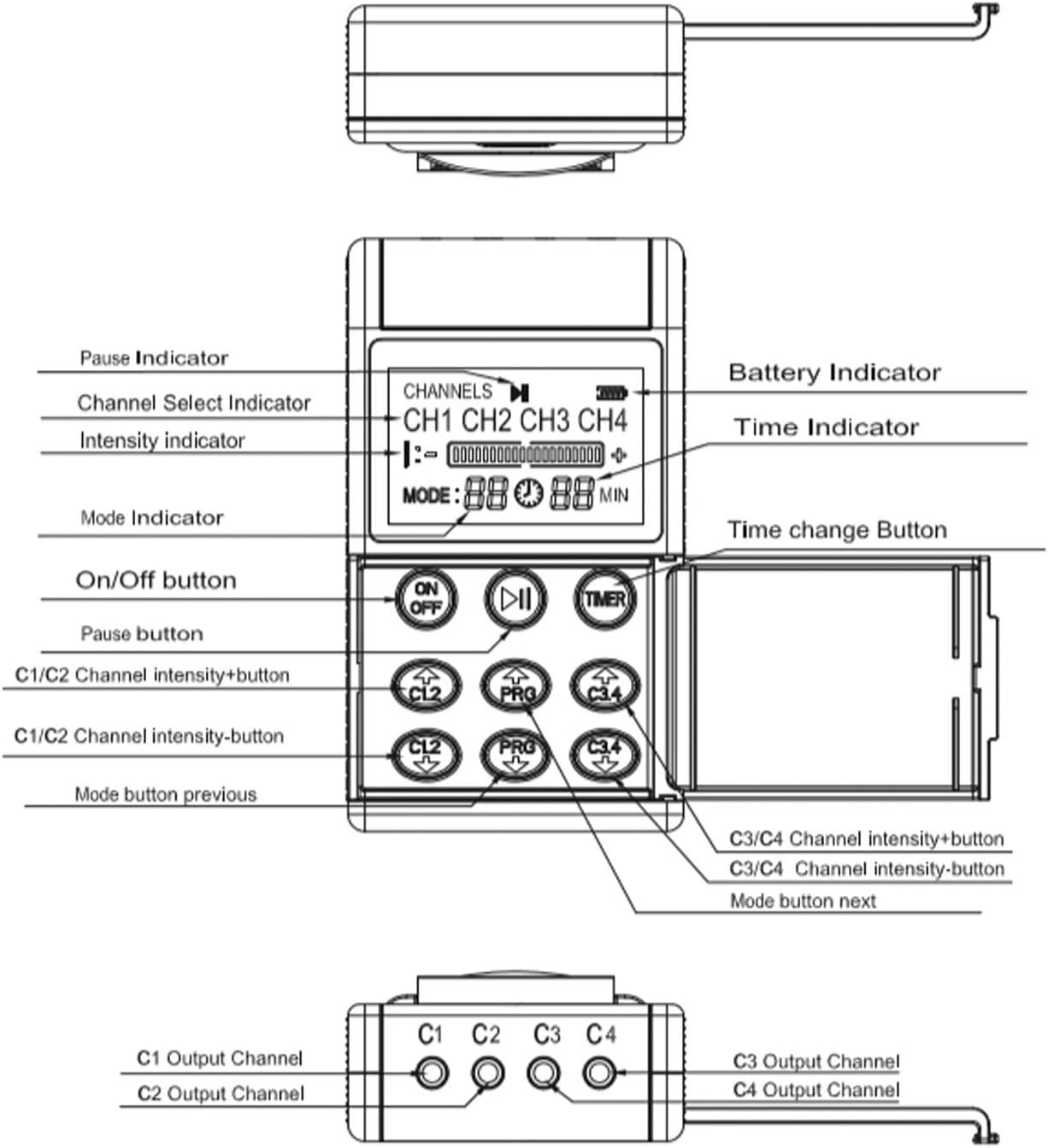
The HealthmateForever CT15AB features a clear LCD screen and intuitive controls for ease of use. It includes four independent output channels, allowing for simultaneous treatment of multiple areas or larger muscle groups.

5. Setup
5.1 Battery Installation
- Open the battery compartment cover on the back of the device.
- Insert the three AAA batteries, ensuring correct polarity (+/-).
- Close the battery compartment cover securely.
5.2 Connecting Electrode Pads
- Connect the lead wires to the output channels (C1, C2, C3, C4) at the top of the device. Each lead wire typically has two connectors for electrode pads.
- Attach the electrode pads to the pins at the end of the lead wires. Ensure a secure connection.
5.3 Applying Electrode Pads
- Clean and dry the skin area where the pads will be applied. Remove any lotions, oils, or sweat.
- Peel the electrode pads from their protective film.
- Apply the pads firmly to the desired treatment area. Ensure good contact with the skin.
- For optimal results, place pads at least one inch apart. Refer to the recommended placement guidelines in Section 6.4.
6. Operating Instructions
6.1 Power On/Off
- To turn on: Press the ON/OFF button. The LCD screen will illuminate.
- To turn off: Press and hold the ON/OFF button until the screen turns off.
6.2 Selecting Modes
- The device offers multiple massage modes. Use the MODE buttons (previous/next) to cycle through the available programs.
- The current mode number will be displayed on the LCD screen.
6.3 Adjusting Intensity
- The CT15AB has four independent channels (C1, C2, C3, C4). Intensity is adjusted in pairs: C1/C2 and C3/C4.
- To increase intensity for C1/C2: Press the C1/C2 intensity+ button.
- To decrease intensity for C1/C2: Press the C1/C2 intensity- button.
- To increase intensity for C3/C4: Press the C3/C4 intensity+ button.
- To decrease intensity for C3/C4: Press the C3/C4 intensity- button.
- Start with the lowest intensity and gradually increase until a comfortable, yet effective, sensation is felt. Avoid increasing intensity to an uncomfortable level.
6.4 Setting Timer
- Press the TIMER button to adjust the treatment duration.
- The time will be displayed in minutes on the LCD screen.
- The device will automatically shut off once the set time has elapsed.
6.5 Recommended Pad Placement
Proper electrode pad placement is crucial for effective treatment. The following images illustrate common placement areas for various body parts and conditions.


7. Maintenance
7.1 Cleaning the Device
- Wipe the device with a soft, damp cloth. Do not use abrasive cleaners or immerse the device in water.
- Ensure the device is completely dry before storage or next use.
7.2 Electrode Pad Care
- After each use, place the electrode pads back onto their protective film to preserve their adhesive quality.
- If pads lose their stickiness, gently wipe the adhesive surface with a damp cloth and let air dry. Do not use soap or harsh chemicals.
- Replace pads when they no longer adhere well to the skin, as poor adhesion can reduce effectiveness and cause discomfort.
7.3 Storage
- Store the device and accessories in a cool, dry place, away from direct sunlight and extreme temperatures.
- Remove batteries if the device will not be used for an extended period to prevent leakage.
8. Troubleshooting
| Problem | Possible Cause | Solution |
|---|---|---|
| Device does not turn on. | Low or dead batteries; incorrect battery installation. | Replace batteries with new AAA batteries; ensure correct polarity. |
| No sensation or weak sensation. | Pads not adhering well; lead wires not connected properly; intensity too low; dead batteries. | Ensure pads are firmly on skin; check lead wire connections; increase intensity gradually; replace batteries. |
| Skin irritation under pads. | Pads used too long; skin not clean; allergic reaction. | Reduce treatment time; clean skin thoroughly before use; discontinue use and consult a physician if irritation persists. |
| One channel not working. | Faulty lead wire; faulty pad; internal device issue. | Try swapping lead wires and pads to isolate the problem. If issue persists, contact customer support. |
9. Specifications
- Model: CT15AB
- Manufacturer: Healthmate International, LLC
- Power Source: AAA Batteries
- Channels: 4 Output Channels
- Date First Available: January 21, 2015
10. Warranty and Support
HealthmateForever products are manufactured under strict quality control. For warranty information or technical support, please refer to the warranty card included with your product or visit the official HealthmateForever website. Keep your purchase receipt as proof of purchase for any warranty claims.
11. Legal Disclaimer
Statements regarding dietary supplements have not been evaluated by the FDA and are not intended to diagnose, treat, cure, or prevent any disease or health condition.