
Product Overview
The ABB MCB-02 is a 22mm modular contact block designed for industrial electrical applications, specifically for use with pushbutton switches. This component features two Normally Closed (N.C.) contacts, providing reliable electrical switching functionality. Its modular design allows for flexible integration into various control systems.
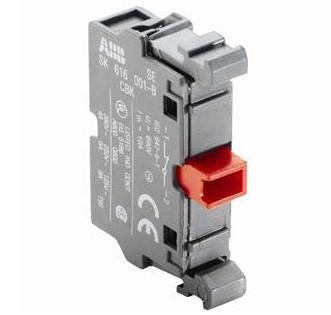
Figure 1: The ABB MCB-02 22mm Contact Block. This image shows the grey modular contact block with a prominent red lever, indicating its operational state. Various technical specifications and certifications are visible on its side.
Safety Information
Always adhere to local electrical codes and safety regulations when installing, operating, or maintaining this product. Failure to do so may result in serious injury or damage to equipment.
- Ensure power is disconnected before installation or maintenance.
- Only qualified personnel should perform electrical work.
- Use appropriate personal protective equipment (PPE).
- Verify correct wiring and connections before applying power.
- Do not exceed the specified electrical ratings of the contact block.
Setup and Installation
The MCB-02 contact block is designed for easy integration with compatible 22mm pushbutton operators and enclosures. It typically mounts behind the panel.
- Preparation: Ensure the control panel or enclosure has a standard 22mm mounting hole for the pushbutton operator.
- Mounting: Attach the contact block to the rear of the pushbutton operator mechanism. The modular design allows for secure snap-on installation.
- Wiring: Connect the electrical wires to the screw terminals of the contact block. The MCB-02 features two Normally Closed (N.C.) contacts. Refer to your system's wiring diagram for correct terminal assignments. Ensure all connections are tight and secure.
- Verification: After wiring, visually inspect all connections for proper insulation and secure fit.
For detailed wiring diagrams, consult the specific pushbutton operator's manual or system schematics.
Operating Principles
The ABB MCB-02 is a Normally Closed (N.C.) contact block. This means that in its default, unactuated state, the electrical circuit through the contacts is closed (current can flow). When the associated pushbutton operator is pressed, the contact block actuates, causing the N.C. contacts to open, thereby breaking the electrical circuit.
- Normally Closed (N.C.): Circuit is closed when the pushbutton is not pressed.
- Actuation: Pressing the pushbutton opens the N.C. circuit.
- Release: Releasing the pushbutton returns the N.C. circuit to its closed state.
This functionality is commonly used for stop functions, emergency stops, or any application where a circuit needs to be broken upon activation.
Maintenance
The ABB MCB-02 contact block is designed for long-term reliability and typically requires minimal maintenance. However, periodic inspection is recommended to ensure optimal performance and safety.
- Visual Inspection: Regularly check for any signs of physical damage, discoloration, or loose connections.
- Terminal Tightness: Over time, vibrations can loosen screw terminals. Periodically check and re-tighten terminal screws if necessary, ensuring not to overtighten.
- Cleanliness: Keep the contact block free from dust, dirt, and moisture. Use a dry, lint-free cloth for cleaning. Do not use solvents or abrasive cleaners.
- Functionality Test: Periodically test the operation of the associated pushbutton and contact block to ensure proper opening and closing of the contacts.
If any damage or malfunction is observed, replace the contact block immediately.
Troubleshooting
This section provides guidance for common issues that may arise with the MCB-02 contact block.
| Problem | Possible Cause | Solution |
|---|---|---|
| Contact block does not open circuit when pushbutton is pressed. |
|
|
| Intermittent circuit opening/closing. |
|
|
| Physical damage to the contact block. |
|
|
If the problem persists after attempting these solutions, contact ABB technical support or a qualified electrician.
Specifications
Key technical specifications for the ABB MCB-02 22mm Contact Block:
- Model Number: MCB-02
- Item Pitch: 22 Millimeters
- Number Of Contacts: 2
- Contact Type: Normally Closed (N.C.)
- Connector Type: Screw
- Mounting Type: DIN Rail Mount (typically via pushbutton operator)
- Material: Nylon, Plastic
- Color: Red (for the lever/actuator)
- Number Of Poles: 2
- Manufacturer: ABB
- ASIN: B00SGBF79E
- UPC: 662019229362
Note: For detailed electrical ratings (voltage, current), refer to the product's official datasheet or markings on the device itself.
Warranty and Support
For information regarding product warranty, technical support, or service, please contact ABB directly through their official website or authorized distributors. Keep your purchase receipt and product model number (MCB-02) available when seeking support.
ABB Official Website: www.abb.com


