
1. Introduction
Thank you for purchasing the Vivitar V143BT-BLK Bluetooth Retro Boom Box Speaker. This manual provides essential information for the safe and efficient operation of your device. Please read it thoroughly before use and retain it for future reference.
Package Contents:
- Vivitar V143BT-BLK Bluetooth Retro Boom Box Speaker
- USB Charging Cable
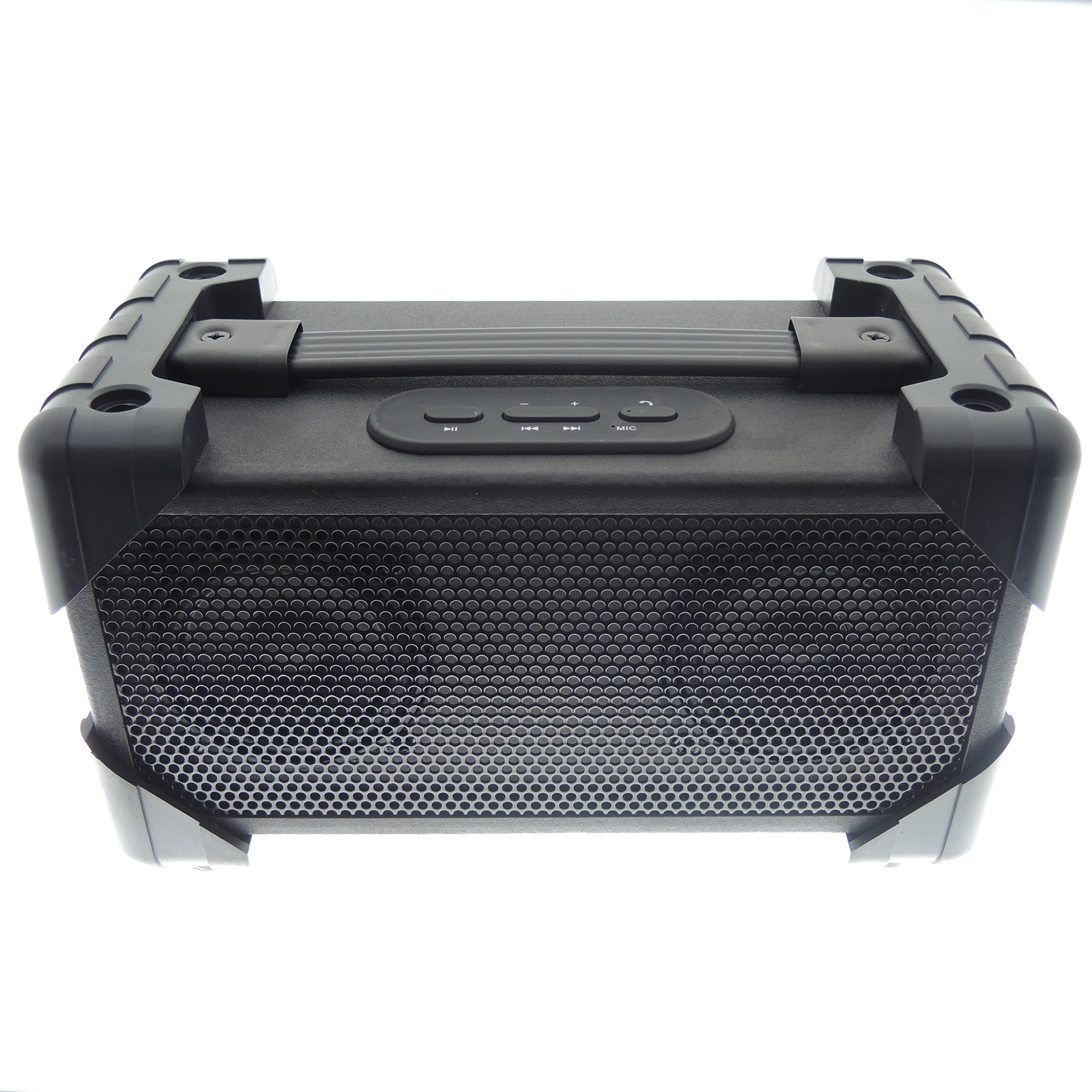
Image 1.1: The Vivitar V143BT-BLK Bluetooth Retro Boom Box Speaker, showcasing its overall design.
2. Product Overview
Familiarize yourself with the various parts and controls of your speaker.
Front Panel:

Image 2.1: Front view of the speaker, featuring the protective grille covering the audio drivers.
Rear Panel and Controls:

Image 2.2: Rear panel showing the ON/OFF switch, DC 5V charging port, and AUX IN port.
- ON/OFF Switch: Powers the speaker on or off.
- DC 5V Port: Connect the USB charging cable here to charge the speaker.
- AUX IN Port: Connect external audio devices using a 3.5mm audio cable (not included).
Top Panel Controls:

Image 2.3: Top view of the speaker, displaying the control buttons for playback and volume.
- Play/Pause Button: Controls audio playback.
- Volume Up/Next Track Button: Increases volume or skips to the next track.
- Volume Down/Previous Track Button: Decreases volume or goes to the previous track.
- Mode Button: Switches between Bluetooth and AUX modes.
3. Setup
3.1 Charging the Speaker
- Connect the small end of the included USB charging cable to the DC 5V port on the rear of the speaker.
- Connect the large end of the USB charging cable to a USB power adapter (not included) or a computer's USB port.
- Allow the speaker to charge fully before first use. The charging indicator light (if present) will typically change color or turn off when charging is complete.
3.2 Powering On/Off
- To power on, slide the ON/OFF switch on the rear panel to the 'ON' position.
- To power off, slide the ON/OFF switch to the 'OFF' position.
4. Operating Instructions
4.1 Bluetooth Pairing
- Ensure the speaker is powered on and in Bluetooth mode. If not, press the Mode button until the Bluetooth indicator light flashes, indicating it is ready for pairing.
- Enable Bluetooth on your smartphone, tablet, or other audio device.
- Search for available Bluetooth devices. The speaker will appear as "Vivitar V143BT-BLK" or similar.
- Select the speaker from the list to connect. Once paired, the Bluetooth indicator light will typically stop flashing and remain solid.
- You can now play audio wirelessly from your connected device.
4.2 Playing Music (Bluetooth Mode)
- Play/Pause: Press the Play/Pause button to start or pause playback.
- Volume Control: Press and hold the Volume Up button to increase volume. Press and hold the Volume Down button to decrease volume.
- Track Control: Briefly press the Volume Up button to skip to the next track. Briefly press the Volume Down button to go to the previous track.
4.3 Using the Auxiliary Input (AUX IN)
- Connect one end of a 3.5mm audio cable (not included) to the AUX IN port on the rear of the speaker.
- Connect the other end of the audio cable to the headphone jack or audio output of your external audio device.
- Press the Mode button on the speaker until it switches to AUX mode.
- Play audio from your external device. Volume can be controlled via the speaker or the external device.
4.4 Speakerphone Function
The speaker features a built-in microphone for hands-free calls when connected via Bluetooth.
- When a call comes in, music playback will pause.
- Press the Play/Pause button to answer the call.
- Speak into the speaker.
- Press the Play/Pause button again to end the call. Music playback will resume.
5. Maintenance
5.1 Cleaning
- Wipe the speaker with a soft, dry cloth.
- Do not use abrasive cleaners, waxes, or solvents.
- Avoid getting moisture into any openings.
5.2 Storage
- Store the speaker in a cool, dry place away from direct sunlight and extreme temperatures.
- If storing for an extended period, charge the battery periodically to maintain its lifespan.
6. Troubleshooting
| Problem | Possible Solution |
|---|---|
| Speaker does not power on. | Ensure the battery is charged. Connect the speaker to a power source using the USB charging cable. |
| Cannot pair via Bluetooth. |
|
| No sound or low volume. |
|
| Sound distortion. |
|
7. Specifications
| Feature | Detail |
|---|---|
| Model Name | Vivitar V143BT-BLK |
| Connectivity Technology | Bluetooth |
| Wireless Communication Technology | Bluetooth |
| Bluetooth Range | 10 Meters (approx. 30 feet) |
| Speaker Type | Portable, Outdoor |
| Audio Output Mode | Stereo |
| Speaker Maximum Output Power | 5 Watts |
| Power Source | Battery Powered |
| Control Method | Buttons on device |
| Item Weight | 3.3 Pounds (1.5 kg) |
| Product Dimensions | 13 x 9 x 8 inches (33 x 22.8 x 20.3 cm) |
| Color | Black |
| Water Resistance Level | Not Water Resistant |
| Compatible Devices | Smartphone, Tablet |
8. Warranty & Support
8.1 Limited Warranty
This Vivitar product is covered by a limited warranty against defects in materials and workmanship under normal use. The duration and terms of the warranty may vary by region. Please refer to the warranty card included with your purchase or visit the manufacturer's website for detailed information.
The warranty does not cover damage caused by misuse, accident, unauthorized modification, or external causes such as drops or liquid damage.
8.2 Customer Support
For technical assistance, warranty claims, or product inquiries, please contact Vivitar customer support. Contact information can typically be found on the Vivitar official website or on the product packaging.
When contacting support, please have your product model number (V143BT-BLK) and proof of purchase readily available.
