
Liebert GXT4-2000RT120
Contents
Liebert GXT4-2000RT120 UPS User Manual
Uninterruptible Power Supply (UPS)
1. Introduction
This manual provides essential information for the safe and efficient installation, operation, and maintenance of your Liebert GXT4-2000RT120 Uninterruptible Power Supply (UPS). The Liebert GXT4 UPS, with a capacity of 2000VA/1800W, is a compact and reliable solution designed to maintain the health and availability of your IT infrastructure. Utilizing on-line double-conversion technology, it protects equipment from power disturbances such as sags, surges, and noise without relying on battery power, thereby extending battery life. This UPS operates on 120V AC power, includes hot-swappable batteries, and comes with all necessary hardware for installation as a tower or in an equipment rack. It is Energy Star qualified and features a selectable eco-mode for enhanced efficiency during off-peak hours.
2. Safety Information
WARNING: Read all safety instructions before installing, operating, or servicing this equipment.
- Electrical Hazard: This unit contains hazardous voltages. Only qualified personnel should perform installation and maintenance.
- Battery Safety: Batteries can present a risk of electrical shock and high short-circuit current. Observe all precautions when working with batteries.
- Grounding: Ensure the UPS is properly grounded to prevent electrical shock.
- Ventilation: Do not block ventilation openings. Ensure adequate airflow around the unit to prevent overheating.
- Liquid Exposure: Do not expose the UPS to rain or snow. Do not use near water or in excessively humid environments.
3. What's in the Box
Verify that all components are present upon unpacking:
- Liebert GXT4 2000VA UPS
- 4-post Rack-mounting Rail Kit
- Tower Support Stands
- Input Power Cable (10 feet)
- USB Cable (3.9 feet)
- Quick Start Guide
- User Manual
- Liebert Multilink Shutdown Software (Installation CD)
- UPS Configuration Program (Installation CD)
- Warnings, safety instructions booklet, and WEEE recycling sheet
- One 1 ft L5-20R to 5-20P Cable (for specific input configurations)

Figure 3.1: Contents of the Liebert GXT4-2000RT120 UPS packaging.
4. Product Overview
The Liebert GXT4-2000RT120 UPS is designed to provide reliable power protection for critical IT equipment. It features true on-line double-conversion technology, ensuring continuous, clean power to connected devices. The unit supports both rack and tower configurations for flexible deployment.
4.1. Key Features
- On-line Double-Conversion Technology: Provides continuous, high-quality AC power to connected equipment.
- Hot-Swappable Batteries: Allows for battery replacement without interrupting power to connected loads.
- Energy Star Qualified: Designed for energy efficiency, including a selectable eco-mode.
- Flexible Installation: Supports both rack-mount and tower configurations.
- Comprehensive Power Protection: Guards against power outages, sags, surges, and electrical noise.
4.2. Rear Panel Components

Figure 4.1: Rear panel of the UPS, showing various ports and connections.
The rear panel includes:
- Input Power Cable: Connects the UPS to the utility power source.
- Input Circuit Breaker: Provides overcurrent protection for the UPS input.
- Programmable Output Receptacles #1 & #2: Outlets that can be controlled independently for load shedding or sequential startup.
- General Output Receptacles: Standard outlets for connecting equipment.
- External Battery Connector: For connecting optional external battery cabinets to extend runtime.
- USB Port: For communication with a computer for monitoring and shutdown software.
- RS232 Port: Serial communication port for monitoring and control.
- Liebert Intellislot Port: For optional communication cards (e.g., network management card).
- Terminal Block Communication: For advanced communication and control.
- Cooling Fan: Ensures proper thermal management of the unit.
4.3. Front Panel and LCD Display
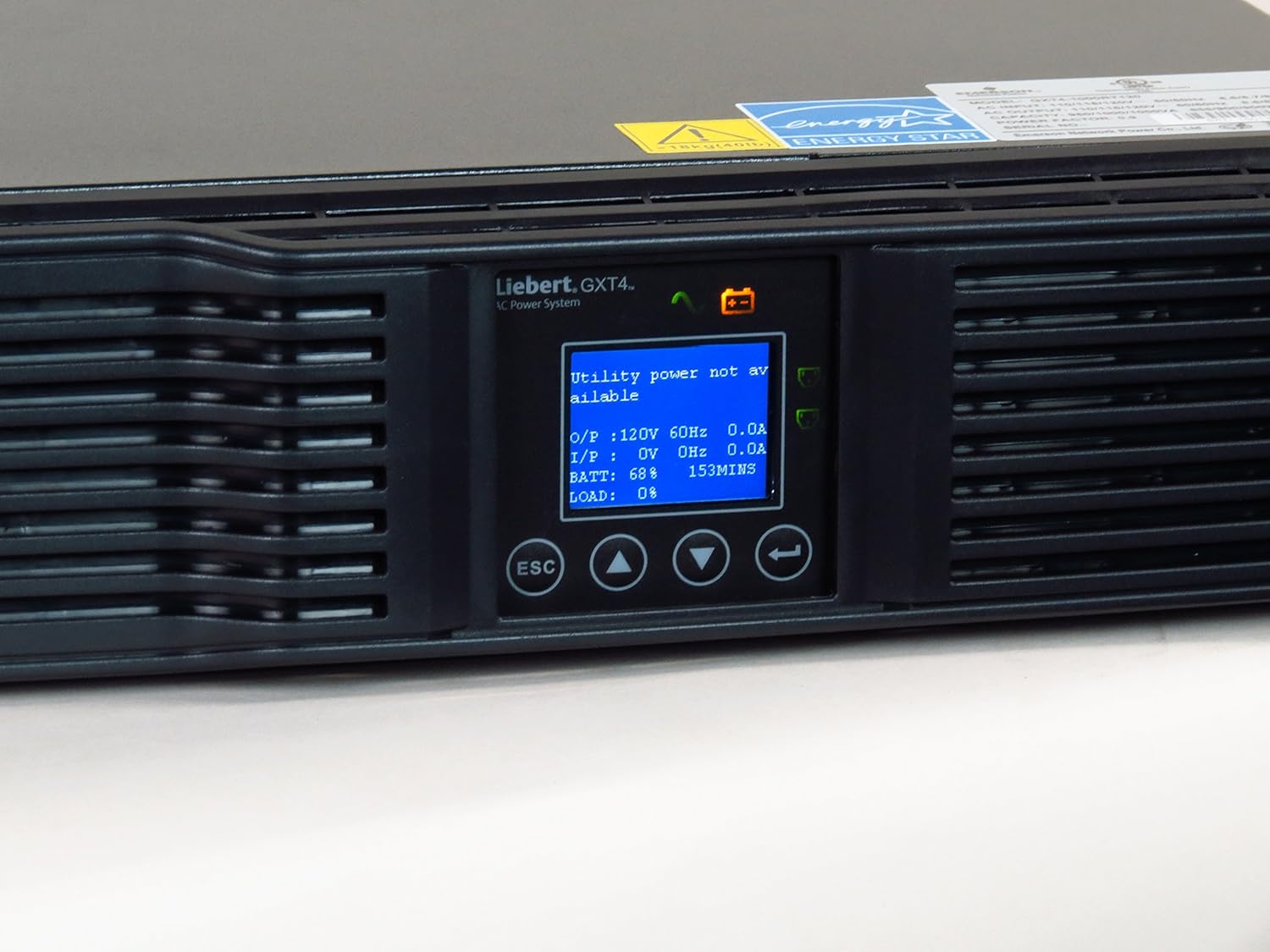
Figure 4.2: LCD Panel and Control Buttons.
The front panel features an LCD display and control buttons for monitoring UPS status, configuring settings, and managing alarms.
- LCD Panel: Displays real-time status, alarms, and configuration menus.
- ESC Button: Used to exit menus or cancel operations.
- UP/DOWN Buttons: Used to navigate through menus and adjust settings.
- ENTER Button: Used to confirm selections or enter sub-menus.
- Inverter Indicator: Illuminates when the UPS is operating on inverter power.
- Battery Indicator: Illuminates when the UPS is operating on battery power.
- Bypass Indicator: Illuminates when the UPS is operating in bypass mode.
- Fault Indicator: Illuminates to indicate a UPS fault condition.
- Programmable Outlet 1/2 Indicators: Show the status of the programmable outlets.
- ECO Mode Indicator: Illuminates when the UPS is operating in Eco-mode for energy efficiency.

Figure 4.3: Energy Star Certification.
The Liebert GXT4-2000RT120 is Energy Star certified, indicating its compliance with energy efficiency guidelines.
Video 4.1: An overview of Vertiv Liebert On-line, Double-Conversion Rack/Tower Smart UPS features and benefits for IT edge environments.
5. Setup
The Liebert GXT4-2000RT120 UPS can be installed in either a rack-mount or tower configuration. Refer to the included Quick Start Guide and User Manual for detailed, step-by-step instructions.
5.1. Rack-Mount Installation
Use the provided 4-post Rack-mounting Rail Kit to install the UPS into a standard 19-inch equipment rack.

Figure 5.1: Rack-mount installation of the UPS.
5.2. Tower Installation
Attach the Tower Support Stands to the bottom of the UPS for stable vertical placement.
5.3. Electrical Connections
- Input Power: Connect the supplied 10-foot input power cable to the UPS input and then to a properly grounded 120V AC utility outlet. Note that the unit may require an L5-20P twist-lock input plug, and an L5-20R to 5-20P adapter is included for compatibility with standard 5-20P outlets.
- Output Connections: Connect your critical equipment to the General Output Receptacles and/or the Programmable Output Receptacles on the rear panel (refer to Figure 4.1).
- Communication: Connect the USB cable from the UPS to your computer for monitoring and shutdown software. The RS232 and Liebert Intellislot ports are available for additional communication options.
- External Batteries (Optional): If using external battery cabinets, connect them to the External Battery Connector.
6. Operating Instructions
6.1. Initial Startup
- After all connections are made, ensure the input circuit breaker is in the 'ON' position.
- Press and hold the 'ON' button on the front panel until the UPS powers on.
- The LCD display will show the current status and initiate self-tests.
6.2. LCD Display and Navigation
The LCD display provides real-time information about the UPS status, input/output voltage, battery charge, and load level. Use the UP/DOWN buttons to navigate through the display screens and the ENTER button to select options or view detailed information. The ESC button allows you to return to the previous screen or exit a menu.

Figure 6.1: UPS LCD display showing operational data.
6.3. Eco-Mode Operation
The UPS features a selectable Eco-mode to enhance efficiency. When enabled, the UPS operates in a high-efficiency mode during stable utility power conditions. Refer to the User Manual for instructions on how to enable or disable Eco-mode via the LCD panel.
6.4. Software Monitoring
Install the Liebert Multilink Shutdown Software and UPS Configuration Program from the included CD onto a connected computer. This software allows for remote monitoring, configuration, and graceful shutdown of connected systems during extended power outages.
7. Maintenance
Regular maintenance ensures the longevity and optimal performance of your Liebert GXT4 UPS.
- Battery Replacement: The UPS features hot-swappable batteries, allowing for replacement without powering down connected equipment. Replace batteries when the battery indicator suggests a fault or after their expected lifespan (typically 3-5 years). Refer to the User Manual for detailed battery replacement procedures.
- Maintenance Bypass: For internal maintenance or service, the UPS can be switched to maintenance bypass mode. This allows utility power to directly supply the connected loads while the UPS is serviced, preventing downtime.
- Cleaning: Keep the ventilation openings clear of dust and debris. Use a dry cloth to clean the exterior of the unit. Do not use liquid cleaners.
- Environmental Conditions: Ensure the UPS operates within the specified temperature and humidity ranges to prevent premature component failure.
8. Troubleshooting
This section provides solutions to common issues. For more complex problems, consult the full User Manual or contact technical support.
| Problem | Possible Cause | Solution |
|---|---|---|
| UPS does not power on | No utility power; UPS not connected; Input breaker tripped | Check power source; Ensure power cable is secure; Reset input circuit breaker. |
| UPS beeping continuously | On battery power; Low battery; Overload; Fault condition | Check utility power; Allow batteries to charge; Reduce load; Check LCD for fault code. |
| Connected equipment loses power | UPS shut down due to low battery; Overload; UPS fault | Allow UPS to recharge; Reduce load; Consult LCD for fault details. |
| Battery indicator illuminated | Battery fault; End of battery life | Perform battery self-test; Replace batteries if necessary. |
9. Specifications
| Feature | Detail |
|---|---|
| Model Number | GXT4-2000RT120 |
| Capacity (VA/W) | 2000VA / 1800W |
| Input Voltage | 120 Volts (AC) |
| Output Voltage | 120 Volts (AC) |
| Output Current | 15 Amps |
| Power Plug Type | Type B - 3 pin (North American) / L5-20P (with adapter) |
| Number of Outlets | 6 |
| Battery Type | Lead Acid |
| Runtime (Full Load) | 3 minutes |
| Form Factor | Rack / Tower |
| Dimensions (H x W x D) | 3.4 x 16.9 x 19.7 inches |
| Weight | 56.1 Pounds |
| Color | Black |
| Material | Metal |
| Manufacturer | Emerson Network Power |
| Certifications | Energy Star |

Figure 9.1: Physical dimensions of the UPS.
10. Warranty and Support
10.1. Warranty Information
The Liebert GXT4-2000RT120 UPS comes with a 2-year warranty. Please retain your proof of purchase for warranty claims. For specific terms and conditions, refer to the warranty documentation included with your product.
10.2. Technical Support
For technical assistance, troubleshooting beyond this manual, or warranty service, please contact Liebert customer support. Contact information can typically be found on the manufacturer's website or in the included documentation.
Documents and downloads
Ask a question about this manual
Ask about setup, troubleshooting, compatibility, parts, safety, or missing instructions. Manuals+ will review the question and use this page’s manual context to help answer it.