NEWLUX Multifunction Kitchen Robot
Model: NL585 - User Manual
1. Introduction
Thank you for choosing the NEWLUX Multifunction Kitchen Robot. This appliance is designed to simplify your cooking experience with its versatile functions and automatic programs. Please read this manual carefully before operating the appliance to ensure safe and efficient use. Keep this manual for future reference.

Figure 1.1: NEWLUX Multifunction Kitchen Robot with recipe app integration.
2. Safety Information
Always follow basic safety precautions when using electrical appliances to reduce the risk of fire, electric shock, and/or injury to persons.
- Do not immerse the main unit in water or any other liquid.
- Ensure the voltage rating on the appliance matches your local power supply.
- Keep out of reach of children.
- Do not operate the appliance if the power cord or plug is damaged.
- Always unplug the appliance when not in use and before cleaning.
- Use only accessories recommended by the manufacturer.
3. Product Overview and Components
Familiarize yourself with the parts of your NEWLUX Kitchen Robot.
- Main Unit with Control Panel
- Removable Inner Pot (5L capacity, non-stick coating)
- Steamer Basket
- Measuring Cup
- Spatula and Ladle

Figure 3.1: All components included with the NEWLUX Kitchen Robot.
4. Setup
Before first use, ensure all packaging materials are removed and clean all removable parts.
- Unpack the appliance and all accessories.
- Wash the inner pot, steamer basket, measuring cup, spatula, and ladle with warm soapy water. Rinse thoroughly and dry completely.
- Wipe the exterior of the main unit with a damp cloth.
- Place the main unit on a stable, flat, heat-resistant surface, away from water and heat sources.
- Carefully place the clean, dry inner pot into the main unit. Ensure it is seated correctly.

Figure 4.1: Correct placement of the inner pot.
5. Operating Instructions
The NEWLUX Kitchen Robot features 9 functions and 8 pre-configured automatic menus. It can be programmed up to 24 hours in advance.
5.1 Basic Operation
- Add your ingredients to the inner pot.
- Close the lid securely.
- Plug the appliance into a power outlet. The display will light up.
- Press the 'MENU' button to cycle through the pre-configured programs (e.g., Rice, Steam, Stew, Fry, Grill, Oven, Slow Cooking, Soup).
- Once a program is selected, you can adjust the cooking time and temperature using the 'COOKING TIME' and 'TEMP' buttons respectively.
- Press 'ON/OFF' to start the cooking process.
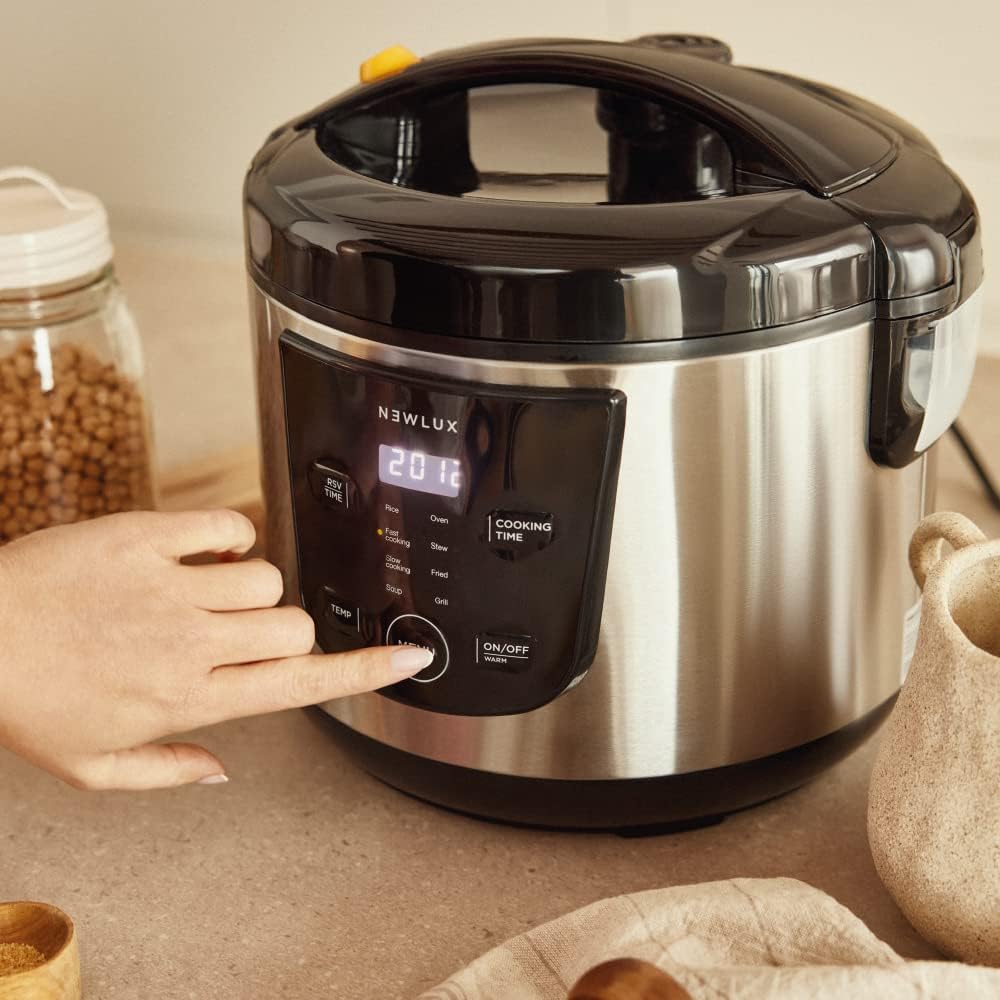
Figure 5.1: Interacting with the control panel.
5.2 Programmable Timer (24H)
To program a delayed start:
- Add ingredients and select your desired cooking program and settings.
- Press the 'RSV TIME' (Reservation Time) button.
- Use the '+' and '-' buttons to set the desired delay time (up to 24 hours). This is the time until cooking begins.
- Press 'ON/OFF' to confirm. The appliance will start cooking automatically after the set delay.
5.3 Keep Warm Function
After cooking is complete, the appliance automatically switches to 'KEEP WARM' mode for up to 24 hours, maintaining food temperature without compromising quality or taste.
5.4 Using the Steamer Basket
For steaming vegetables, fish, or other foods:
- Add water to the inner pot (ensure it does not exceed the maximum fill line).
- Place the steamer basket with your ingredients inside the inner pot.
- Select the 'STEAM' program and adjust time as needed.
- Close the lid and press 'ON/OFF' to start.

Figure 5.4: Using the steamer basket for healthy cooking.
6. Maintenance and Cleaning
Regular cleaning ensures the longevity and optimal performance of your appliance.
- Always unplug the appliance and allow it to cool completely before cleaning.
- Remove the inner pot and wash it with warm, soapy water using a soft sponge. Do not use abrasive cleaners or metal scrubbers to protect the non-stick coating.
- The inner pot is NOT dishwasher safe to preserve the non-stick coating.
- Clean the steamer basket, measuring cup, spatula, and ladle with warm, soapy water. These accessories are generally dishwasher safe, but hand washing is recommended for longevity.
- Wipe the exterior of the main unit with a damp cloth. Do not immerse the main unit in water.
- Ensure all parts are completely dry before storing or next use.
7. Troubleshooting
| Problem | Possible Cause | Solution |
|---|---|---|
| Appliance does not turn on. | Not plugged in; power outage; faulty outlet. | Check power cord connection; check circuit breaker; try a different outlet. |
| Food not cooking properly. | Incorrect program/time/temperature selected; insufficient liquid. | Verify settings according to recipe; add appropriate amount of liquid. |
| Lid not closing securely. | Inner pot not seated correctly; food obstruction. | Ensure inner pot is properly placed; check for food debris around the rim. |
| Food sticks to the pot. | Insufficient oil/liquid; high heat for too long; damaged non-stick coating. | Use adequate oil/liquid; adjust cooking time/temperature; ensure proper cleaning to avoid coating damage. |
8. Specifications
| Feature | Detail |
|---|---|
| Model Number | NL585 |
| Brand | NEWCOOK |
| Capacity | 5 Liters |
| Power | 700 Watts |
| Voltage | 240 Volts |
| Material | Stainless Steel (exterior), Non-stick (inner pot) |
| Dimensions (L x W x H) | 22 x 28 x 23 cm |
| Weight | 3.6 kg |
| Special Features | 9 Functions, 8 Pre-configured Menus, 24H Programmable, Automatic Keep Warm (24H), Temperature Sensors, Adjustable Power |
9. Warranty and Support
This product comes with a standard manufacturer's warranty. For specific warranty terms and conditions, please refer to the warranty card included in the product packaging or visit the official NEWCOOK website.
For technical support, troubleshooting assistance, or spare parts, please contact NEWCOOK customer service. Have your model number (NL585) and purchase date ready when contacting support.
Online Resources:
- Visit the NEWCOOK Brand Store on Amazon: NEWCOOK Brand Store

