
Introduction
The Comet CFX-5140 Triplexer is a high-quality RF signal combiner and splitter designed for amateur radio operators. It allows for the efficient integration of HF, 6M, 2M, and 70cm bands into a single common feed line. This device ensures reliable multi-band performance by covering three distinct frequency ranges: 1.3 to 90 MHz, 130 to 200 MHz, and 380 to 500 MHz.
Key Features
- Three-Band Operation: Covers 1.3-90 MHz (HF/6M), 130-200 MHz (2M), and 380-500 MHz (70cm).
- High Isolation: Over 55 dB separation between ports to minimize cross-band interference.
- Low Insertion Loss: Preserves signal strength across all supported frequency ranges.
- Robust Connectors: Equipped with durable SO-239 and PL-259 connectors for secure connections.
- High Power Handling: Supports up to 800 W PEP on HF/VHF bands and 500 W PEP on UHF.
- Simplified Installation: Enables a single coax run for multiple frequency ranges, reducing cabling complexity.
Safety Information
Please read and understand all safety instructions before operating the Comet CFX-5140 Triplexer. Failure to do so may result in equipment damage or personal injury.
- Power Limits: Do not exceed the specified power handling capabilities (800 W PEP for HF/VHF, 500 W PEP for UHF). Exceeding these limits can damage the triplexer and connected equipment.
- Grounding: Ensure all connected radio equipment and antennas are properly grounded according to local electrical codes and amateur radio practices.
- Environmental Conditions: Install the triplexer in a location protected from extreme weather conditions, excessive moisture, and direct sunlight to ensure optimal performance and longevity.
- Connector Care: Always use appropriate connectors and ensure they are clean and securely tightened to prevent signal loss and potential arcing.
Package Contents
Verify that all items are present and in good condition upon unpacking:
- Comet CFX-5140 Triplexer Unit
- Instruction Manual (this document)
Setup and Installation
The CFX-5140 Triplexer can be used to combine multiple radio outputs into a single antenna feed line or to split a single antenna feed line to multiple radios, depending on your station configuration.
Connecting the Triplexer
The triplexer features three input/output ports for specific frequency bands and one common port. Identify the ports as follows:
- Port 1 (HF/6M): For 1.3-90 MHz (PL-259 connector)
- Port 2 (2M): For 130-200 MHz (PL-259 connector)
- Port 3 (70cm): For 380-500 MHz (PL-259 connector)
- Common Port: Connects to the single antenna or radio (SO-239 connector)
Installation Steps:
- Determine whether you are combining signals from multiple radios to one antenna or splitting a single antenna signal to multiple radios.
- Connect your HF/6M radio or antenna feed line to the 1.3-90 MHz port.
- Connect your 2M radio or antenna feed line to the 130-200 MHz port.
- Connect your 70cm radio or antenna feed line to the 380-500 MHz port.
- Connect the common port (SO-239) to your single multi-band antenna or the common input of your multi-band radio system.
- Ensure all coaxial cable connections are secure and properly tightened.
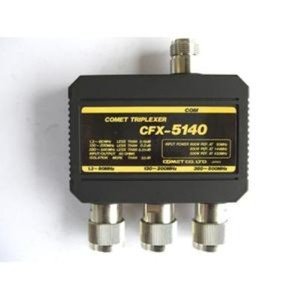
Image: The Comet CFX-5140 Triplexer unit, showing its compact design and clearly labeled input/output ports for HF/6M, 2M, 70cm, and the common antenna connection.
Operation
The CFX-5140 Triplexer operates passively, requiring no external power. It uses precision band-pass filters to separate or combine RF signals based on their frequency. When used as a combiner, it allows three different radios operating on distinct bands to share a single multi-band antenna. When used as a splitter, it allows a single multi-band antenna to feed three different radios, each tuned to one of the supported frequency ranges.
- Ensure your radios are tuned to frequencies within the specified ranges for each port to achieve optimal performance and isolation.
- The high isolation between ports prevents signals from one band from interfering with another, maintaining clear communication.
- The low insertion loss ensures minimal signal attenuation, preserving the power of your transmitted signals and the sensitivity of your received signals.
Maintenance
The Comet CFX-5140 Triplexer is designed for durability and requires minimal maintenance. Follow these guidelines to ensure its longevity:
- Cleaning: Keep the unit clean and free from dust and debris. Use a soft, dry cloth for cleaning. Do not use harsh chemicals or abrasive materials.
- Connector Inspection: Periodically inspect all coaxial connectors for corrosion or damage. Clean connectors with an appropriate contact cleaner if necessary.
- Environmental Protection: While robust, protecting the unit from direct exposure to severe weather, extreme temperatures, and high humidity will extend its lifespan.
Troubleshooting
If you experience issues with your CFX-5140 Triplexer, consider the following troubleshooting steps:
- No Signal or Weak Signal:
- Check all coaxial cable connections to ensure they are secure and properly tightened.
- Verify that the correct radio/antenna is connected to the corresponding frequency port on the triplexer.
- Inspect coaxial cables for damage or shorts.
- High SWR (Standing Wave Ratio):
- Ensure your antenna is properly tuned for the operating frequency. The triplexer itself should not introduce significant SWR if correctly installed.
- Confirm that the power output from your radio does not exceed the triplexer's maximum power handling capabilities.
- Check for any moisture ingress or corrosion in the connectors or cables.
- Interference Between Bands:
- While the triplexer offers high isolation, ensure that your radios are operating within their designated frequency ranges for each port.
- Verify that all connections are tight and properly shielded.
Specifications
| Feature | Detail |
|---|---|
| Model Number | CFX-5140 |
| Frequency Range (Port 1) | 1.3 - 90 MHz (HF/6M) |
| Frequency Range (Port 2) | 130 - 200 MHz (2M) |
| Frequency Range (Port 3) | 380 - 500 MHz (70cm) |
| Impedance | 50 Ohms |
| Isolation | >55 dB |
| Power Handling (HF/VHF) | 800 W PEP |
| Power Handling (UHF) | 500 W PEP |
| Connectors | PL-259 (Band Ports), SO-239 (Common Port) |
| Manufacturer | Comet |
Warranty Information
The Comet CFX-5140 Triplexer comes with a 1-year warranty from the date of purchase. This warranty covers defects in materials and workmanship under normal use. Please retain your proof of purchase for warranty claims. The warranty does not cover damage caused by misuse, unauthorized modifications, exceeding power limits, or improper installation.
Customer Support
For technical assistance, troubleshooting guidance, or warranty inquiries regarding your Comet CFX-5140 Triplexer, please contact Comet customer support. Refer to the official Comet website or your product packaging for the most current contact information.