
1. Introduction
The Royal Sovereign RCD-4000D is an advanced counterfeit detection device designed to verify the authenticity of currency using dual-band infrared camera technology. This manual provides essential information for the proper setup, operation, maintenance, and troubleshooting of your detector, ensuring reliable performance and security.
The RCD-4000D quickly identifies photosensitive inks and anti-counterfeit design patterns that are not visible to the naked eye, displaying them on a large LCD screen for easy verification. Its compact design allows for versatile placement in various business environments.
2. Safety Information
- Read all instructions before operating the device.
- Do not expose the device to water or excessive moisture.
- Use only the power adapter supplied with the unit.
- Avoid placing the device in direct sunlight or near heat sources.
- Do not attempt to open or repair the device yourself. Refer all servicing to qualified personnel.
- Keep the device away from children.
3. Package Contents
Carefully unpack the box and ensure all items are present:
- Royal Sovereign RCD-4000D Counterfeit Detector Unit
- Power Adapter
- User Manual (this document)
4. Setup
- Unpacking: Remove the RCD-4000D from its packaging. Retain the packaging for future storage or transport.
- Placement: Place the detector on a stable, flat surface. The unit can stand freely or be mounted for convenience. Ensure adequate ventilation around the device.
- Power Connection: Connect the supplied power adapter to the DC IN port on the detector. Plug the other end of the adapter into a standard electrical outlet.
- Power On: Press the power button located on the top panel of the device. The LCD screen will illuminate.
5. Operating Instructions
The RCD-4000D is designed for straightforward currency verification.
- Power On: Ensure the device is powered on. The LCD screen should be active.
- Place Currency: Gently slide a banknote onto the detection platform, ensuring it lies flat. The infrared camera will automatically capture the image.

- Observe Display: The large LCD display will show the infrared image of the banknote. Authentic currency will reveal specific photosensitive inks and security patterns that are not visible under normal light.

- Utilize Currency Guide: The base of the detector features a currency guide illustrating the typical infrared locations for various denominations of US and Canadian currency. Refer to this guide to cross-reference the patterns observed on the screen.
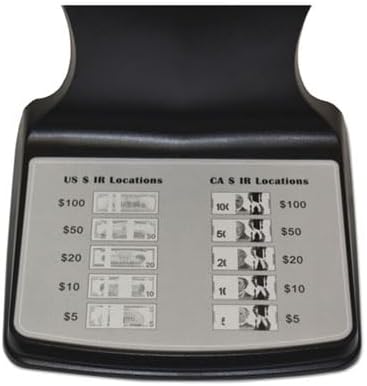
- Dual Band Detection: The dual-band infrared detection enhances visibility, causing photosensitive inks to appear more distinctly or to 'blink', aiding in easier detection of genuine features.
- Power Off: When not in use, press the power button to turn off the device.
6. Maintenance
- Cleaning: Regularly wipe the exterior of the device and the LCD screen with a soft, dry, lint-free cloth. Do not use abrasive cleaners or solvents.
- Storage: Store the detector in a cool, dry place away from direct sunlight and extreme temperatures when not in use for extended periods.
- Power Cord: Inspect the power cord periodically for any signs of damage. If damaged, discontinue use and contact support.
7. Troubleshooting
| Problem | Possible Cause | Solution |
|---|---|---|
| Device does not power on. | No power supply; faulty power adapter; unit malfunction. | Ensure power adapter is securely connected to both the unit and the outlet. Test the outlet with another device. If issues persist, contact customer support. |
| LCD screen is blank or unclear. | Currency not placed correctly; screen damage; internal issue. | Ensure the banknote is flat on the detection platform. Clean the screen if smudged. If the screen remains blank or unclear, contact customer support. |
| Infrared features are not visible. | Counterfeit bill; incorrect currency placement; sensor obstruction. | Verify the bill is genuine using other methods if available. Ensure the bill is correctly positioned. Check for any obstructions on the detection platform. |
8. Specifications
| Feature | Detail |
|---|---|
| Model Number | RCD-4000D |
| Dimensions (L x W x H) | 4.7 x 5.2 x 5.8 inches |
| Item Weight | 0.83 Pounds (13.3 ounces) |
| Power Source | Battery Powered (Adapter included) |
| Wireless Communication Technology | Infrared |
| Special Feature | Currency Guide, LCD Display, Lightweight, Camera |
| Control Method | Touch |
| Color | Black |
9. Warranty and Support
Royal Sovereign products are manufactured with quality and reliability in mind. For specific warranty information regarding your RCD-4000D, please refer to the warranty card included with your purchase or visit the official Royal Sovereign website. If you require technical assistance or have questions about your device, please contact Royal Sovereign customer support through their official channels.
