
Introduction
Thank you for choosing the Interstate Batteries JMP3500 Portable Jump Starter and Charger. This versatile device is designed to provide reliable power for jump starting vehicles and charging electronic devices. Featuring a high-capacity LiFePo4 battery, it offers a peak current of 1200A for 12V systems and 600A for 24V systems, capable of jump starting engines up to 15L diesel. Its compact and lightweight design, combined with multiple charging options and safety features, makes it an essential tool for automotive emergencies, roadside assistance, and outdoor activities.
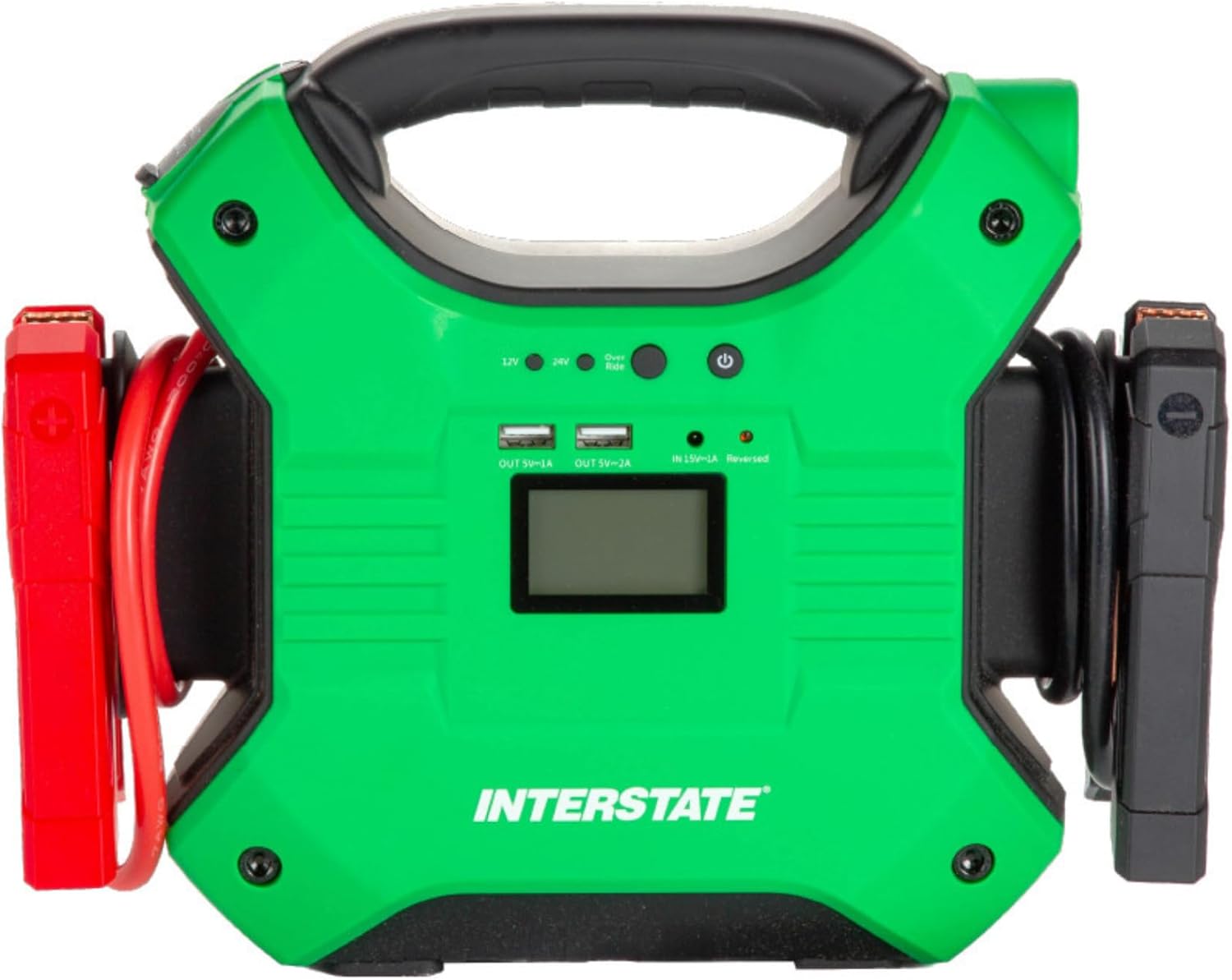
Figure 1: Front view of the Interstate Batteries JMP3500, showing the central display, USB output ports, 12V/24V selection, and power button.
Safety Information
Please read and understand all safety instructions before using this product. Failure to follow these instructions may result in electric shock, fire, or serious injury. This product contains chemicals known to the State of California to cause cancer and birth defects or other reproductive harm (Proposition 65 warning).
- Always wear eye protection when working with batteries.
- Do not short-circuit the jump starter clamps.
- Do not expose the jump starter to rain or extreme moisture.
- Do not operate the jump starter if it has been damaged.
- Keep out of reach of children.
- Ensure proper ventilation during use.
- Do not attempt to disassemble or modify the unit.

Figure 2: Detailed view of the product packaging, listing technical specifications, key features, and step-by-step instructions for jump starting a vehicle, including safety warnings and component identification.
Package Contents
The Interstate Batteries JMP3500 package includes:
- JMP3500 Jump Starter Power Bank
- Smart Clamp Jump Cables
- AC Power Adapter
- USB-C Charging Cable
- 3-in-1 Charging Cables
- Compact Carrying Case
- User Manual

Figure 3: The JMP3500 unit, smart clamp jump cables, AC power adapter, and 3-in-1 charging cables are organized within a durable carrying case.
Product Overview
The JMP3500 unit features a robust design with clearly labeled ports and controls for ease of use.
- LED Work Light: Built-in ultra-bright LED flashlight with steady beam, SOS flashing, and strobe light modes.
- USB Output Ports: Dual USB outputs for charging electronic devices.
- Voltage Select Buttons: For selecting 12V or 24V jump start modes.
- Override Button: For boost starting in specific situations.
- Main Power Button: To turn the unit on/off and check battery level.
- 15V/1A Input Port: For charging the jump starter unit.
- Reversed Polarity Indicator Light: For safety, indicates incorrect clamp connection.
- 12V DC Output Port: For powering 12V accessories.
- Battery Clamp Cable POS (+): Positive connection point for jump cables.
- Battery Clamp Cable NEG (-): Negative connection point for jump cables.
Charging the Device
Before initial use, fully charge your JMP3500 unit. It is recommended to recharge the unit immediately after each use to maintain optimal battery life.
- Connect the AC power adapter to the 15V/1A input port on the jump starter.
- Plug the AC power adapter into a standard wall outlet.
- The LED display will indicate the charging progress. A full charge typically takes approximately 6-7 hours.
- Alternatively, use the USB-C charging cable for quick charging via a compatible USB-C power source.
Setup for Jump Starting
Ensure the jump starter unit has at least 50% charge before attempting to jump start a vehicle.
- Turn off the vehicle's ignition and all accessories.
- Connect the smart clamp jump cables to the corresponding ports on the JMP3500 unit. Ensure a secure connection.
- Attach the red (positive +) clamp to the positive terminal of the vehicle battery.
- Attach the black (negative -) clamp to the negative terminal of the vehicle battery.
- The unit's LED display will show the battery status. If the connections are correct, a green light will indicate it's ready to proceed.
Video 1: Official video from Interstate Batteries demonstrating the correct procedure to jump start a car using their jump starter.
Operating Instructions
Jump Starting a Vehicle
- After connecting the clamps as described in the Setup section, press the Main Power Button on the JMP3500 unit.
- Select the appropriate voltage (12V or 24V) using the Voltage Select Buttons.
- If the indicator light is green, proceed to start the vehicle. If the light indicates an error (e.g., reversed polarity), correct the connection before proceeding.
- Turn the vehicle's ignition to start. If the vehicle does not start immediately, wait 30 seconds before trying again.
- Once the vehicle starts, disconnect the jump cables from the vehicle battery in reverse order (negative first, then positive).
- Disconnect the jump cables from the JMP3500 unit.
For severely discharged batteries or in cold weather, you may need to use the Boost Start function. Press and hold the Override Button for 2-3 seconds until the green light illuminates, then attempt to start the vehicle within 30 seconds.
Video 2: An instructional video by Interstate Batteries providing professional tips on how to safely and effectively jump start a vehicle.
Charging Electronic Devices
The JMP3500 can also serve as a power bank for your electronic devices.
- Connect your device's USB charging cable to one of the dual USB output ports or the USB-C port on the JMP3500.
- Press the Main Power Button to activate the charging function.
- The 3-in-1 charging cable can be used to charge multiple compatible devices simultaneously.

Figure 4: The JMP3500 unit connected to a smartphone, demonstrating its capability to charge electronic devices using its USB output ports.
Flashlight Functionality
The built-in LED flashlight provides illumination for various situations.
- Press the Flashlight Button once for a steady beam.
- Press it a second time for SOS flashing mode.
- Press it a third time for strobe light mode.
- Press it a fourth time to turn off the flashlight.
Troubleshooting
Refer to the back of the product packaging or the user manual for a detailed troubleshooting guide. Common issues and their solutions are typically listed, such as:
- No power/Unit not turning on: Ensure the unit is charged.
- Vehicle not starting: Check clamp connections, ensure correct voltage selection, or use Boost Start.
- Reversed polarity: The indicator light will alert you to incorrect clamp connections. Reconnect correctly.
Specifications
| Feature | Specification |
|---|---|
| Brand | Interstate Batteries |
| Model Number | JMP3500 |
| Peak Output Current | 1200 Amps (12V), 600 Amps (24V) |
| Battery Capacity | 35,000 mAh (35Ah) LiFePo4 |
| Product Dimensions | 4.9"D x 4.1"W x 7.7"H |
| Item Weight | 4.85 Pounds |
| Voltage | 12 Volts, 24 Volts |
| Bulb Type | LED |
| Special Features | 12V, 24V Auto Jump Starter, USB Charger |
Warranty and Support
For warranty information, technical support, or service inquiries, please refer to the contact details provided in your product packaging or visit the official Interstate Batteries website. Keep your purchase receipt as proof of purchase for any warranty claims.