
1. Introduction
The Hot Wheels Nitro Bot Trackset (Model CDR06) provides an interactive play experience where a Hot Wheels vehicle confronts a large robot. The objective is to launch cars to defeat the Nitro Bot and free captured vehicles. This manual provides detailed instructions for setting up, operating, and maintaining your trackset.
2. Safety Information
- Recommended Age: This product is suitable for children aged 4 to 12 years.
- Choking Hazard: Contains small parts. Not suitable for children under 3 years. Adult supervision is recommended during assembly and play.
- Proper Use: Use only with official Hot Wheels vehicles. Do not modify the trackset or vehicles.
3. Package Contents
Before assembly, ensure all components are present. The package typically includes:
- Nitro Bot figure
- Track pieces (ramps, loops, connectors)
- One (1) Hot Wheels vehicle
- Launcher mechanism
- Base structure (city building elements)

Image: Hot Wheels Nitro Bot Trackset packaging, illustrating the included components.
4. Assembly Instructions
Follow these steps to assemble your Hot Wheels Nitro Bot Trackset:
- Unpack Components: Carefully remove all pieces from the packaging.
- Assemble Base: Connect the base sections, including the city building elements, as indicated in the visual guide.
- Attach Tracks: Securely connect the orange track pieces to the base and the Nitro Bot figure. Ensure all connections are firm to prevent track separation during play.
- Position Launcher: Place the red launcher mechanism at the designated starting point on the track.
- Attach Nitro Bot Head and Arm: Ensure the Nitro Bot's head and arm are correctly attached and in their default, non-defeated positions.

Image: The Hot Wheels Nitro Bot Trackset fully assembled, ready for play.
The trackset is designed to connect with other Hot Wheels tracks (sold separately) for expanded play. Refer to the connection points on the track pieces for compatibility.
5. Operating the Trackset
Engage in exciting battles against the Nitro Bot:
- Load Vehicle: Place a Hot Wheels vehicle into the launcher. Ensure it is seated correctly.
- Aim and Launch: Adjust the position of the launcher to aim at the Nitro Bot. Press the launcher button to send the car speeding towards the robot.
- Defeat the Bot: Aim for the Nitro Bot's chest or head. A successful hit will cause the robot's head to fly off and its arm to swing down, releasing any captured car.
- Resetting the Bot: To reset the Nitro Bot for another round, reattach its head and manually lift its arm back into the upright position.
- Multiple Launch Points: Experiment with different launch positions on the trackset to find the most effective angles to defeat the Nitro Bot.
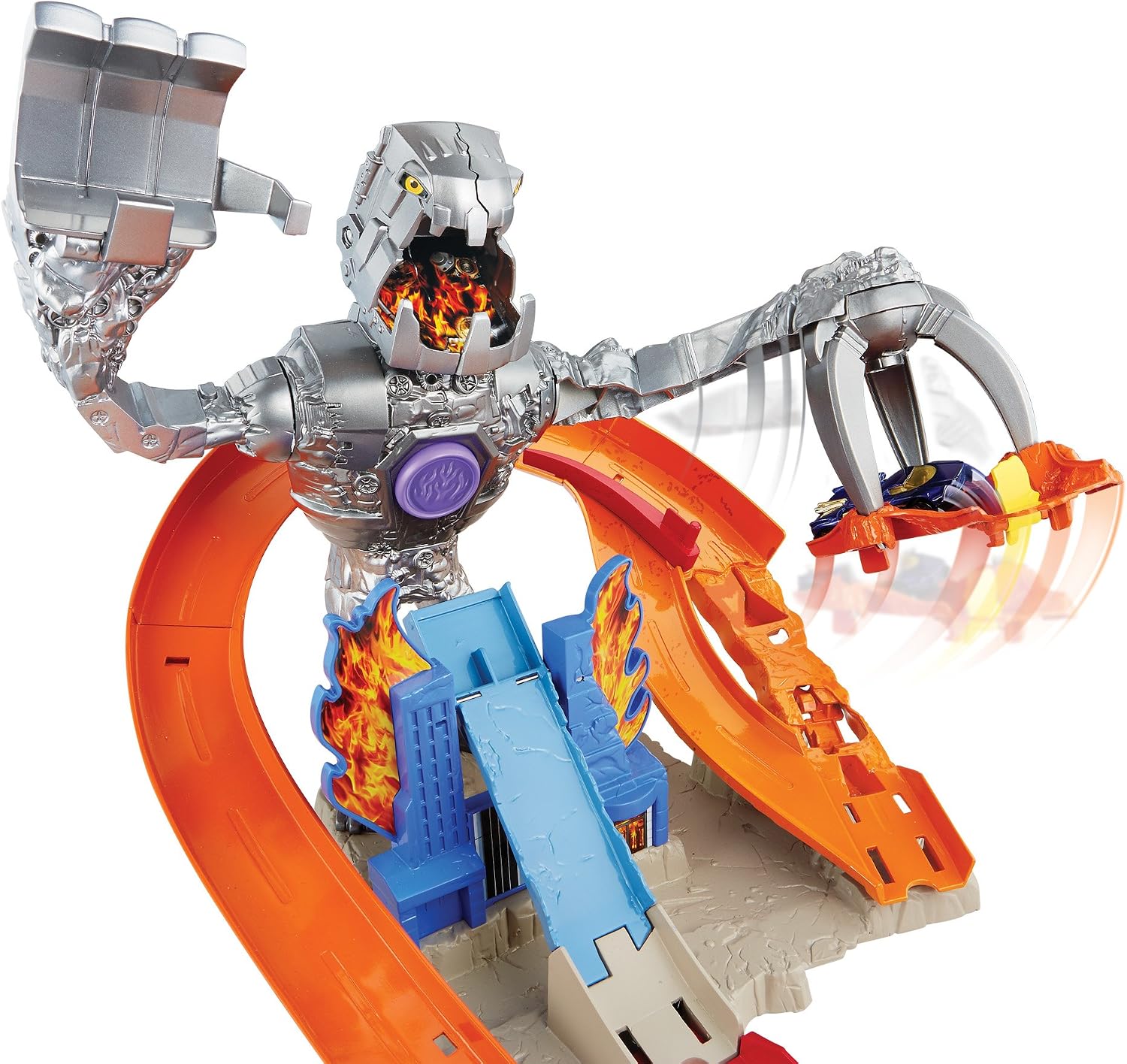
Image: The Nitro Bot's claw mechanism, capable of capturing a Hot Wheels car.

Image: The Nitro Bot's head detaching, indicating a successful defeat.
Official Product Video
Video: An official demonstration of the Hot Wheels Nitro Bot Attack Track Set in action, showing car launching and robot defeat mechanisms.
6. Maintenance
To ensure the longevity of your Hot Wheels Nitro Bot Trackset:
- Cleaning: Wipe the trackset and components with a soft, dry cloth. Avoid using harsh chemicals or abrasive cleaners.
- Storage: Store the trackset in a cool, dry place away from direct sunlight when not in use.
- Inspection: Periodically check all track connections and moving parts for wear or damage. Replace any damaged components immediately.
7. Troubleshooting
If you encounter issues with your trackset, refer to the following common problems and solutions:
| Problem | Possible Cause | Solution |
|---|---|---|
| Car does not launch effectively. | Vehicle not properly seated in launcher; launcher mechanism obstructed or damaged. | Ensure the car is fully inserted into the launcher. Check for any debris or obstructions in the launcher. |
| Nitro Bot's head or arm does not react. | Car did not hit the target area; mechanism is stuck. | Adjust launcher aim to hit the designated target points on the robot. Gently check the robot's mechanisms for any blockages. |
| Track pieces disconnect during play. | Connections are not secure. | Press track pieces firmly together until they click into place. Ensure they are fully engaged. |
8. Specifications
- Brand: Hot Wheels
- Model Name: Nitro Bot Trackset
- Model Number: CDR06
- Item Dimensions: 18 x 3 x 12 inches (approximate assembled size)
- Item Weight: 0.9 kg
- Recommended Age: 4 - 12 years
- Material: Plastic
9. Warranty Information
This product comes with a 1-year warranty against manufacturer defects. Please retain your proof of purchase for warranty claims. The warranty does not cover damage resulting from misuse, accidents, or unauthorized modifications.
10. Customer Support
For further assistance, missing parts, or warranty inquiries, please contact Hot Wheels customer service. Refer to the contact information provided on the product packaging or visit the official Hot Wheels website for support details.
