
1. Introduction
This manual provides instructions for the proper use and maintenance of your Motorola PMKN4128A USB Programming Cable. This cable is specifically designed to connect Motorola CP200D digital series two-way radios to a computer for programming purposes. Please read this manual thoroughly before use to ensure correct operation and to prevent damage to the cable or your radio.
2. Safety Information
- Do not expose the cable to extreme temperatures, moisture, or direct sunlight.
- Avoid bending or twisting the cable excessively, as this can damage internal wires.
- Keep the cable away from strong electromagnetic fields.
- Use only with compatible Motorola CP200D digital series radios. Using with incompatible devices may cause damage.
- Disconnect the cable from both the radio and computer when not in use.
3. Package Contents
Verify that your package contains the following item:
- 1 x Motorola PMKN4128A USB Programming Cable
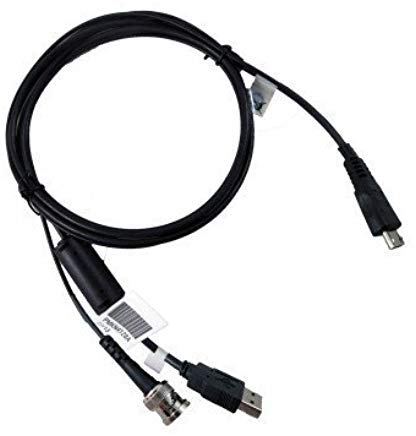
Figure 1: Motorola PMKN4128A USB Programming Cable. This image shows the black USB programming cable with a standard USB Type-A connector on one end and a proprietary connector for Motorola radios on the other.
4. Setup
4.1 Driver Installation
Before connecting the programming cable, ensure that the necessary USB drivers are installed on your computer. These drivers are typically provided with the Motorola programming software (CPS - Customer Programming Software) or can be downloaded from the official Motorola Solutions website. Refer to your radio's programming software documentation for specific driver installation instructions.
4.2 Software Requirements
To program your Motorola CP200D radio, you will need the appropriate Motorola Customer Programming Software (CPS) installed on your computer. Ensure you are using the correct version of CPS compatible with your CP200D digital series radio model.
5. Operating Instructions
Follow these steps to program your Motorola CP200D radio using the PMKN4128A cable:
- Install Drivers and Software: Ensure all required USB drivers and the Motorola CPS are correctly installed on your computer as described in Section 4.
- Connect to Computer: Plug the USB Type-A end of the PMKN4128A cable into an available USB port on your computer.
- Connect to Radio: With the radio powered off, connect the proprietary connector of the programming cable to the programming port on your Motorola CP200D radio. Ensure a secure connection.
- Power On Radio: Turn on your Motorola CP200D radio.
- Launch CPS: Open the Motorola Customer Programming Software (CPS) on your computer.
- Read/Write Radio Data: Within the CPS, select the option to "Read Radio" to retrieve the current configuration from your radio, or "Write Radio" to upload new programming data. Follow the on-screen prompts in the CPS.
- Disconnect: Once programming is complete, safely close the CPS, power off the radio, and then disconnect the cable from both the radio and the computer.
6. Maintenance
6.1 Cleaning
To clean the cable, gently wipe it with a soft, dry cloth. Do not use liquid cleaners or solvents, as these can damage the cable's insulation or connectors.
6.2 Storage
Store the cable in a cool, dry place, away from direct sunlight and extreme temperatures. Avoid tightly coiling the cable or placing heavy objects on it to prevent damage.
7. Troubleshooting
- Cable Not Recognized by Computer:
- Ensure USB drivers are correctly installed.
- Try a different USB port on your computer.
- Restart your computer.
- Verify the cable is securely connected.
- Programming Fails or Errors Occur:
- Confirm the radio is powered on and fully charged.
- Ensure the correct version of Motorola CPS is being used for your specific CP200D model.
- Check for secure connections between the cable, radio, and computer.
- Temporarily disable antivirus or firewall software if it interferes with the CPS.
- Radio Does Not Respond to Programming:
- Verify the radio is a Motorola CP200D digital series model, as this cable is not compatible with analog versions.
- Ensure the radio's firmware is compatible with the CPS version.
8. Specifications
| Feature | Detail |
|---|---|
| Model Name | PMKN4128A |
| Brand | Motorola |
| Connector Type | USB Type A (Computer), Proprietary (Radio) |
| Cable Type | USB Programming Cable |
| Compatible Devices | PC, Motorola CP200D Digital Series Radios |
| Connectivity Technology | USB |
| Maximum Voltage | 5 Volts (DC) |
| Color | Black |
| Item Weight | 0.25 Kilograms |
9. Warranty and Support
9.1 Warranty Information
This Motorola PMKN4128A USB Programming Cable comes with a 1 Year Replacement Warranty. Please retain your proof of purchase for warranty claims.
9.2 Customer Support
For technical assistance, troubleshooting, or warranty inquiries, please contact your authorized Motorola dealer or visit the official Motorola Solutions support website. Ensure you have your product model number (PMKN4128A) and proof of purchase available when seeking support.

