
1. Introduction
This manual provides essential information for the safe and effective use of the Vktech 650nm 6mm 3V 5mW Red Dot Diode Laser Module. This product is designed for various DIY projects requiring a compact red laser dot source. Please read these instructions carefully before installation and operation to ensure proper functionality and safety.
2. Safety Information
WARNING: Laser radiation can be hazardous. Improper use can result in serious eye injury.
- Never look directly into the laser beam. Direct exposure to the laser beam can cause permanent eye damage.
- Avoid pointing the laser beam at people or animals.
- Do not point the laser beam at reflective surfaces, as reflected beams can also cause injury.
- Keep the device out of reach of children.
- Use appropriate laser safety eyewear when operating the module, especially during alignment or extended use.
- Ensure the working voltage does not exceed 3V DC to prevent damage to the module.
- This product is intended for DIY projects and should be integrated into a larger system with proper safety considerations.
3. Package Contents
The package includes the following items:
- 10x Vktech 650nm 6mm 3V 5mW Red Dot Diode Laser Modules
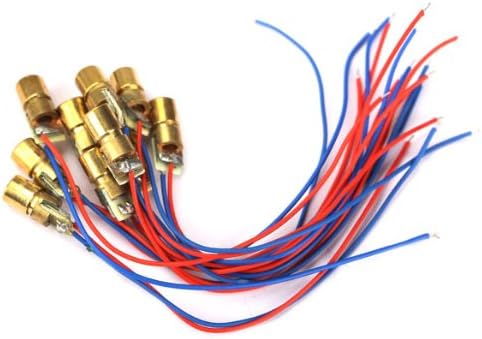
Image 1: A set of ten Vktech 650nm 6mm 3V 5mW Red Dot Diode Laser Modules, each with red and blue connecting wires.
4. Specifications
| Feature | Specification |
|---|---|
| Output Power | 5mW |
| Wavelength | 650nm (Red) |
| Outer Diameter | 6mm |
| Working Voltage | DC 3V |
| Operating Current | < 40 mA |
| Laser Shape | Dot |
| Working Temperature | -10 ℃ to +40 ℃ |
| Shell Material | Copper |
| Cable Length | Approx. 2.4cm |
| Diode Diameter | Approx. 0.6cm |

Image 2: A single Vktech 650nm 6mm 3V 5mW Red Dot Diode Laser Module, showing its compact size and wiring.
5. Setup Instructions
Follow these steps to set up your laser diode module:
- Power Supply: Connect the red wire to the positive (+) terminal of a DC 3V power supply and the blue wire to the negative (-) terminal. Ensure the power supply is regulated and provides a stable 3V DC. Exceeding 3V can damage the module.
- Mounting: Secure the laser module in your project enclosure or mounting bracket. Ensure it is stable and the beam path is clear. Avoid applying excessive force to the module.
- Alignment: If precise alignment is required, use appropriate tools and safety measures. Always wear laser safety glasses during alignment.
- Testing: Before full operation, perform a brief test to confirm functionality. Ensure the laser dot is visible and stable.

Image 3: A close-up view of several Vktech 650nm 6mm 3V 5mW Red Dot Diode Laser Modules, highlighting their brass casing and wiring connections.
6. Operating Instructions
Once the module is properly set up and connected to a 3V DC power source:
- Apply power to the module. The laser diode will emit a red dot.
- Ensure the laser beam is directed away from eyes and reflective surfaces.
- For continuous operation, ensure adequate ventilation around the module to prevent overheating, although these modules are designed for low power consumption.
- Disconnect power when the laser is not in use.
Video 1: This video demonstrates the appearance and basic functionality of similar laser diode modules. It shows multiple modules and a single module, highlighting their compact design and wiring.
7. Maintenance
The Vktech laser diode modules require minimal maintenance.
- Cleaning: Keep the laser aperture clean and free from dust or debris. Use a soft, lint-free cloth if cleaning is necessary. Avoid touching the lens directly.
- Storage: Store the modules in a dry, cool environment, away from direct sunlight and extreme temperatures.
- Inspection: Periodically inspect the wiring for any signs of damage or wear.
8. Troubleshooting
| Problem | Possible Cause | Solution |
|---|---|---|
| No laser dot emitted |
|
|
| Dim or flickering laser dot |
|
|
| Module gets excessively hot |
|
|
9. Warranty and Support
Specific warranty information for this product is not provided in the available data. For any issues or support inquiries, please contact your retailer or the manufacturer, Vktech, directly. When contacting support, please provide your product model number (CNMX-Hardlines-530121) and a detailed description of the issue.