
Omron H3CR-H8L
Omron H3CR-H8L Timer Instruction Manual
Model: H3CR-H8L | 110/120V 50/60Hz
1. Introduction
This manual provides essential instructions for the safe and effective use of the Omron H3CR-H8L Timer. This device is designed for precise timing control in various industrial and commercial applications. Please read this manual thoroughly before installation and operation.
2. Safety Information
WARNING:
- Always disconnect power before installing, wiring, or performing maintenance on the timer.
- Installation and wiring must be performed by qualified personnel in accordance with all local and national electrical codes.
- Do not exceed the specified voltage and current ratings to prevent damage to the unit and potential hazards.
- Ensure proper grounding to prevent electric shock.
- Do not disassemble or modify the timer. Refer all servicing to authorized personnel.
3. Product Overview
The Omron H3CR-H8L is a compact, multi-functional timer. Key components include:
- Time Setting Dial: Used to set the desired delay time.
- RyON Indicator: Illuminates when the timer is powered on.
- Output Terminals: Pins for electrical connections.

Figure 3.1: Front view of the Omron H3CR-H8L Timer, showing the time setting dial (0-12 seconds) and the RyON power indicator.

Figure 3.2: Top view of the timer, displaying the model number H3CR-H8L and compliance information such as IEC 60664-1.

Figure 3.3: Bottom view of the timer, illustrating the 8-pin connector base for electrical connections.
4. Setup and Installation
Follow these steps for proper installation:
- Mounting: Securely mount the timer in a suitable panel or enclosure. Ensure adequate ventilation.
- Wiring: Refer to the wiring diagrams below for correct electrical connections. Ensure the power source matches the timer's specifications (100/110/120VAC, 50/60Hz).
- Connection: Insert the timer into its compatible socket, ensuring all pins are correctly aligned and seated.
4.1 Wiring Diagram (100/110/120VAC)

Figure 4.1: Wiring diagram for 100/110/120VAC input. Pins 2 and 7 are for the source, while contacts are on pins 1, 3, 4, 5, 6, 8.
Source: 100/110/120VAC, 50/60Hz. Connect to pins 2 and 7.
Contact: 5A 250VAC, 5A 30VDC Resistive.
4.2 Wiring Diagram (24VDC/AC)
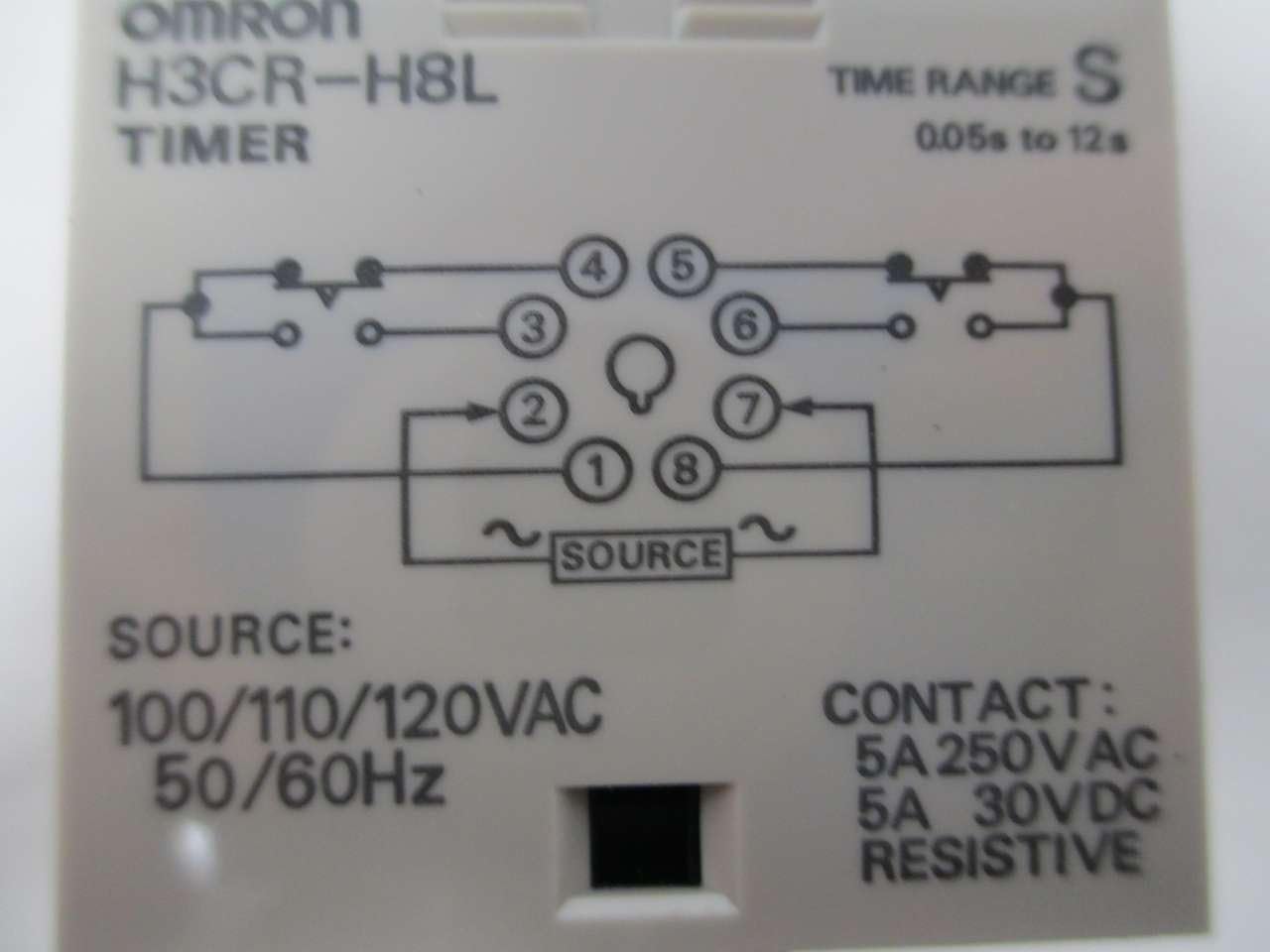
Figure 4.2: Wiring diagram for 24VDC/AC input. Pins 2 and 7 are for the source, while contacts are on pins 1, 3, 4, 5, 6, 8.
Source: 24VDC/AC, 50/60Hz. Connect to pins 2 and 7.
Contact: 5A 250VAC.
Note: The specific model H3CR-H8L in this manual is rated for 110/120V 50/60Hz. Always verify the voltage rating on your specific unit before wiring.
5. Operating Instructions
The Omron H3CR-H8L Timer operates as a power-off delay timer.
- Power On: Apply power to the timer. The RyON indicator will illuminate.
- Set Time: Rotate the time setting dial to the desired delay time (e.g., 0-12 seconds).
- Operation: When power is applied, the timer's output contacts will immediately change state. When power is removed, the timer will begin its countdown. After the set delay time has elapsed, the output contacts will revert to their original state.
Ensure the time range is correctly selected if your model supports multiple ranges. This specific model has a range of 0.05s to 12s.
6. Maintenance
The Omron H3CR-H8L Timer requires minimal maintenance.
- Cleaning: Periodically clean the exterior of the timer with a soft, dry cloth. Do not use abrasive cleaners or solvents.
- Inspection: Regularly inspect wiring connections for tightness and signs of wear or damage.
- Storage: Store the timer in a dry, dust-free environment when not in use.
7. Troubleshooting
| Problem | Possible Cause | Solution |
|---|---|---|
| Timer does not power on (RyON indicator off) | No power supply; incorrect wiring; faulty unit. | Check power source; verify wiring according to diagram; replace unit if faulty. |
| Timer does not count down or output contacts do not switch | Incorrect time setting; faulty output contacts; incorrect wiring. | Adjust time setting; check load connections; verify wiring; replace unit if faulty. |
| Inaccurate timing | Incorrect time setting; environmental factors (temperature, humidity). | Re-adjust time setting; ensure operating environment is within specified limits. |
8. Specifications
| Feature | Detail |
|---|---|
| Model | H3CR-H8L |
| Series | H3CR |
| Input Voltage | 110/120V AC, 50/60Hz (as per product title and specific model rating) |
| Output Voltage | 24V AC/DC |
| Output Current Rating | 5A AMP |
| Time Range | 0.05 to 12 seconds |
| Material | Plastic, Resin |
| Product Dimensions (D x W x H) | 2.51" x 1.89" x 1.89" |
| Item Weight | 0.01 Ounces |
| Manufacturer | OMRON |
| SKU | B268183 |
| Additional Identifier | 334264 |
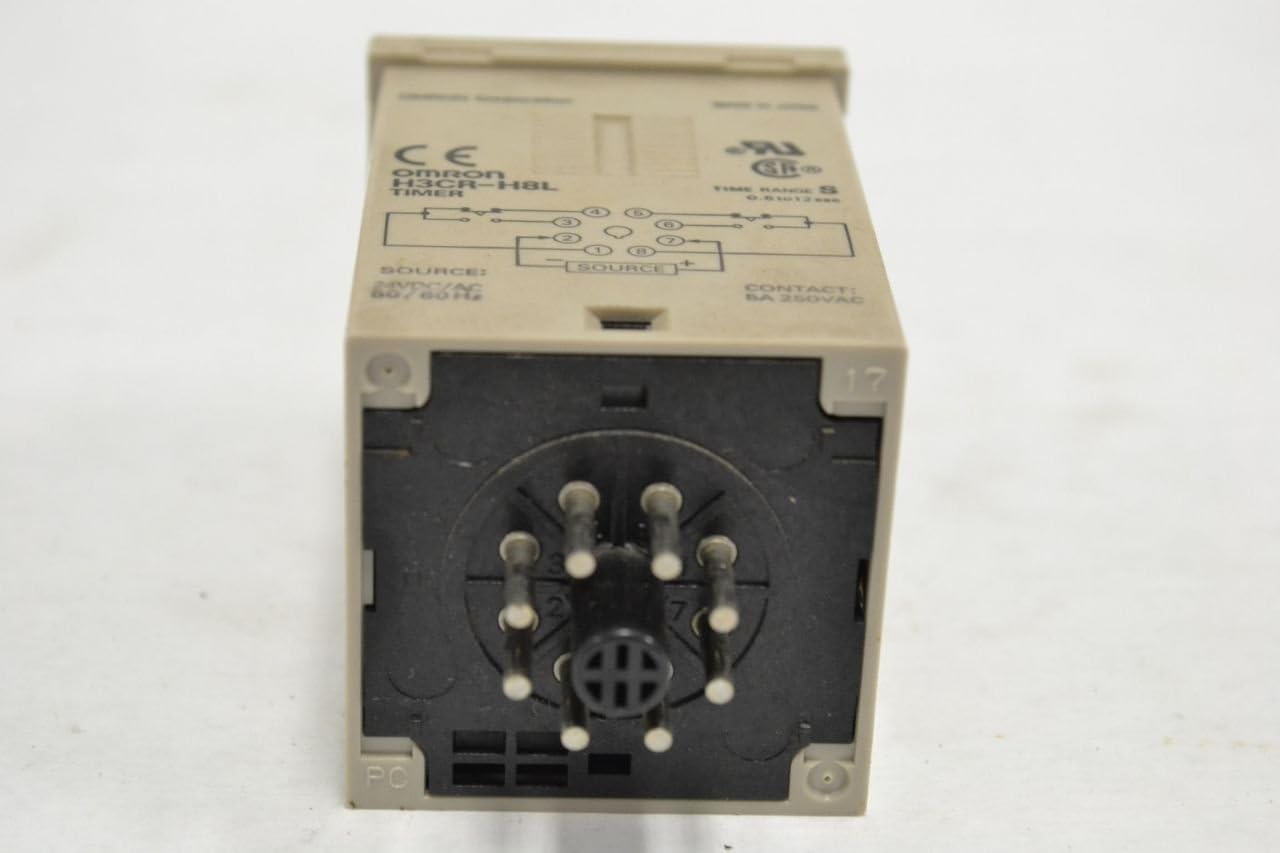
Figure 8.1: Product label with model details and identifier 334264.
9. Warranty and Support
For warranty information, technical support, or service inquiries, please contact Omron customer service or visit the official Omron website. Keep your purchase receipt for warranty claims.
Omron Official Store: Visit Omron Store on Amazon
Related documentsH3CR-H8L


Ask a question about this manual
Ask about setup, troubleshooting, compatibility, parts, safety, or missing instructions. Manuals+ will review the question and use this page’s manual context to help answer it.