Introduction
The EYE-VAC Home Touchless Vacuum is an automatic dustpan designed for instant removal of dust, hair, and debris from hard floors. Featuring powerful 1000-watt suction and infrared sensors for touchless operation, it simplifies daily cleaning. This bagless canister vacuum is equipped with high-efficiency filters to return clean air to your environment, making it ideal for homes with pets and children.

The EYE-VAC Home Touchless Vacuum, designed for effortless floor cleaning.
Product Components

Key components and control panel of the EyeVac Home.
- Canister: Collects vacuumed debris.
- Pre-Motor Filter: Filters air before it reaches the motor.
- Lid: Covers the canister and filter assembly.
- Inlet: Opening where debris is vacuumed.
- Infrared Sensor: Detects sweeping motion for automatic activation.
- Exhaust Filter: Filters air before it is returned to the room.
- Control Panel: Includes Power, Auto Mode, Manual Mode, Canister Full indicator, and Activate button.
Setup
- Unpacking: Carefully remove the EyeVac Home from its packaging. Ensure all components are present.
- Placement: Place the EyeVac in a desired location where sweeping is frequent, such as a kitchen, entryway, or pet area. Ensure it is near a power outlet.
- Power Connection: Plug the power cord into a standard electrical outlet. The unit is always ready when plugged in.

Visual guide for setting up and operating your EyeVac Home.
Operating Instructions
The EyeVac Home offers two operating modes: Auto and Manual.
Auto Mode (Recommended for daily use)
- Select Auto Mode: Press the "MODE" button on the control panel until the "AUTO" indicator light is illuminated.
- Sweeping: Sweep dirt and debris directly towards the inlet at the base of the EyeVac. The infrared sensors will detect the debris and automatically activate the vacuum.
- Automatic Shut-off: The vacuum will run until all detected debris is cleared, then automatically shut off.
Manual Mode
- Select Manual Mode: Press the "MODE" button until the "MAN" (Manual) indicator light is illuminated.
- Activate Vacuum: Press the "ACTIVATE" button to turn the vacuum on.
- Sweeping: Sweep dirt and debris towards the inlet.
- Deactivate Vacuum: Press the "ACTIVATE" button again to turn the vacuum off when finished.

The EyeVac efficiently handles various types of floor debris.
Maintenance
Regular maintenance ensures optimal performance of your EyeVac Home.
Emptying the Canister
- Full Indicator: The "FULL" indicator light on the control panel will illuminate when the canister needs to be emptied.
- Remove Canister: Gently pull the front lid forward and lift the entire canister assembly out of the unit.
- Empty Debris: Open the canister lid and empty the collected debris into a trash bin.
- Replace Canister: Place the canister assembly back into the EyeVac unit, ensuring it clicks securely into place.

Easy removal of the canister for emptying.
Cleaning Filters
The EyeVac Home is equipped with two high-efficiency washable filters. It is recommended to clean them regularly, especially when suction power decreases.
- Access Filters: After removing the canister, locate the pre-motor filter and exhaust filter.
- Remove Filters: Carefully remove both filters from their compartments.
- Clean Filters: Tap the filters gently to remove loose dust. For a deeper clean, rinse them under cool running water until the water runs clear.
- Dry Filters: Allow filters to air dry completely for at least 24 hours before reinserting them. Do not use a dryer or heat source.
- Replace Filters: Once completely dry, reinsert the filters into their correct positions and replace the canister.
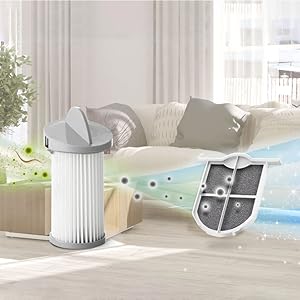
The EyeVac's high-efficiency filters ensure clean air is returned to your home.
Troubleshooting
If you encounter issues with your EyeVac Home, please refer to the following common solutions:
| Problem | Possible Cause | Solution |
|---|---|---|
| Vacuum does not turn on. | Not plugged in; Power switch off; Canister not properly seated. | Ensure unit is plugged into a live outlet; Check if the power button is pressed; Re-seat the canister firmly. |
| Weak suction. | Canister full; Clogged filters; Obstruction in inlet. | Empty the canister; Clean or replace filters; Check and clear any blockages in the inlet. |
| Auto mode not activating. | Infrared sensors blocked or dirty; Not in Auto mode. | Clean the infrared sensors at the base of the unit; Ensure "AUTO" light is illuminated on the control panel. |
| "FULL" indicator light is on. | Canister is full. | Empty the canister as described in the Maintenance section. |
If problems persist after attempting these solutions, please contact customer support.
Specifications
- Brand: EYE-VAC
- Model Name: EyeVac Home (EVH-W)
- Wattage: 1000 Watts
- Capacity: 4 Liters
- Filter Type: Cartridge, High-Efficiency Washable Filters
- Special Feature: Motion-Activated, Powerful Suction, Easy To Use
- Control Method: Touch (Push Button)
- Connectivity Technology: Infrared
- Product Dimensions: 13"L x 8"W x 18"H
- Item Weight: 7.6 pounds
- Noise Level: 75 dB
- Color: Home White
- Indoor/Outdoor Usage: Indoor
- Batteries Required: No
Warranty & Support
Warranty Information
The manufacturer offers a 1-year full warranty on all EyeVac models. A warranty card is not required to be filled out. However, proof of purchase and a clear picture of the label (showing all information and numbers) on the back of your unit are required for warranty claims. Please note: taking apart the EyeVac unit voids the warranty. If you do not purchase your EyeVac through an authorized dealer, the manufacturer may be unable to provide a warranty replacement.
Customer Support
For further assistance, technical support, or warranty claims, please visit the official EYE-VAC website or contact their customer service department. Refer to your product packaging for specific contact details.
You can also visit the EYE-VAC Store on Amazon for more information and product resources.


