
1. Product Overview
The Fujifilm XF16-55mmF2.8 R LM WR is a high-performance standard zoom lens designed for Fujifilm X-series cameras. It features a constant maximum aperture of F2.8 across its entire zoom range, equivalent to 24-84mm in 35mm format. This lens incorporates advanced optical design with three aspherical and three ED glass elements to minimize aberrations and deliver edge-to-edge sharpness. Its weather-resistant construction ensures durability in various shooting conditions.

Figure 1: Front view of the Fujifilm XF16-55mmF2.8 R LM WR lens.
- Focal Length: 16-55mm (24-84mm equivalent in 35mm format).
- Maximum Aperture: Constant F2.8.
- Optical Design: 17 elements in 12 groups, including 3 aspherical and 3 ED elements.
- Autofocus: High-speed, quiet linear motor.
- Construction: Weather-resistant, dust-resistant, and -10°C low-temperature operation.
- Coating: Nano-Gi coating technology for reduced flare and ghosting.
2. Setup
2.1 Attaching the Lens
- Ensure both the camera and lens are powered off.
- Remove the rear lens cap from the lens and the body cap from the camera.
- Align the white mounting mark on the lens barrel with the white mounting mark on the camera body.
- Insert the lens into the camera mount and rotate it clockwise until it clicks into place. Do not force the lens.
- Replace the front lens cap when not in use.

Figure 2: Aligning and attaching the lens to the camera body.
2.2 Detaching the Lens
- Ensure the camera is powered off.
- While pressing the lens release button on the camera body, rotate the lens counter-clockwise until it stops.
- Carefully remove the lens from the camera mount.
- Attach the rear lens cap to the lens and the body cap to the camera to protect the sensor and lens elements.
3. Operating the Lens
3.1 Zooming
To adjust the focal length, rotate the zoom ring on the lens barrel. The lens offers a versatile 16-55mm range, suitable for various photographic situations from wide-angle landscapes to medium telephoto portraits.

Figure 3: The zoom ring on the lens barrel.
3.2 Focusing
The lens features a fast and quiet linear motor for autofocus. For manual focusing, rotate the focus ring located towards the front of the lens. Ensure your camera's focus mode is set to manual focus (MF) if you wish to use the manual focus ring.
3.3 Aperture Control
The lens is equipped with an aperture ring, allowing for direct control over the aperture setting. Rotate the aperture ring to select your desired F-stop. The lens maintains a constant F2.8 aperture throughout its zoom range, providing consistent low-light performance and depth-of-field control.

Figure 4: The aperture ring on the lens barrel.
4. Maintenance
4.1 Cleaning the Lens
- Use a blower brush to remove dust and loose particles from the lens surface.
- For smudges or fingerprints, use a clean, soft microfiber cloth specifically designed for optical lenses. Apply a small amount of lens cleaning solution to the cloth, not directly to the lens.
- Avoid using abrasive materials or harsh chemicals, as these can damage the lens coatings.
4.2 Storage and Handling
- Always attach the front and rear lens caps when the lens is not in use to protect the optical elements.
- Store the lens in a cool, dry place, away from direct sunlight and extreme temperatures.
- The lens is weather-resistant, but prolonged exposure to heavy rain or dust should be avoided. If exposed, wipe it dry with a clean cloth as soon as possible.
- Avoid dropping or subjecting the lens to strong impacts.
5. Troubleshooting
- Lens not recognized by camera: Ensure the lens is securely attached to the camera body and that the camera is powered on. Clean the electrical contacts on both the lens and camera with a dry, soft cloth.
- Autofocus not working: Check if the camera's focus mode is set to autofocus (AF). Ensure there is sufficient light and contrast in the scene for the autofocus system to operate effectively.
- Images are blurry: Verify that the lens is properly focused. Check the camera's shutter speed to ensure it is fast enough to prevent motion blur, especially in low light or with moving subjects. Consider using a tripod for sharper images.
- Dust or spots on images: First, clean the front and rear elements of the lens as described in the Maintenance section. If spots persist, they may be on the camera sensor, which requires professional cleaning.
6. Specifications
| Model Name | XF16-55mmF2.8 R LM WR |
| Brand | Fujifilm |
| Focal Length | 16-55mm (24-84mm equivalent in 35mm format) |
| Maximum Aperture | F2.8 (constant) |
| Minimum Aperture | F22 |
| Lens Construction | 17 elements in 12 groups (including 3 aspherical and 3 ED elements) |
| Angle of View | 83.2° - 29° |
| Number of Diaphragm Blades | 9 (rounded diaphragm) |
| Minimum Focus Distance | 0.3m (Wide), 0.4m (Telephoto) |
| Maximum Magnification | 0.16x (Telephoto) |
| Filter Size | Ø77mm |
| External Dimensions | Ø83.3mm x 106mm (approx.) |
| Weight | 655g (1.44 lbs) |
| Weather Resistance | Dust-resistant, moisture-resistant, and -10°C low-temperature operation |
| Compatible Mountings | Fujifilm X Mount |
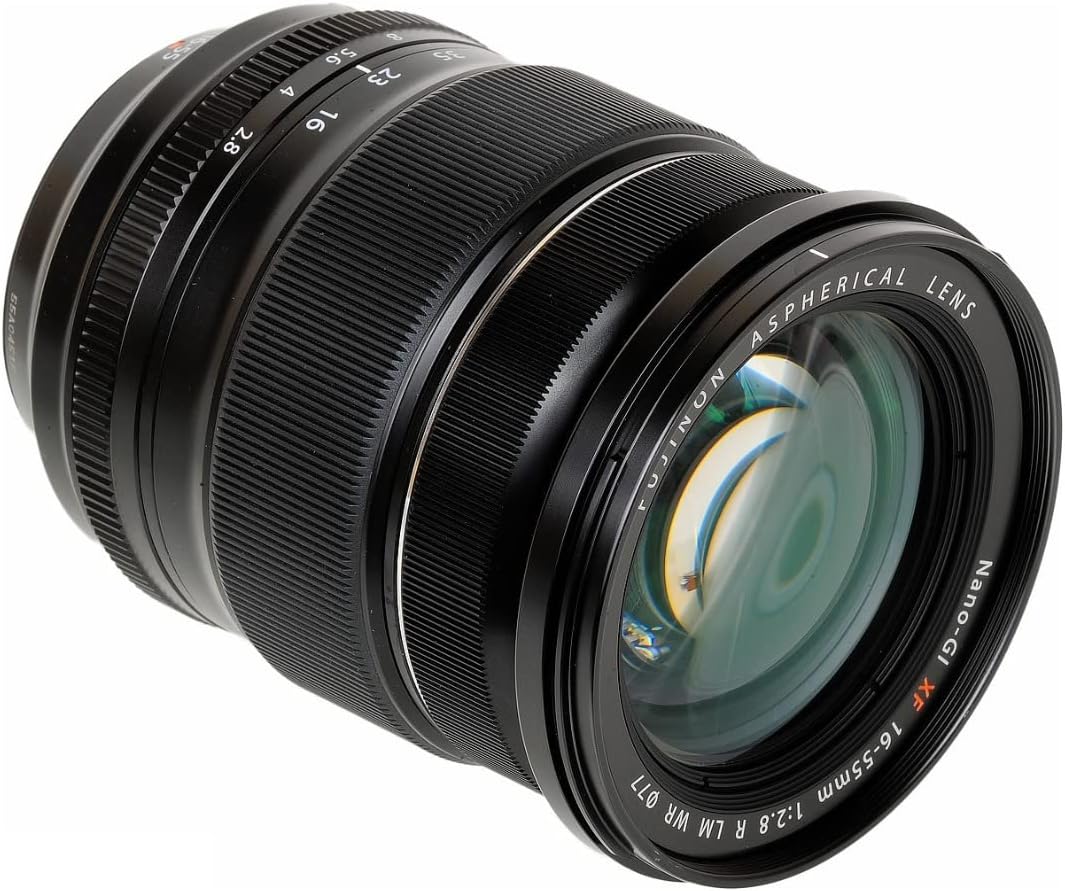
Figure 5: Optical diagram illustrating the lens elements and groups.
7. Warranty and Support
This Fujifilm XF16-55mmF2.8 R LM WR lens comes with a 1-year coverage for labor and 1-year coverage for parts. This warranty does not cover accessories not made by the manufacturer, batteries, or flash equipment.
For further support, technical assistance, or warranty claims, please visit the official Fujifilm website or contact their customer service department. Keep your proof of purchase for warranty validation.
Online Support: www.fujifilm.com


