
NEC 650001
NEC DTZ-6DE-3(BK) DT410 Digital Phone User Manual
Model: 650001
Introduction
This manual provides comprehensive instructions for the setup, operation, and maintenance of your NEC DTZ-6DE-3(BK) DT410 Digital 6 Button Display Endpoint Phone. This digital telephone is an integral part of the DT400 series desktop telephones and is designed for seamless integration with NEC Univerge SV9000 and SV8000 Series communications platforms.
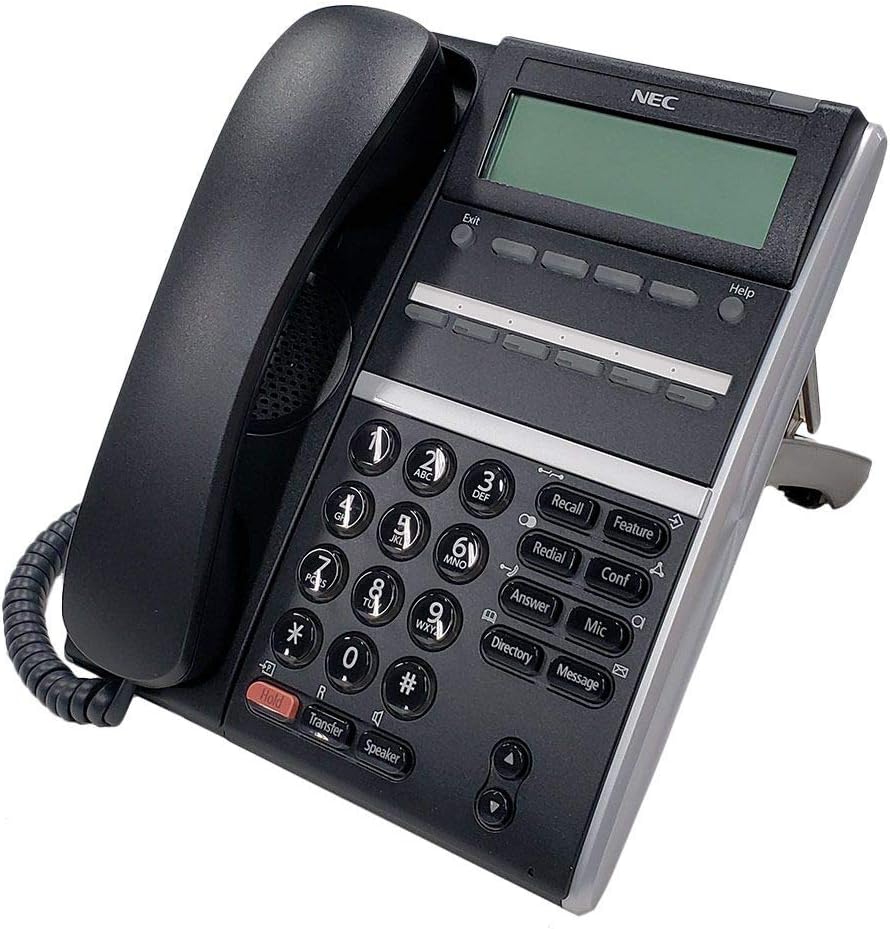
Figure 1: NEC DTZ-6DE-3(BK) DT410 Digital Phone. This image shows the black corded phone with its handset, keypad, display screen, and various function buttons.
Setup and Installation
Follow these steps to properly set up your NEC DTZ-6DE-3(BK) DT410 Digital Phone.
Package Contents
- NEC DTZ-6DE-3(BK) DT410 Digital Phone Unit
- Handset
- Handset Cord
- Line Cord (RJ-11)
- Desk Stand (if applicable)
Connecting the Phone
- Connect the Handset: Plug one end of the coiled handset cord into the handset and the other end into the handset jack on the phone base.
- Connect the Line Cord: Plug one end of the line cord into the "LINE" port on the back of the phone and the other end into the appropriate digital extension port on your NEC Univerge SV9000 or SV8000 Series system.
- Power Connection: The phone is typically powered via the digital line. No separate power adapter is usually required for standard operation.
- Positioning: Place the phone on a stable, flat surface or attach it to a wall using the integrated wall-mount holes (if available and desired). Ensure proper ventilation.
Operating Instructions
This section details the basic and advanced functions of your DTZ-6DE-3(BK) DT410 Digital Phone.
Keypad and Display Overview
The phone features a standard numeric keypad, a display screen, and dedicated function buttons.
- Display Screen: Shows call information, menu options, time, and date.
- Numeric Keypad (0-9, *, #): Used for dialing numbers and entering data.
- Recall Button: Used for various call handling features, often for transferring or conferencing.
- Feature Button: Accesses programmable features and system functions.
- Redial Button: Dials the last number called.
- Conf (Conference) Button: Initiates a 3-way conference call.
- Answer Button: Answers an incoming call.
- Mic Button: Mutes/unmutes the microphone during a call.
- Directory Button: Accesses the phone's internal directory.
- Message Button: Accesses voicemail messages.
- Hold Button: Places an active call on hold.
- Transfer Button: Transfers an active call to another extension or external number.
- Speaker Button: Toggles speakerphone mode on/off.
- Volume Control Buttons (Up/Down): Adjusts handset, speaker, or ringer volume.
- Exit Button: Exits current menu or function.
- Help Button: Provides on-screen help for certain functions.
Basic Call Functions
- Making a Call:
- Lift the handset or press the Speaker button.
- Dial the desired number using the numeric keypad.
- The call will connect automatically.
- Answering a Call:
- Lift the handset or press the Answer button.
- Ending a Call:
- Place the handset back in the cradle or press the Speaker button again.
- Placing a Call on Hold:
- During an active call, press the Hold button.
- To retrieve the call, press the flashing line button or the Hold button again.
- Transferring a Call:
- During an active call, press the Transfer button.
- Dial the extension or external number you wish to transfer to.
- Wait for the party to answer (consultative transfer) or hang up (blind transfer).
- 3-Way Conference Call:
- While on a call with the first party, press the Conf button.
- Dial the second party's number.
- Once the second party answers, press the Conf button again to join all parties.
Maintenance
Proper care and maintenance will ensure the longevity and optimal performance of your NEC DTZ-6DE-3(BK) DT410 Digital Phone.
Cleaning
- Use a soft, damp cloth to clean the exterior of the phone.
- Do not use abrasive cleaners, solvents, or strong chemicals, as these can damage the finish and electronic components.
- Avoid spraying cleaning solutions directly onto the phone; apply to the cloth first.
- Regularly wipe the display screen with a microfiber cloth to remove dust and fingerprints.
Storage
- If storing the phone for an extended period, disconnect it from the line and store it in a cool, dry place away from direct sunlight and extreme temperatures.
Troubleshooting
This section provides solutions to common issues you might encounter with your NEC DTZ-6DE-3(BK) DT410 Digital Phone.
| Problem | Possible Cause | Solution |
|---|---|---|
| No dial tone | Phone not properly connected to the digital line. | Check that the line cord is securely plugged into both the phone and the wall jack/system port. |
| Display is blank | No power to the phone. | Ensure the phone is correctly connected to the digital line, which provides power. If connected to a PBX, check the PBX status. |
| Cannot hear caller / Caller cannot hear me | Volume too low; Microphone muted; Faulty cord/handset. | Adjust volume using the volume buttons. Check if the Mic button is active (muted). Ensure handset cord is fully plugged in. Try another handset if available. |
| Buttons are unresponsive | Temporary software glitch. | Disconnect the phone from the line for 30 seconds, then reconnect it to perform a soft reset. |
If the problem persists after attempting these solutions, please contact your system administrator or NEC technical support.
Specifications
Detailed technical specifications for the NEC DTZ-6DE-3(BK) DT410 Digital Phone.
- Model: DTZ-6DE-3(BK) / 650001
- Type: Digital 6 Button Display Endpoint Phone
- Compatibility: NEC Univerge SV9000 and SV8000 Series communications platforms, PSTN, ISDN, VoIP services
- Display: Yes
- Buttons: 6 programmable buttons, standard numeric keypad, dedicated function buttons (Recall, Feature, Redial, Conf, Answer, Mic, Directory, Message, Hold, Transfer, Speaker, Exit, Help)
- Conference Call: 3-way capability
- Multiline Operation: Single-Line Operation
- Dialer Type: Single Keypad
- Answering System Type: Digital (refers to system compatibility, not built-in answering machine)
- Power Source: Corded Electric (typically Power over Ethernet or digital line)
- Color: Black
- Dimensions (L x W x H): 11 x 11 x 6.5 inches (27.94 x 27.94 x 16.51 cm)
- Weight: 2.81 pounds (1.27 kg)
Warranty and Support
For warranty information and technical support, please refer to the documentation provided with your NEC Univerge SV9000 or SV8000 Series system, or contact your authorized NEC dealer or system administrator.
NEC provides comprehensive support for its products. For the most up-to-date information, visit the official NEC website or contact their customer service directly.
Online Resources: www.nec.com
Ask a question about this manual
Ask about setup, troubleshooting, compatibility, parts, safety, or missing instructions. Manuals+ will review the question and use this page’s manual context to help answer it.