
Introduction
Thank you for choosing the Magic Chef 4.3 cubic feet Compact Refrigerator. This appliance is designed for convenient food and beverage storage in various settings, including dorm rooms, offices, or as an auxiliary refrigerator in your home. It features a separate freezer compartment, adjustable shelving, and an Energy Star rating for efficient operation. Please read this manual thoroughly before installation and use to ensure proper operation and maintenance.

Front view of the Magic Chef 4.3 cu. ft. Compact Refrigerator, showcasing its stainless steel look finish and two-door design.
Safety Information
Always follow basic safety precautions when using electrical appliances to reduce the risk of fire, electric shock, and injury.
- Ensure the refrigerator is connected to a properly grounded electrical outlet.
- Do not operate the appliance with a damaged power cord or plug.
- Keep ventilation openings clear of obstruction.
- Do not store explosive substances such as aerosol cans with a flammable propellant in this appliance.
- Unplug the refrigerator before cleaning or performing any maintenance.
- Supervise children when they are near the appliance.
Package Contents
Upon unpacking, ensure all items listed below are present and in good condition. If any items are missing or damaged, contact customer service.
- Magic Chef 4.3 cu. ft. Compact Refrigerator Unit
- Adjustable Wire Shelves (3 for fresh food compartment)
- Crisper Drawer
- Can Dispenser (integrated into door shelf)
- Instruction Manual (this document)
Setup and Installation
1. Unpacking
Remove all packaging materials, including foam and adhesive tape. Keep packaging materials out of reach of children. It is recommended to retain the original packaging for future transport of the appliance.
2. Placement
Place the refrigerator on a firm, level floor. Allow at least 5 inches (12.7 cm) of space between the back and sides of the refrigerator and any adjacent walls or furniture to ensure proper air circulation. Avoid placing the unit in direct sunlight or near heat sources like stoves or heaters.
3. Leveling the Refrigerator
The refrigerator has adjustable leveling legs at the front bottom corners. Turn the legs clockwise to raise the unit or counter-clockwise to lower it. Ensure the refrigerator is level to prevent vibrations and ensure proper door sealing.
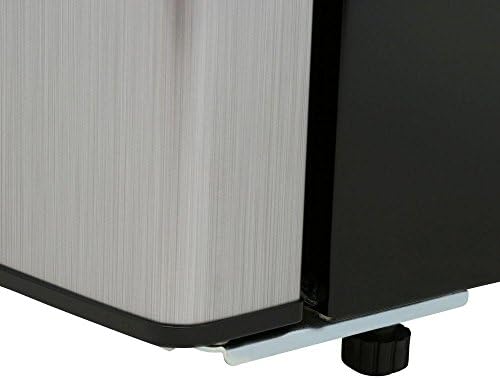
Close-up view of the adjustable leveling leg located at the bottom corner of the refrigerator.
4. Door Reversal (Optional)
The refrigerator doors are reversible, allowing them to open from either the left or right side. Refer to the detailed instructions in the separate door reversal guide (if provided) or contact customer support for assistance with this procedure.
5. Initial Power-On
After placement and leveling, wait at least 2-4 hours before plugging the refrigerator into a grounded electrical outlet. This allows the refrigerant to settle. Once plugged in, let the unit run empty for several hours (e.g., 4-6 hours) to reach its operating temperature before loading food.
Operating Instructions
1. Temperature Control
The refrigerator features interior analog controls for temperature adjustment. Turn the dial to select the desired cooling level. A higher number typically indicates a colder setting. Start with a medium setting and adjust as needed based on food load and ambient temperature.
2. Food Storage
The refrigerator is equipped with multiple storage options:
- Adjustable Wire Shelves: Three shelves in the fresh food compartment can be repositioned to accommodate items of various heights.
- Crisper Drawer: Located at the bottom, ideal for storing fruits and vegetables to maintain their freshness.
- Door Shelves: Provide additional storage for bottles, jars, and smaller items.
- Can Dispenser: Integrated into the door, designed to hold standard beverage cans for easy access.

Interior view of the refrigerator, showing food items organized on shelves, in the crisper, and beverages in the door's can dispenser and shelves.
3. Freezer Compartment
The separate top freezer compartment is suitable for storing frozen foods. While the main refrigerator section is frost-free, some minimal frost may accumulate in the freezer over time.
4. Interior Light
The refrigerator is equipped with an interior light that illuminates when the fresh food compartment door is opened, providing clear visibility of stored items.
Care and Maintenance
1. Cleaning
Regular cleaning helps maintain the efficiency and appearance of your refrigerator.
- Interior: Unplug the unit. Wash interior surfaces with a solution of warm water and baking soda (2 tablespoons baking soda to 1 quart water). Rinse and dry thoroughly. Remove shelves and crisper for separate cleaning.
- Exterior: Clean the exterior with a mild detergent and warm water. For the stainless steel look finish, use a non-abrasive cleaner specifically designed for stainless steel. Wipe dry with a soft cloth.
- Door Gaskets: Clean door gaskets regularly to ensure a proper seal.
2. Power Outage
In case of a power outage, keep the refrigerator door closed to maintain internal temperature for as long as possible. Avoid opening the door unnecessarily.
3. Vacation and Long-Term Storage
For long vacations or extended periods of non-use, unplug the refrigerator, empty all contents, clean the interior thoroughly, and leave the doors slightly ajar to prevent odors and mold growth.
Troubleshooting
Before contacting service, check the following common issues and solutions:
| Problem | Possible Cause | Solution |
|---|---|---|
| Refrigerator does not operate. | Not plugged in; circuit breaker tripped; temperature control set to "OFF" or too warm. | Ensure plug is secure; reset circuit breaker; adjust temperature control to a colder setting. |
| Temperature is too warm. | Door opened too frequently; large amount of warm food added; poor air circulation; temperature control set too warm. | Minimize door openings; allow warm food to cool before placing in fridge; ensure proper clearance around unit; adjust temperature control to a colder setting. |
| Temperature is too cold (food freezing). | Temperature control set too cold. | Adjust temperature control to a warmer setting. |
| Excessive noise. | Refrigerator not level; loose parts; normal operating sounds. | Level the unit using adjustable legs; check for loose items inside; gurgling/hissing sounds are normal refrigerant flow. |
| Door does not close completely. | Unit not level; food package blocking door; dirty gaskets. | Level the unit; rearrange food; clean door gaskets. |
Specifications
| Feature | Detail |
|---|---|
| Manufacturer | MAGIC CHEF |
| Model Number | HVDR430SE |
| Dimensions (H x W x D) | 110.24 x 48.51 x 52.58 cm (43.4 x 19.1 x 20.7 inches) |
| Weight | 32.2 kg (71 lbs) |
| Capacity | 4.3 Cubic Feet |
| Configuration | Compact Top Freezer |
| Color | Black |
| Special Features | Two doors (separate freezer compartment), Interior light |
| Installation Type | Freestanding |
| Number of Doors | 2 |
| Defrost System | Frost-Free (refrigerator section) |
| Finish Type | Stainless Steel Look with Black Sides |
| Shelf Type | Wire |
Warranty and Support
For detailed warranty information, please refer to the warranty card included with your product or visit the official Magic Chef website.
If you require technical assistance or have questions not covered in this manual, please contact Magic Chef customer support. Contact details can typically be found on the manufacturer's website or on the product packaging.


